WooCommerce ERP integration built around how your business already runs
Your ERP is the source of truth for stock, pricing and the books. Your store is where the orders happen. WooCommerce ERP integration decides which system owns each piece of data and keeps the two in step, so nobody re-keys orders and nobody sells what isn’t on the shelf.
Certified
When the ERP and the store disagree
The symptoms are familiar. Stock on the website is a day behind the warehouse. A wholesale customer with negotiated pricing sees retail prices at checkout. Orders get printed and typed into the ERP by hand, and every typo turns into a mis-ship or a credit memo.
The root cause is rarely the software. It’s that nobody decided which system owns which field, how often they talk and what happens when a sync fails. That decision comes before any code, and it’s why ERP projects sit with our senior WooCommerce agency team rather than ending as a plugin install.
Inventory that trails the warehouse and leads to oversellingCustomer-specific or tiered pricing that never reaches the storeOrders re-keyed into the ERP by handTax, shipping and payment lines that don’t reconcile with the ledgerA sync that fails overnight with nobody notified
What an ERP integration project includes
The goal is one record of truth per field, moving on a schedule you agree with.
Ownership map
A field-by-field document stating whether the ERP or WooCommerce owns stock, price, product content, customer records and order status, and which way each flows.
Inventory and pricing sync
Stock levels and price lists, including customer-group or tiered pricing, pushed from the ERP to the store on a schedule or on change.
Order export
Paid orders sent to the ERP with line items, SKUs, tax, shipping and payment references mapped to the fields your accountants expect.
Fulfillment back to the store
Shipment and tracking updates written back to WooCommerce, so customers get accurate emails without anyone touching the order.
Direct API or middleware
We choose between a direct connection and a middleware layer based on your ERP’s API, order volume and how much the data needs reshaping.
Error handling and alerts
Failed records are queued, retried and logged, and the right person gets an alert with enough detail to fix the cause.
ERP work on an enterprise footwear store
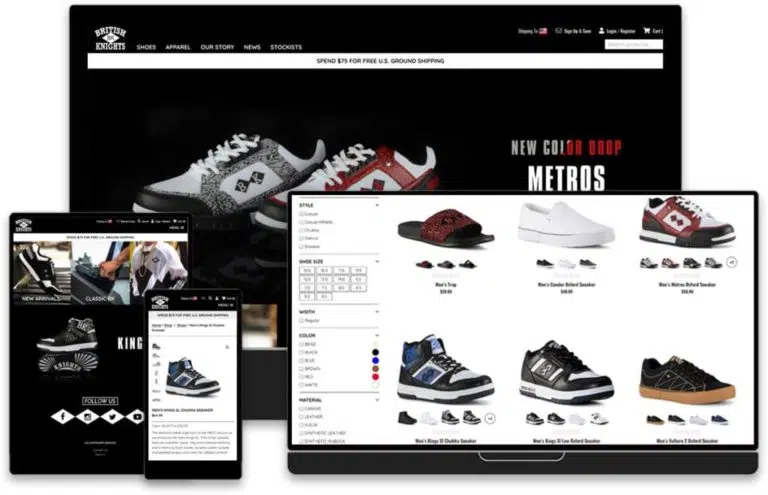
For Lugz and British Knights, the footwear brands, we built an enterprise WooCommerce store with an ERP integration at its center and provided the ERP integration consulting to decide how data moves between the two. The build includes variation-level custom fields, custom FacetWP mapping and a custom filter plugin, which matters here because every size and color has to line up with a SKU the ERP knows. Past customer and order data was migrated into the new store in the same project.
A related pattern runs on a gun dealer’s store we built: Products and cost of goods update every day from Ordoro through a scheduled job. Ordoro is an order and inventory management system, not an ERP, but the engineering problem is the same: A back-office system owns the numbers and the store has to follow it reliably. For tools outside the ERP, see our WooCommerce integration services.
Lugz: ERP integration on an enterprise WooCommerce storeERP integration consulting to define who owns which dataVariation-level fields lined up with ERP SKUsGun dealer: Daily product and cost sync from Ordoro
How an ERP connection gets built
Discovery
We meet your finance and operations people, review the ERP’s API and write the ownership map.
Fixed price
With the map and the API limits known, you get a fixed quote and a test plan.
Sandbox and staging
An ERP sandbox is connected to a staging copy of the store and run through refunds, partial shipments and backorders.
Go live in stages
Read-only syncs first, then order export, with logs checked daily until the numbers match.
WooCommerce ERP integration questions
Related WooCommerce services
WooCommerce Third-Party Integrations
Dropship, inventory, search and email connections for the rest of your stack.
WooCommerce REST API Integration & JSON Support
Custom endpoints and JSON feeds when your ERP or middleware needs data the standard API doesn’t expose.
Full-Stack WooCommerce Development
Full store builds, for when the ERP project is part of a bigger replatform.
Tell us which ERP runs your business. We’ll map what syncs, in which direction, and what it costs.
A plan, price and timeline inside five business days.