Mastering SSL Certificates: What You Need to Know for Seamless Security
Why SSL Certificate Management Matters for Your Business
SSL certificate management is the process of monitoring, issuing, renewing, and deploying the digital certificates that secure your website’s connections. It involves finding all existing certificates, installing them correctly, monitoring their health and expiration, renewing them on time, and revoking any that are compromised.
Every website with that reassuring padlock icon in the address bar relies on SSL/TLS certificates. When they expire or are misconfigured, the consequences are immediate: security warnings scare away customers, search rankings drop, and critical services go offline. A single expired certificate can trigger a “catastrophic outage,” making your site inaccessible, failing payment systems, and leaving customer data vulnerable. Visitors won’t wait around if their browser throws up a “Not Secure” warning.
Many organizations still track certificates in spreadsheets, a method prone to human error that doesn’t scale. With certificate validity now limited to 398 days, the renewal cycle is faster than ever. Missing a deadline means lost revenue, a damaged reputation, and frantic emergency fixes.
The good news is that modern certificate management doesn’t have to be complicated. Automated platforms can handle findy, renewal, and deployment across your entire infrastructure. The key is understanding the fundamentals of how certificates work and which approach fits your organization.
I’m Joseph Riviello, and over my 22+ years in digital marketing and technology leadership, I’ve helped countless organizations implement robust SSL certificate management systems that prevent outages and protect customer trust. In this guide, I’ll walk you through everything you need to know to master certificate management, from understanding Public Key Infrastructure to choosing between manual and automated solutions.
Understanding the SSL/TLS Ecosystem
Before we dive into the intricacies of SSL certificate management, grasp the fundamental components that make secure online communication possible. At its heart, we’re talking about digital trust and encryption.
What is an SSL/TLS Certificate?
An SSL/TLS certificate is a digital document that verifies ownership of a public key, acting like a digital passport for your website. Its primary function is to secure online communications by encrypting web traffic. When a certificate is installed on your web server, all data exchanged with a user’s browser—from logins to credit card numbers—is scrambled and unreadable to outsiders. This switches the protocol from HTTP to HTTPS and displays a padlock icon in the browser, signaling a private connection. This encryption is crucial for data confidentiality and user trust.
How the TLS Handshake Establishes a Secure Connection
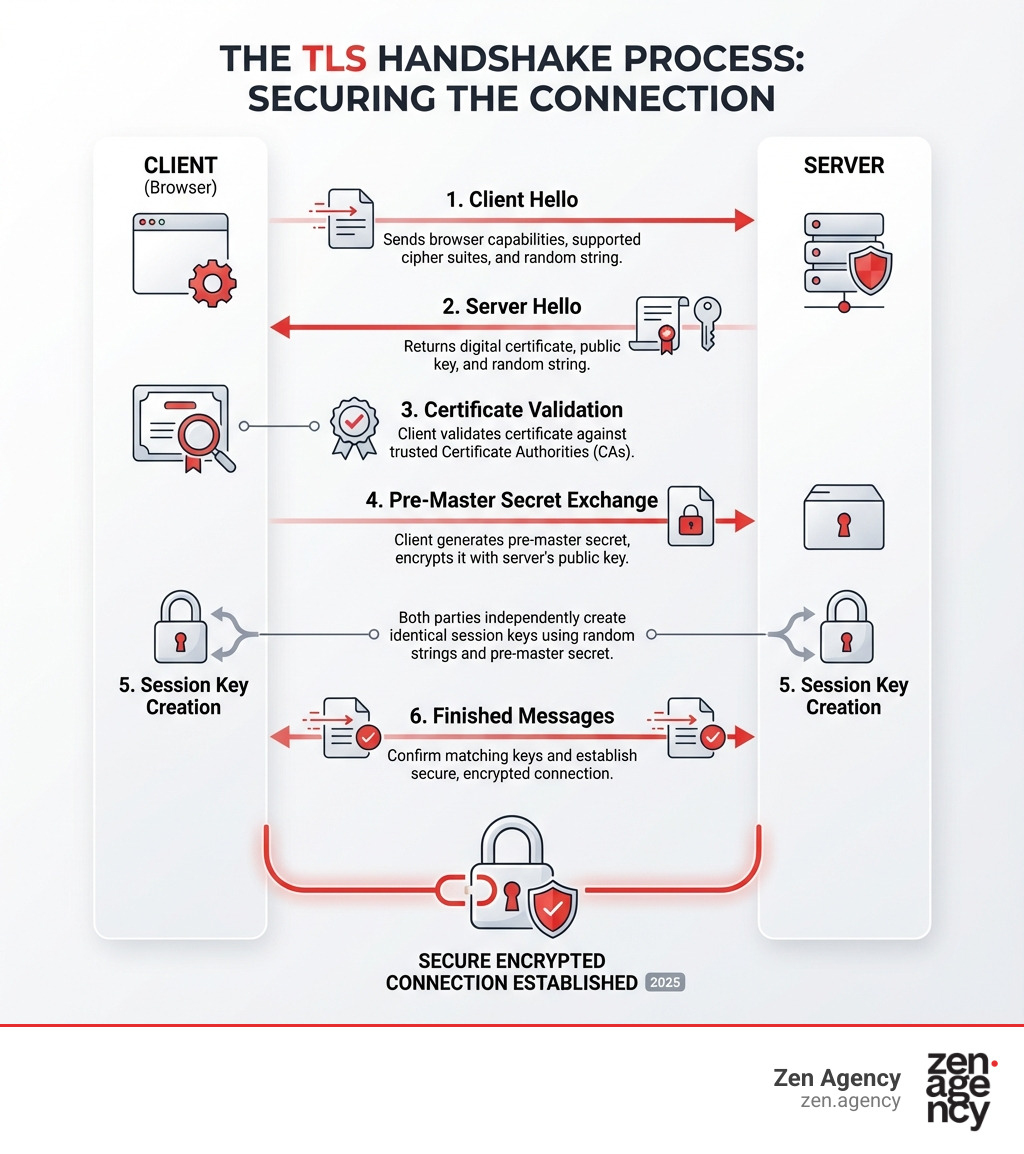
This secure connection is created via the TLS (Transport Layer Security) handshake, a negotiation between a client (your browser) and a server. Here’s a simplified breakdown:
- Client Hello: Your browser tells the server its security capabilities (TLS versions, cipher suites).
- Server Hello: The server chooses the best shared options and sends back its SSL/TLS certificate, which includes its public key.
- Certificate Validation: The browser checks if the certificate is valid, unexpired, and issued by a trusted Certificate Authority (CA). Any issues trigger a browser warning.
- Key Exchange: The browser creates a secret key, encrypts it with the server’s public key, and sends it to the server. Only the server’s private key can decrypt it.
- Session Keys Created: Both client and server use the secret key to generate identical “Session Keys” for symmetric encryption.
- Secure Connection: Both sides confirm the keys match, and all further communication is encrypted with the session keys, ensuring privacy and integrity.
Anatomy of a Certificate: Key Information Explained
An SSL/TLS certificate is a structured digital document containing key information to establish its authenticity:
- Subject Name: The owner of the certificate, usually the domain name (e.g.,
www.example.com). - Issuer Name: The Certificate Authority (CA) that issued the certificate.
- Validity Period: The “not before” and “not after” dates defining when the certificate is active.
- Public Key: The key used to encrypt data that only the server’s private key can decrypt.
- Serial Number: A unique identifier from the CA.
- Digital Signature: The CA’s signature, which verifies the certificate’s authenticity and integrity.
- Cryptographic Algorithm: The algorithms used for encryption and hashing (e.g., RSA, ECDSA).
Understanding these components is fundamental to effective SSL certificate management.
The Role of Certificate Authorities (CAs) and PKI
Trust in the SSL/TLS ecosystem is managed by Certificate Authorities (CAs) and Public Key Infrastructure (PKI).
Certificate Authorities (CAs) are trusted third-party organizations that verify website identities and issue digital certificates. After validating an applicant’s identity, the CA digitally signs the certificate, vouching for its authenticity. Browsers trust certificates only from recognized CAs.
A Public Key Infrastructure (PKI) is the framework for creating, managing, and revoking digital certificates. Trust is established through a “chain of trust”:
- Root CA: The ultimate source of trust, whose certificate is pre-installed in browsers.
- Issuing CA (Intermediate CA): Signed by the Root CA, these CAs sign the end-user server certificates. If any link in this chain is broken, the certificate is invalid.
Certificates use different encryption algorithms for security:
- RSA (Rivest-Shamir-Adleman): A robust and widely used algorithm, though it requires longer keys.
- ECDSA (Elliptic Curve Digital Signature Algorithm): Offers strong security with shorter, more efficient keys, making it ideal for mobile devices.
- DSA (Digital Signature Algorithm): Another option for digital signatures, but less common for SSL/TLS.
These algorithms ensure data integrity and confidentiality. For older clients that don’t support TLS Server Name Indication (SNI), a unique IP address may be needed for each certificate. You can learn more about Server Name Indication (SNI) to understand how it allows multiple SSL certificates on a single IP address.
A Practical Guide to the Certificate Lifecycle
Effective SSL certificate management means overseeing a certificate’s entire lifespan, from creation to retirement. Ignoring any stage can lead to security flaws or service outages. The lifecycle includes findy, creation, installation, monitoring, renewal, and revocation.

Stage 1: Findy and Inventory
You can’t manage what you can’t see. The first step is to scan your network to find all existing certificates on servers, devices, and applications. This creates a comprehensive inventory tracking key details like issuer, expiration date, domain, and location. Without a complete inventory, you risk missing expiring or rogue certificates. Automated findy tools are essential for preventing surprises.
Stage 2: Creation, Purchase, and Installation
This stage involves obtaining and deploying new certificates.
- Generate a CSR: Create a Certificate Signing Request (CSR) on your server. This file contains your public key and domain information and is sent to a Certificate Authority (CA).
- Choose a Certificate: Select a CA and a validation level based on your needs:
- Domain Validated (DV): Basic verification of domain ownership.
- Organization Validated (OV): Verifies your organization’s identity.
- Extended Validation (EV): The most stringent validation for the highest level of trust.
- Install the Certificate: Once the CA issues the certificate, install it on your web server or device and configure the software (e.g., Apache, Nginx) to use it. Proper configuration is crucial for it to function correctly.
Stage 3: Monitoring, Renewal, and Replacement
This ongoing stage is critical for avoiding outages caused by expired certificates.
- Automated Monitoring: Continuously monitor certificate health and expiration dates, with alerts providing advance notice of expiration.
- Proactive Renewal: Renew certificates well before they expire—ideally with a third of their lifetime remaining. For large-scale deployments, automated, staggered renewals prevent service disruptions. Renewing a certificate involves generating a new key pair for fresh security.
- Replacement: A certificate may need to be replaced due to a security incident, domain change, or an algorithm upgrade. This follows the same process as a new installation, followed by decommissioning the old certificate.
Stage 4: Revocation and Decommissioning
Sometimes, a certificate must be revoked before it expires.
- Reasons for Revocation: Immediate revocation is essential if a private key is compromised, a certificate is misused, or the issuing CA is decommissioned. CAs use Certificate Revocation Lists (CRLs) or OCSP to notify browsers of revoked certificates.
- Decommissioning: When a server is retired, its certificates should be revoked to maintain a clean and secure inventory and minimize attack vectors.
Mastering SSL Certificate Management: Manual vs. Automated Strategies
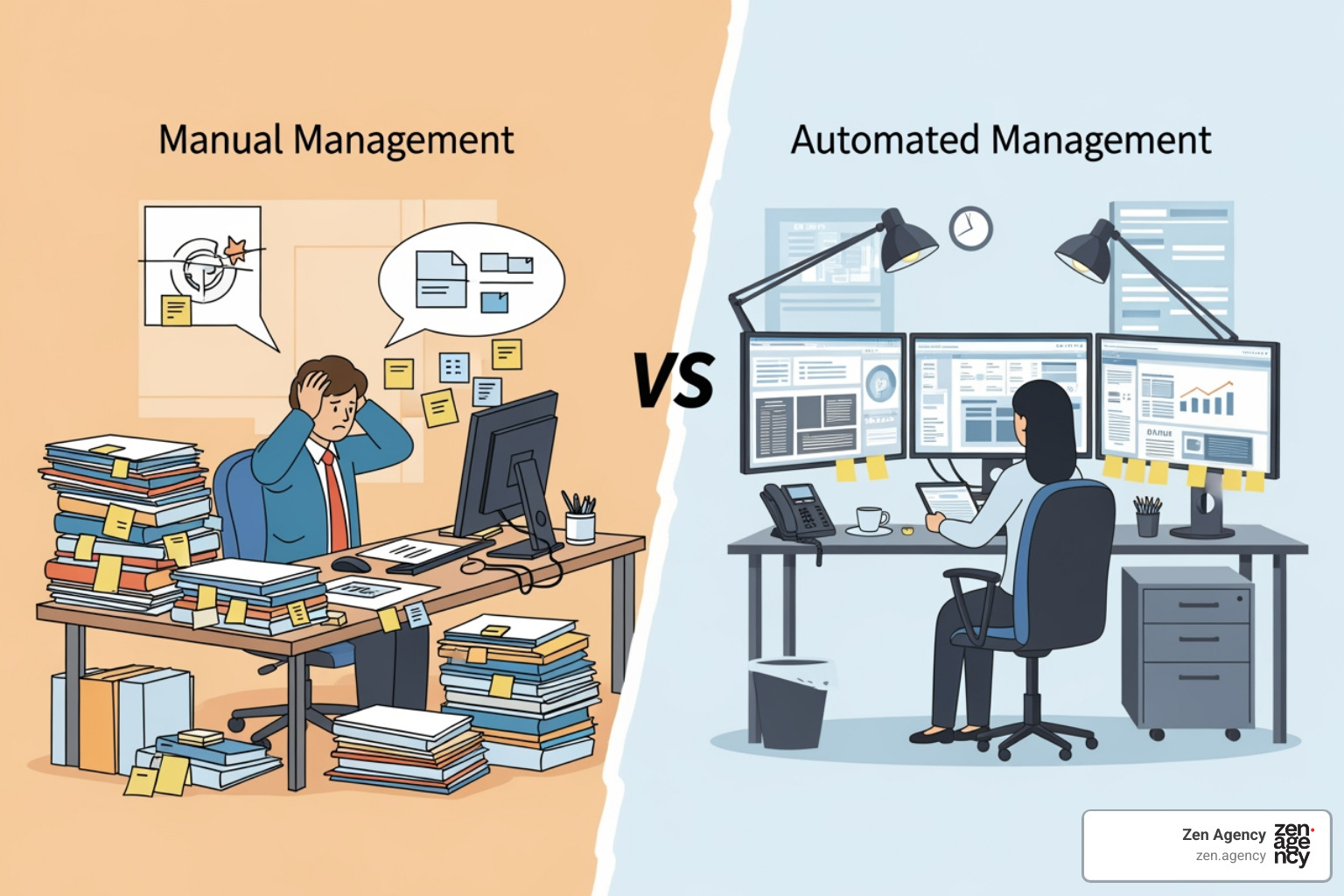
The approach an organization takes to SSL certificate management can significantly impact its security posture, operational efficiency, and bottom line. We often see a stark contrast between manual and automated strategies.
The Challenges of Manual SSL Certificate Management
Manually tracking certificates in a spreadsheet might seem feasible for small organizations, but it quickly becomes a liability as you scale. This approach is a significant risk for any growing business.
The challenges of manual SSL certificate management include:
- Human Error: A simple typo in an expiration date can cause an outage.
- Increased Risk of Outages: Without automation, certificates can easily expire unnoticed, leading to lost revenue and a damaged reputation.
- Fragmented Procurement: Purchasing from various CAs creates confusion, increases costs, and makes tracking difficult.
- Lack of Visibility: It’s nearly impossible to get a complete overview of all certificates, their status, and their locations.
- Compliance Gaps: Unmanaged certificate use can lead to compliance issues and security vulnerabilities.
Core Operations in an SSL Certificate Management Plan
A robust SSL certificate management plan, whether manual or automated, involves several core operations for managing digital identities. These tasks apply to all certificate types, from the end-entity certificates on your servers to the intermediate and root CA certificates that form the chain of trust.
Common operations include:
- Creation and Requesting: Generating new certificates via a Certificate Signing Request (CSR) or creating self-signed ones for internal use.
- Renewal and Replacement: Obtaining a new certificate before expiration or swapping an old one due to a compromise or upgrade.
- Listing and Viewing: Checking the details of existing certificates and pending requests.
- Import/Export: Moving certificates between systems or keystores.
- Deletion and Revocation: Removing outdated, compromised, or unnecessary certificates and requests.
These operations ensure certificates are provisioned, maintained, and retired securely.
Embracing Automation for Scalable Security
For any growing organization, automation is a necessity for effective SSL certificate management. Automated systems are more secure, cost-effective, and efficient, minimizing human error.
Automated platforms offer:
- Streamlined Operations: Automate the issuance, renewal, and revocation of certificates, including CSR generation and installation.
- Centralized Control: Gain complete visibility and control over all certificates from a single dashboard.
- Reduced IT Workload: Free up IT teams from manual tracking to focus on strategic initiatives.
- Improved Security: Ensure certificates are always up-to-date, reducing vulnerabilities from expired or misconfigured certificates.
- Cost Savings: Lower operational costs by reducing man-hours and preventing costly errors.
The Automatic Certificate Management Environment (ACME) protocol is a key technology enabling this automation. Used by services like Let’s Encrypt, ACME automates interactions with CAs for low-cost, hands-free certificate deployment. Embracing automation makes your digital infrastructure secure, efficient, and resilient.
The Business Case for Effective Certificate Management
Why should organizations invest time and resources into robust SSL certificate management? Beyond the technical necessities, there’s a compelling business case rooted in security, compliance, and operational efficiency.
Key Benefits: Improved Security, Compliance, and Efficiency
Effective SSL certificate management delivers tangible business benefits:
- Improved Security: Proactive management prevents data breaches from expired or rogue certificates, protecting sensitive data and customer trust.
- Guaranteed Compliance: Proper certificate management is mandated by regulations like PCI DSS and HIPAA. Centralized reporting helps ensure you meet these standards.
- Operational Efficiency: Centralized tracking and simplified procurement streamline processes, reduce supplier overhead, and save significant time and money.
- Reduced Risk of Outages: Automated monitoring and renewal prevent costly outages caused by expired certificates, ensuring continuous service availability.
- Simplified Procurement: Consolidating certificate purchases improves purchasing power and reduces vendor management complexity.
In short, effective management keeps your organization secure, connected, and always on.
Self-Signed vs. CA-Signed: Making the Right Choice
Organizations can use self-signed certificates or those from a trusted Certificate Authority (CA). The choice depends on the required level of trust.
- Self-Signed Certificates: You create and sign these yourself. They are free and useful for internal testing or private networks where you control the clients. However, public browsers do not trust them and will display security warnings, making them unsuitable for public-facing sites.
- CA-Signed Certificates: Issued by a trusted CA, these are universally accepted by browsers and operating systems. They are essential for public websites to encrypt traffic and build user trust without security warnings. While they often have a cost and require validation, they are the standard for external communication.
For any public-facing application, a CA-signed certificate is the only viable option. Self-signed certificates can be a cost-effective choice for internal-only systems.
Beyond Websites: Other Use Cases for Digital Certificates
Digital certificates are not just for websites. Their ability to establish identity and encrypt data makes them vital for many other applications:
- Code Signing: Verifies a software publisher’s identity and ensures code integrity, protecting users from malware.
- Document Signing: Applies secure, legally binding digital signatures to electronic documents, ensuring authenticity and integrity.
- Email Security (S/MIME): Digitally signs and encrypts emails to authenticate the sender and protect content privacy.
- VPN and Device Authentication: Secures connections by authenticating users, IoT devices, and other endpoints before granting network access.
- Cloud and API Security: Used for machine-to-machine authentication, securing API calls, and verifying services in cloud environments.
- SSH Key Management: SSH keys function similarly to certificates for secure server access and fall under digital identity management.
A comprehensive SSL certificate management platform supports these diverse use cases, centralizing public trust management for web servers, email, software, and documents.
Frequently Asked Questions about SSL Certificate Management
What happens if an SSL certificate expires?
If a certificate expires, browsers will show a security warning to visitors, deterring them from accessing the site. This can lead to a loss of traffic, trust, and revenue, and can cause service interruptions for applications that rely on the certificate.
How long are SSL certificates valid for?
The maximum validity period for publicly trusted SSL/TLS certificates is currently 398 days (approximately 13 months). This shorter lifespan improves security by ensuring keys are rotated and validation information is updated more frequently.
Can I manage all my certificates from one place?
Yes, dedicated certificate management platforms and solutions allow organizations to find, monitor, and manage all their digital certificates from a single, centralized dashboard, regardless of the issuing Certificate Authority.
Conclusion: Secure Your Digital Presence with Expert Management
In today’s interconnected world, effective SSL certificate management is no longer just a technical detail; it’s a strategic imperative. We’ve seen how a single expired certificate can lead to catastrophic outages, erode customer trust, and even impact your search engine rankings. Conversely, proactive management ensures seamless security, operational efficiency, and sustained growth.
By understanding the SSL/TLS ecosystem, embracing a systematic approach to the certificate lifecycle, and leveraging automated solutions, we can transform a potential headache into a robust defense mechanism. This protects not only our data and our customers but also our brand reputation and bottom line.
At Zen Agency, we understand the complexities of scaling businesses and the critical role secure digital infrastructure plays. We believe that SSL certificate management should be a seamless, invisible layer of protection, not a constant source of worry.
Don’t let overlooked certificates put your business at risk. Secure your website and ensure uninterrupted service with our expert website maintenance and security support. Let us help you master your digital trust, so you can focus on what you do best: growing your business.