The A to Z of Web Accessibility: Understanding WCAG and ADA Guidelines
Making the Web Accessible for Everyone
What is WCAG? The Web Content Accessibility Guidelines (WCAG) are technical standards from the World Wide Web Consortium (W3C) on making web content accessible to people with disabilities. As the international benchmark for digital accessibility, they help organizations ensure their websites, apps, and digital content are usable by everyone, regardless of ability.
Quick Answer:
- Definition: WCAG is a set of technical guidelines created by the W3C to make web content accessible to people with disabilities
- Purpose: To remove barriers and ensure everyone can perceive, operate, understand, and interact with digital content
- Key Point: WCAG itself is not a law, but it’s the standard most accessibility laws reference
- Current Version: WCAG 2.2 (released October 2023), though 2.0, 2.1, and 2.2 are all currently supported
- Most Common Target: Level AA conformance is the widely adopted standard for most organizations
The impact of web accessibility goes far beyond legal compliance. According to the World Health Organization, 1.3 billion people worldwide have some form of disability. When your digital content isn’t accessible, you’re potentially excluding a significant portion of your audience—and missing out on revenue opportunities.
WCAG addresses a wide range of disabilities, including visual impairments (blindness, low vision, color blindness), hearing impairments, motor disabilities (limited hand movement, inability to use a mouse), speech disabilities, and cognitive or learning disabilities. The guidelines also improve usability for older users and benefit everyone through better overall design and user experience.
I’m Joseph Riviello. With over 22 years in digital marketing, I’ve helped companies implement WCAG to reduce legal risk and expand their market reach. This guide covers everything you need to know about WCAG, from its core principles to its connection with legal requirements like the ADA.
What is WCAG and Who Creates It?
When we talk about digital accessibility, the term WCAG inevitably comes up. It’s the cornerstone of creating an inclusive online experience. But what exactly is it, and who is behind its development? Let’s dive in.

The Core Question: What is WCAG?
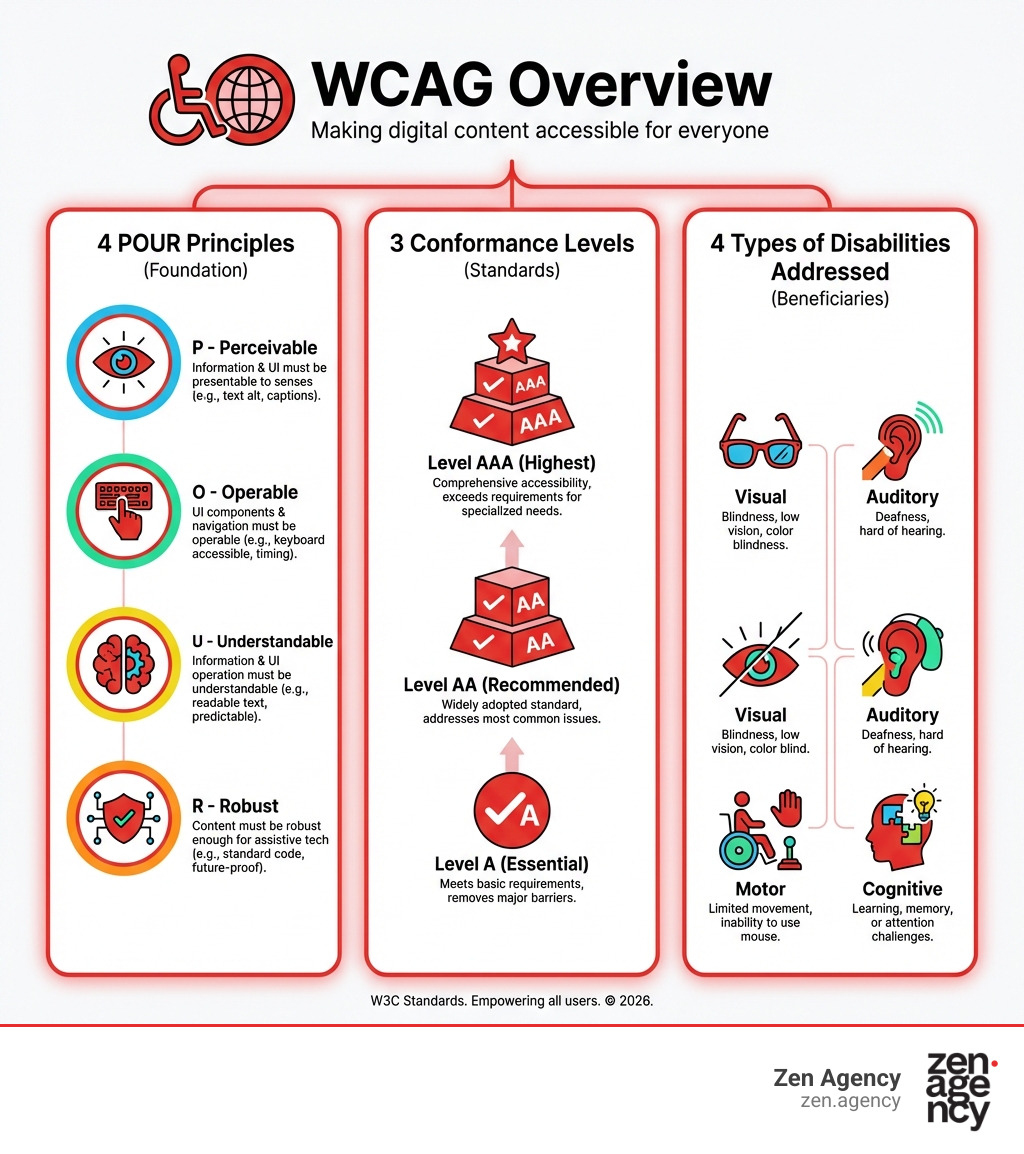
WCAG stands for Web Content Accessibility Guidelines, a set of technical standards from the World Wide Web Consortium (W3C). Its primary purpose is to make web content—including websites, apps, and documents—accessible to people with visual, auditory, physical, speech, cognitive, and neurological disabilities. It’s about removing digital barriers for all users.
While WCAG itself is not a law, it’s the universally recognized benchmark that most accessibility laws reference. Adhering to WCAG is the best way to achieve legal compliance and demonstrate ethical responsibility.
Who is WCAG For?
WCAG is designed for anyone involved in creating web content:
- Web Developers and Designers: To build accessible code, design, and interactive features.
- Content Creators: To produce accessible content with text alternatives, captions, and proper structure.
- Organizations and Governments: To meet legal obligations, expand their audience, and show commitment to inclusion, which is crucial for our clients in Pennsylvania and Montana.
- Tools and Software Developers: To create authoring and evaluation tools that support accessibility.
In short, if you create for the web, WCAG is for you.
The Primary Purpose of WCAG
The overarching goal of WCAG is to provide a single, shared standard for web content accessibility that meets the needs of individuals, organizations, and governments internationally. Its purpose is to define how to make Web content more accessible to people with disabilities.
Beyond directly benefiting individuals with disabilities, WCAG also improves the overall usability of the web for everyone. For instance, clear navigation benefits users with cognitive disabilities and also makes it easier for older individuals (whose abilities may change with age) or anyone using a mobile device in a busy environment. Providing text alternatives for images isn’t just for screen reader users; it also helps users with slow internet connections, which can be a real issue in some rural areas of Pennsylvania and Montana.
By following WCAG, we help ensure that assistive technologies like screen readers, voice control software, and alternative input devices can properly interpret and interact with web content, opening up the digital world to millions.
Decoding WCAG: The 4 Principles and 3 Levels of Conformance
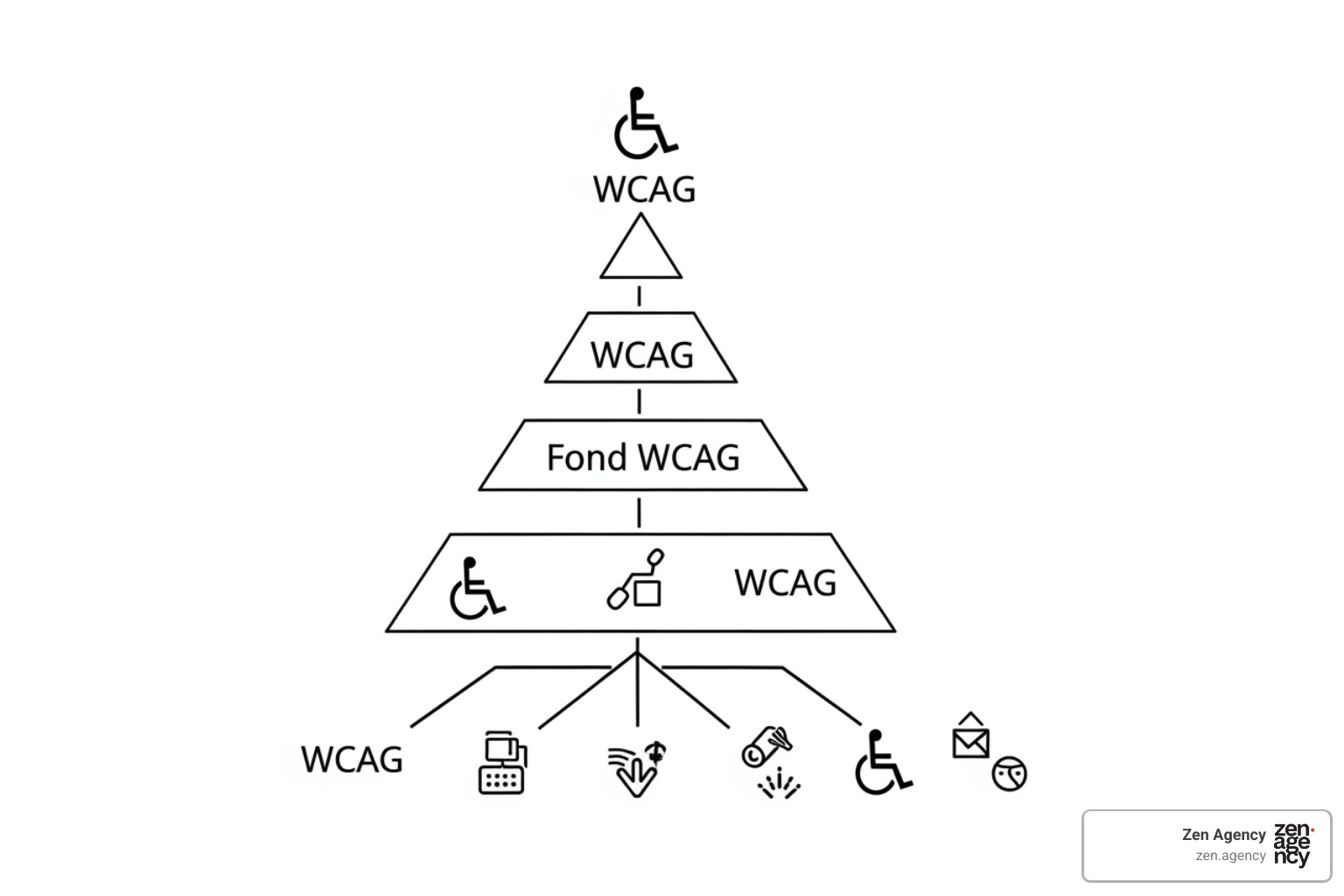
Understanding what is WCAG means grasping its fundamental structure. The guidelines are built upon a logical hierarchy that moves from broad principles down to specific, testable criteria. This structure ensures a comprehensive approach to accessibility.
The Four POUR Design Principles
At the very top of the WCAG hierarchy are the four foundational principles, often remembered by the acronym POUR: Perceivable, Operable, Understandable, and Robust. These aren’t just technical terms; they’re the philosophical pillars ensuring anyone can access or use web content. If your website isn’t POUR, it’s not truly accessible.
- Perceivable: Can users perceive the information presented? This means content must be available to the senses.
- Examples: Providing text alternatives (alt text) for images so screen readers can describe them, offering captions for videos, and ensuring sufficient color contrast for users with low vision.
- Operable: Can users interact with and steer the interface? This ensures that user interface components and navigation are functional for everyone.
- Examples: Making all functionality available via keyboard (not just a mouse), giving users enough time to complete tasks, and avoiding content that flashes rapidly and could cause seizures.
- Understandable: Is the information and operation of the user interface comprehensible? Content should be clear and predictable.
- Examples: Using clear language, ensuring navigation is predictable, and providing clear instructions and error messages on forms to help users avoid and correct mistakes.
- Robust: Can content be interpreted reliably by a wide variety of user agents, including assistive technologies? This means your content should work across different browsers, devices, and assistive technologies, now and in the future.
- Examples: Using proper HTML to ensure content works with current and future browsers, devices, and assistive technologies.
How WCAG is Structured: Guidelines and Success Criteria
Beneath the POUR principles lie the guidelines. WCAG 2.0 introduced twelve WCAG 2.0 guidelines, which are general statements of best practice. For example, “Provide text alternatives for any non-text content.” These guidelines are broad and stable, meaning they don’t change frequently with technology.
Each guideline is then broken down into specific, testable Success Criteria. These are the “how-to” aspects of WCAG. They are precise statements that define what needs to be done to meet the guideline. For instance, under the “Perceivable” principle and the “Text Alternatives” guideline, a success criterion might be: “All non-text content that is presented to the user has a text alternative that serves the equivalent purpose.”
Here are some common examples of success criteria:
- Alt Text (1.1.1 Non-text Content): Meaningful images must have descriptive alt text so screen readers can convey the image’s content to users who cannot see it.
- Keyboard Accessibility (2.1.1 Keyboard): All interactive elements like buttons and links must be usable with only a keyboard, which is vital for users who cannot use a mouse.
- Color Contrast (1.4.3 Contrast (Minimum)): Text must have a contrast ratio of at least 4.5:1 against its background to ensure readability for people with low vision.
- Error Messages (3.3.1 Error Identification): When an input error occurs, it must be identified and described in text to help users correct it.
These success criteria are the measurable points that determine whether a website conforms to WCAG.
The Three Conformance Levels: A, AA, AAA
WCAG success criteria are categorized into three conformance levels: A, AA, and AAA. These levels indicate the impact of a barrier on users with disabilities and the feasibility of implementing the solution.
- Level A (Minimum Requirements): This is the most basic level of accessibility. It addresses the most fundamental barriers, without which some groups of users would find it impossible to access your content. Achieving Level A removes critical blockers.
- Level AA (Significant Barriers Removed): This is the most commonly targeted and widely adopted level. It addresses significant barriers that many users with disabilities would encounter, making your content usable for a much broader audience. Meeting Level AA demonstrates a strong commitment to accessibility and is often the benchmark for legal mandates.
- Level AAA (Improved Access): This is the highest level of accessibility. It provides the most comprehensive support for users with disabilities, often going above and beyond what is strictly necessary for basic access. While achieving AAA is commendable, it’s not always feasible for all content or organizations, as some AAA criteria might conflict with specific design goals or be very difficult to implement across an entire site.
As an agency serving clients in Pennsylvania and Montana, we typically guide our clients to aim for Level AA conformance. This strikes a balance between achieving robust accessibility and practical implementation, while also aligning with most legal expectations in the U.S.
The Evolution of Standards: A Look at WCAG Versions
The digital landscape is constantly changing, and so are the tools and technologies people use to access the web. To keep pace, WCAG has evolved through several versions, each building upon the last to address new challenges and improve accessibility. A key characteristic of WCAG 2.x versions is their backward compatibility, meaning content conforming to a later version also conforms to earlier ones.
| Feature | WCAG 2.0 (2008) | WCAG 2.1 (2018) | WCAG 2.2 (2023) |
|---|---|---|---|
| Guidelines | 12 guidelines under 4 POUR principles | 13 guidelines (1 new) under 4 POUR principles | 13 guidelines under 4 POUR principles |
| Success Criteria | 61 success criteria | 17 new success criteria (total 78) | 9 new success criteria (total 87); 4.1.1 Parsing deprecated |
| Focus | Technology-agnostic, foundational web accessibility | Mobile devices, low vision, cognitive and learning disabilities (initial expansion) | Cognitive disabilities, motor disabilities, touch input, and new interaction patterns (further expansion) |
| ISO Standard | ISO/IEC 40500:2012 | N/A | ISO/IEC 40500:2025 (based on 2.2) |
| Key Additions | POUR principles, testable criteria | Touch targets, orientation, reflow, character key shortcuts | Focus Not Obscured, Dragging Movements, Target Size, Consistent Help |
| Backward Comp. | N/A (first with POUR) | Backward-compatible with WCAG 2.0 | Backward-compatible with WCAG 2.1 and 2.0 |
| W3C Status | W3C Recommendation (Dec 2008) | W3C Recommendation (June 2018) | W3C Recommendation (Oct 2023) |
From WCAG 1.0 to 2.0
The journey began with WCAG 1.0, published in 1999. While groundbreaking, it was tied to specific web technologies and was challenging to apply universally as the web evolved.
Then came WCAG 2.0 in December 2008, a monumental shift. It introduced the technology-agnostic POUR principles, testable success criteria, and A/AA/AAA conformance levels. Its robustness was confirmed when it became an ISO standard (ISO/IEC 40500:2012), cementing its status as the international foundation for web accessibility.
What’s New in WCAG 2.1 and 2.2?
As smartphones became ubiquitous and new interaction methods emerged, WCAG needed to adapt. WCAG 2.1 was released in June 2018, extending WCAG 2.0 with 17 new success criteria. These additions primarily focused on:
- Mobile Devices: Addressing challenges with touchscreens, device orientation, and small screen sizes (e.g., Target Size, Orientation).
- Low Vision: Enhancing readability and visual perception (e.g., Reflow, Non-text Contrast).
- Cognitive and Learning Disabilities: Providing initial steps towards better support for these groups (e.g., Character Key Shortcuts).
Most recently, WCAG 2.2 became a W3C Recommendation on 5 October 2023. This version builds upon 2.1 with a further nine new success criteria, significantly enhancing accessibility for:
- Cognitive Disabilities: New criteria like “Consistent Help” aim to reduce cognitive load.
- Motor Disabilities: “Dragging Movements” and “Target Size (Minimum)” improve interaction for users with limited fine motor control.
- Touch Input: Further refining how interactive elements respond to touch.
One notable change in WCAG 2.2 is the deprecation of success criterion 4.1.1 Parsing, which often caused confusion and was frequently passed automatically in earlier versions. This shows the continuous refinement of the guidelines.
Which WCAG Version is Most Relevant Today?
Given the steady evolution, the question of which WCAG version to target is critical for any organization. While WCAG 2.0, 2.1, and 2.2 are all currently supported by the W3C, we strongly recommend aiming for WCAG 2.2 Level AA as your current standard.
Why 2.2? Because it’s backward-compatible. If your website conforms to WCAG 2.2, it automatically conforms to 2.1 and 2.0. This makes it the most comprehensive and future-proof choice, covering the latest advancements in web accessibility, including critical considerations for mobile and cognitive access.
For organizations in the U.S., including those in Wilkes Barre, Scranton, or Billings, proactively adopting WCAG 2.2 helps align with evolving legal requirements and positions you ahead of the curve. It’s a smart strategic move for both compliance and providing the best possible user experience. You can always refer to the WCAG 2 Overview for the latest official information.
From Guidelines to Law: How WCAG Connects to ADA and Global Regulations
Now that we understand what is WCAG and its structure, let’s talk about the big question: how do these technical guidelines translate into legal obligations? While WCAG itself isn’t a law, it’s the gold standard that courts and regulatory bodies often point to when defining what constitutes an “accessible” website. Ignoring these guidelines isn’t just poor practice; it can lead to significant legal repercussions. If you want to avoid costly lawsuits, understanding Don’t Get Sued: The ADA Website Standards You Need to Know is essential.
United States: ADA and Section 508
In the United States, the primary legal framework for accessibility is the Americans with Disabilities Act (ADA). While the ADA doesn’t explicitly mention websites, courts have increasingly interpreted it to cover digital spaces. This means businesses, state and local governments, and other entities that serve the public must ensure their websites are accessible to individuals with disabilities.
The U.S. Department of Justice (DOJ) has long recommended WCAG as a primary resource for achieving ADA compliance. Most recently, on April 24, 2024, the DOJ’s final rule updating its regulations for Title II of the ADA explicitly states that WCAG Version 2.1, Level AA is the technical standard for state and local governments’ web content and mobile apps. This provides a clear, legally mandated benchmark for many organizations, including those operating in Pennsylvania and Montana. For a deeper dive into these requirements, our ADA Compliance Laws: Complete Guide is an invaluable resource.
Another critical piece of legislation is Section 508 of the Rehabilitation Act. This law requires federal agencies to make their electronic and information technology accessible to people with disabilities. In January 2017, the U.S. Access Board approved a final rule to update Section 508, adopting seventeen WCAG 2.0 success criteria as part of its technical standards. This means any organization working with the U.S. federal government must also adhere to WCAG standards.
For our clients in the U.S., the message is clear: conforming to WCAG 2.1 (and ideally 2.2, due to backward compatibility and improved features) Level AA is not just a best practice; it’s a critical step towards legal compliance and avoiding potential litigation.
International Regulations: Australia, Canada, and EU
While our operations and primary focus are on U.S.-based businesses in areas like Scranton, PA, and Billings, MT, it’s important to understand that WCAG’s influence extends globally. Many countries and regions have adopted WCAG as their official standard for digital accessibility, demonstrating its universal recognition.
For example, the Australian government has mandated via the Disability Discrimination Act 1992 that all Australian government websites meet the WCAG 2.0 level A accessibility requirements. In Canada, regulations under the Accessibility for Ontarians with Disabilities Act, 2005, require that public web content of certain Ontario organizations complies with WCAG 2.0 Level AA. The Canadian federal government also generally requires WCAG 2.0.
In the European Union, Directive 2016/2102 requires websites and mobile applications of public sector bodies to conform to WCAG 2.1 Level AA. This directive has significantly driven accessibility improvements across EU member states.
These examples highlight how WCAG serves as the common language for digital accessibility legislation worldwide. Even if these specific international laws don’t directly apply to your U.S.-based business, their widespread adoption underscores the global expectation for accessible web content. It’s a clear signal that web accessibility is a universal right, not just a local recommendation.
Frequently Asked Questions about WCAG
We often get asked similar questions about what is WCAG and how to steer its requirements. Let’s tackle some of the most common ones to clarify any lingering doubts.
What is the difference between WCAG conformance and compliance?
This is a really important distinction! While often used interchangeably, “conformance” and “compliance” have different meanings in the context of WCAG:
- WCAG Conformance: This refers to whether your web content meets all the specific success criteria outlined in the WCAG guidelines at a particular level (A, AA, or AAA). It’s a technical measurement of adherence to the W3C’s accessibility standards. When we say a website “conforms” to WCAG 2.1 Level AA, we mean it has successfully implemented all the relevant success criteria at that level.
- Legal Compliance: This refers to whether your website meets the requirements of a specific law or regulation, such as the ADA in the United States. While many laws like the ADA don’t explicitly state “you must meet WCAG 2.1 Level AA,” they often reference WCAG as the technical standard to achieve their accessibility goals.
So, here’s the kicker: WCAG itself is not a law. Therefore, there’s no such thing as “WCAG compliance” in the legal sense. However, achieving WCAG conformance (especially at Level AA) is widely considered the best practice and the most reliable way to demonstrate that your digital content is legally compliant with accessibility laws like the ADA. Think of WCAG as the detailed instruction manual, and the ADA as the legal requirement to build an accessible building. Following the manual helps you meet the legal requirement. For more on this, check out our WCAG insights.
Which WCAG conformance level should my organization aim for?
For the vast majority of organizations, including businesses and government entities in the U.S., we recommend aiming for WCAG 2.1 Level AA or, even better, WCAG 2.2 Level AA.
Here’s why:
- Industry Standard: Level AA is globally recognized as the industry standard for web accessibility. It strikes a practical balance between achieving significant accessibility for a broad range of users and the feasibility of implementation for most organizations.
- Legal Mandates: As we discussed, many legal frameworks, including the recent DOJ final rule for Title II of the ADA in the U.S., explicitly point to WCAG 2.1 Level AA as the technical benchmark. By meeting this, you significantly mitigate your legal risk.
- Broader Impact: While Level A removes critical barriers, Level AA addresses the more common and significant obstacles that users with disabilities face, leading to a much more inclusive and positive user experience.
- Balancing Effort and Impact: Achieving Level AAA, while ideal, can be very challenging and sometimes impractical for all content. It often involves highly specialized design and development efforts that might not always be necessary to provide a legally compliant and highly usable experience.
For our clients in Pennsylvania and Montana, targeting WCAG 2.1/2.2 Level AA is the most strategic approach. It covers the essential requirements, aligns with legal expectations, and demonstrates a strong commitment to digital inclusion.
What is WCAG testing?
WCAG testing is the process of evaluating web content to determine whether it conforms to the WCAG guidelines and success criteria. It’s how we ensure your digital properties are genuinely accessible. This process typically involves a combination of methods:
- Automated Tools: These are software programs that can quickly scan a website for common accessibility issues, such as missing alt text, insufficient color contrast (though this needs manual verification), or incorrect heading structure. Tools like Google Lighthouse or WAVE can provide a quick initial assessment. Automated tools are fast and efficient for catching obvious errors, but they can only detect about 30-50% of accessibility issues.
- Manual Testing: This involves human experts systematically reviewing web pages against WCAG success criteria. Manual testing is crucial for identifying complex issues that automated tools miss, such as the context of alt text, the logical order of content, or the usability of keyboard navigation. Our team often performs detailed manual audits to ensure thorough coverage.
- Human Testing (with assistive technologies): The most effective way to truly assess accessibility is to have real users with disabilities steer and interact with your website using their preferred assistive technologies (e.g., screen readers, voice control software). This provides invaluable qualitative feedback on actual user experience and helps uncover barriers that might not be apparent through automated or purely manual checks. This is the ultimate test of usability.
The goal of WCAG testing is not just to find problems but to identify violations that need remediation. A comprehensive testing strategy, combining these methods, allows us to pinpoint accessibility barriers and provide actionable recommendations to fix them, leading to a truly accessible digital experience.
Conclusion: Achieve WCAG Conformance with Expert Help
Understanding what is WCAG is the first crucial step towards creating an inclusive digital presence. We’ve explored its core definition, the foundational POUR principles, its layered structure of guidelines and success criteria, and how its various versions have evolved to meet the demands of a dynamic web. We’ve also seen how WCAG serves as the essential technical backbone for legal frameworks like the ADA in the U.S., making conformance not just an ethical choice, but a legal imperative for businesses and governments alike.
The benefits of achieving WCAG conformance extend far beyond simply avoiding lawsuits. An accessible website:
- Expands Your Audience: You open up access for the 1.3 billion people worldwide with disabilities, plus older users and anyone benefiting from improved usability.
- Improves Your Brand Reputation: It signals a commitment to diversity, equity, and inclusion, fostering trust and loyalty among your customers.
- Improves User Experience for Everyone: Better contrast, clear navigation, and logical content structure benefit all users, leading to higher engagement and satisfaction.
- Boosts SEO: Search engines favor well-structured, accessible content, which can improve your rankings and visibility.
At Zen Agency, we believe that building an accessible website isn’t a chore; it’s an opportunity. Since 2008, we’ve been helping businesses in places like Wilkes Barre, Scranton, and Billings transform their digital presence. Our expertise in custom website development and digital marketing, combined with a deep understanding of WCAG and ADA guidelines, allows us to deliver enterprise-grade solutions that are both innovative and inclusive.
If you’re ready to ensure your website meets the highest standards of accessibility, expand your reach, and protect your business, our team is here to help. Explore our ADA Compliance Services today and let us guide you on your journey to a truly accessible web.