Unlock Your Store’s Potential: A Guide to WooCommerce B2B and Beyond
Why WooCommerce B2B Matters for Growing Businesses
WooCommerce B2B is a specialized e-commerce approach that transforms your standard WooCommerce store into a powerful wholesale platform. It enables businesses to serve other businesses with features like custom pricing, bulk ordering, user role management, and quote requests—all within the familiar WordPress ecosystem.
Key capabilities of WooCommerce B2B solutions:
- Custom Pricing – Set different prices for different customer groups or individual buyers
- User Role Management – Create wholesale, distributor, or VIP customer tiers with unique permissions
- Bulk Ordering – Allow customers to purchase large quantities quickly via CSV upload or quick order forms
- Quote Requests – Enable negotiated pricing for custom orders or large volumes
- Product Visibility – Hide or show specific products and catalogs based on customer type
- Tax Management – Handle VAT validation, tax exemptions, and region-specific tax rules
- Hybrid Models – Run B2B and B2C operations simultaneously from one site
As your business expands, managing wholesale customers alongside retail shoppers becomes increasingly complex. You need different pricing for different buyers. You need approval workflows for new business accounts. You need minimum order quantities and payment terms that standard WooCommerce simply doesn’t support out of the box.
The problem is clear: Standard WooCommerce is built for B2C transactions. When you try to serve business customers with retail-focused tools, you end up with manual workarounds, frustrated wholesale buyers, and revenue leaking through the cracks.
Over 14,000 businesses worldwide have already implemented dedicated B2B solutions on WooCommerce, seeing improvements in operational efficiency and customer satisfaction. The question isn’t whether you need B2B functionality—it’s which solution fits your specific needs and how to implement it effectively.
I’m Joseph Riviello, and with over 22 years leading digital marketing and e-commerce strategies at Zen Agency, I’ve helped companies scale their online presence through platforms like WooCommerce B2B. My focus is on multi-faceted approaches that drive measurable results—from traffic and leads through to conversions and revenue.
Opening Up Core B2B Functionalities in WooCommerce
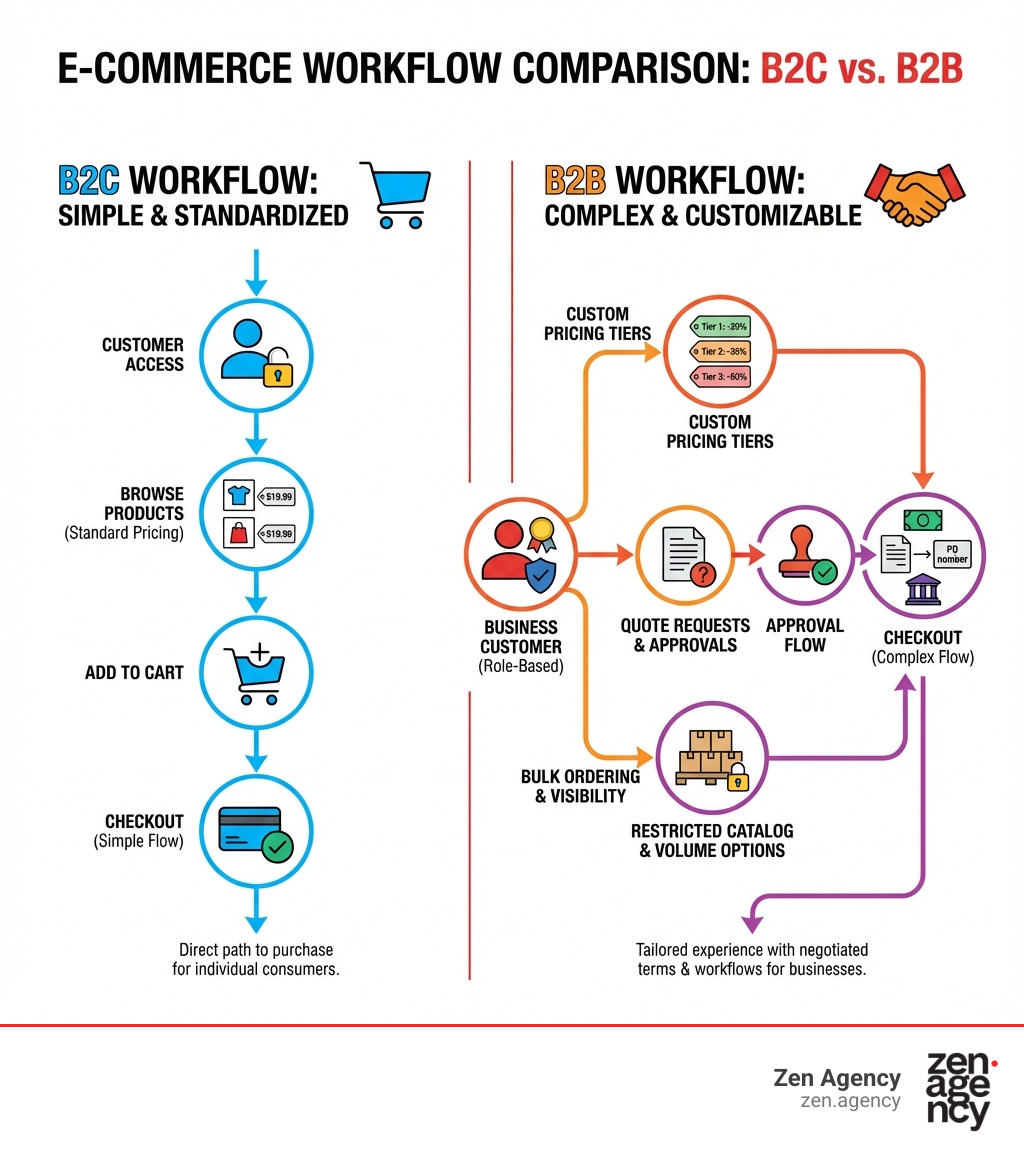
When we talk about WooCommerce B2B, we’re essentially discussing how to layer enterprise-grade features onto an already robust e-commerce platform. The core problem that WooCommerce B2B solutions solve is adapting a B2C-centric platform to the unique demands of business-to-business transactions. This means moving beyond simple product listings and single-price points to a more nuanced, relationship-driven commerce model.
For businesses like manufacturers, distributors, and wholesalers, traditional e-commerce often falls short. They need to manage diverse customer segments, each with specific pricing agreements, access levels, and purchasing behaviors. Without dedicated B2B functionalities, these businesses are left to juggle spreadsheets, manual invoicing, and endless email exchanges—a recipe for inefficiency and errors. WooCommerce B2B solutions step in to automate these complex processes, bringing order and professionalism to wholesale operations.
Essential Features for a Woo Commerce B2B Store
At the heart of any successful WooCommerce B2B implementation are features designed to cater to the distinct needs of wholesale customers. One of the most critical aspects is flexible pricing. Unlike B2C where one price fits all, B2B demands dynamic pricing strategies. This includes:
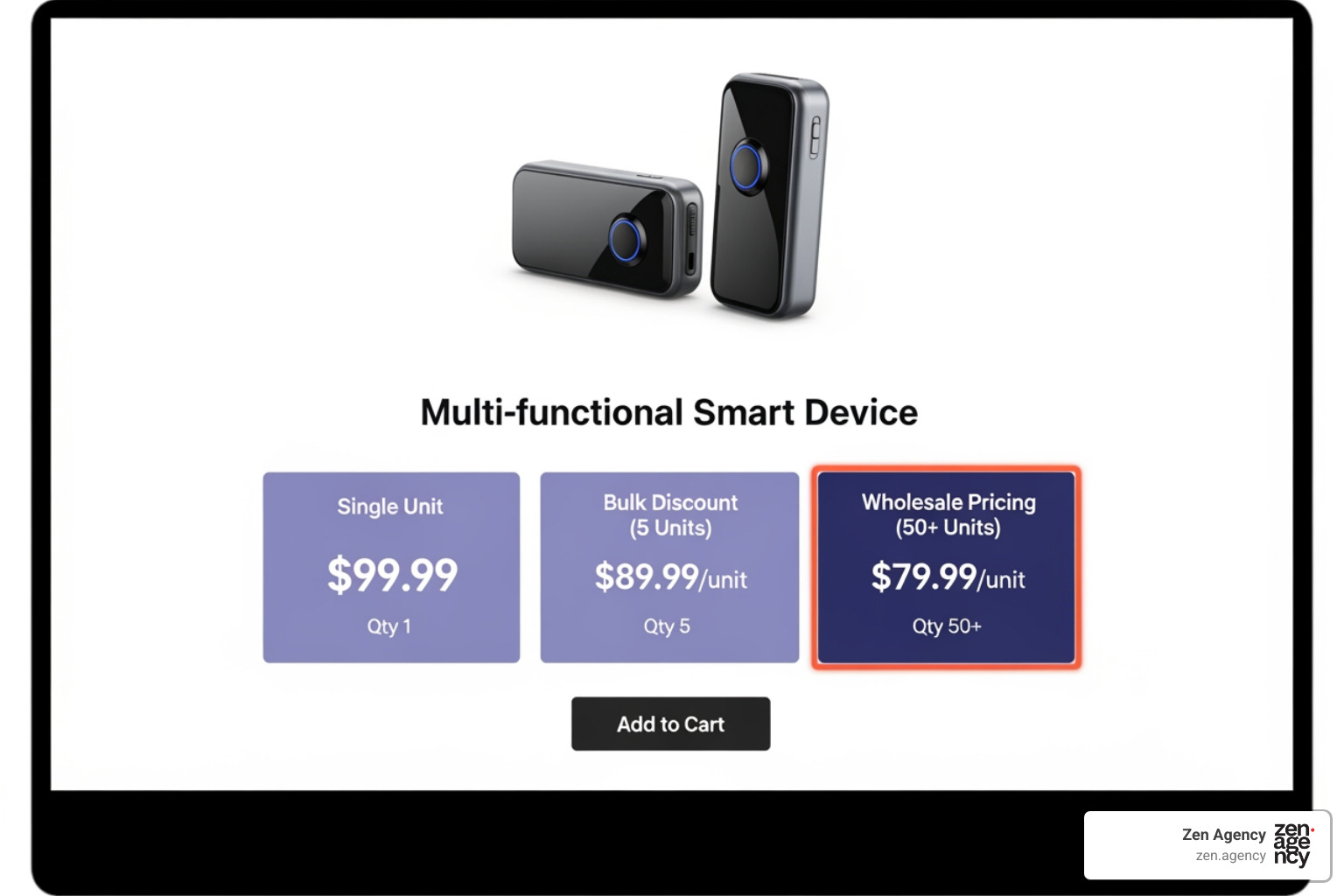
- Tiered Pricing and Volume Discounts: Imagine a customer buying 10 units gets one price, but a customer buying 100 units gets a significantly lower per-unit cost. WooCommerce B2B plugins allow us to set up these quantity-based discounts, encouraging larger orders. For example, a supplier might offer a 5% discount on glass products to resellers if they place an order of at least $500. This is a powerful incentive for bulk purchasing.
- Customer-Specific Pricing: Some B2B relationships involve negotiated contracts. Dedicated solutions allow us to assign unique price lists or percentage discounts to individual customers or entire customer groups. This means the same product can show a different price to “Gold Tier Resellers” versus “Silver Tier Distributors.”
- Hidden Prices and Gated Content: For many B2B businesses, pricing is proprietary and only visible to approved, logged-in wholesale customers. WooCommerce B2B solutions enable us to hide prices and even the “add to cart” button from guest users, often replacing it with a “Login to view prices” or “Request a Quote” option. This turns your public-facing store into a catalog until a B2B customer logs in.
- Category and Product Visibility: Beyond pricing, we can control what products or categories different B2B customer groups can even see. This is essential for managing diverse catalogs where certain items are exclusive to specific partners or regions. We can mark products as “Wholesale Only” or “Public Only,” ensuring each customer segment sees only what’s relevant to them.
These features transform a standard WooCommerce site into a highly customized, efficient platform capable of handling the intricacies of wholesale trade.
Managing User Roles and Permissions
Effective B2B operations hinge on granular control over who sees what and who can do what. This is where user roles and permissions become indispensable. In a standard WooCommerce setup, you typically have “Customer” roles. For WooCommerce B2B, we need to expand on this significantly.
Dedicated plugins allow us to create an unlimited number of custom user roles, such as “Wholesaler,” “Distributor,” “VIP Partner,” or “Reseller.” Each of these roles can be assigned distinct capabilities and access levels. This means we can:
- Apply Role-Based Discounts: Beyond global discounts, we can set specific percentage or fixed amount discounts directly tied to a user’s role.
- Control Shipping and Payment Methods: Imagine offering “Invoice Payment” or “Net 30 Terms” only to our trusted “VIP Partner” role, while other roles might only see standard credit card options. Similarly, we can restrict specific shipping methods based on a user’s role or location.
- Manage Product and Category Access: As mentioned, user roles are key to showing or hiding specific products or entire categories, creating a custom browsing experience for each B2B segment.
Here’s a quick comparison to illustrate the difference:
| Feature | Standard Customer Role (WooCommerce) | Advanced B2B Role (WooCommerce B2B) |
|---|---|---|
| Pricing | Single, public price | Tiered, role-specific, customer-specific, hidden prices |
| Product Visibility | All public products | Restricted by role, category, individual product |
| Payment Methods | Standard B2C options (card, PayPal) | B2C options + Invoice, Purchase Order, Net Terms |
| Shipping Methods | Standard B2C options | Restricted by role, custom rates, free shipping conditions |
| Order Minimums/Maximums | None | Configurable by role, product, category |
| Registration | Simple form, instant access | Extended fields, manual approval, VAT validation |
| Account Management | Basic order history | Company dashboards, subaccounts, shared carts, quote history |
These robust role management capabilities are crucial for maintaining order and security in a B2B environment. For more detailed information on security best practices, we always recommend consulting official documentation for secure implementation. More on security best practices
Streamlining the B2B Customer Journey
A successful B2B e-commerce platform isn’t just about features; it’s about the entire customer experience. From the moment a prospective client finds your site to their ongoing reorders, every interaction should be smooth, intuitive, and custom to their professional needs. WooCommerce B2B solutions allow us to craft this journey with precision.
Managing Customer Registration in Woo Commerce B2B
The registration process for B2B customers is vastly different from B2C. We’re not just collecting an email and password; we need company details, tax information, and often a vetting process. WooCommerce B2B plugins address this through:
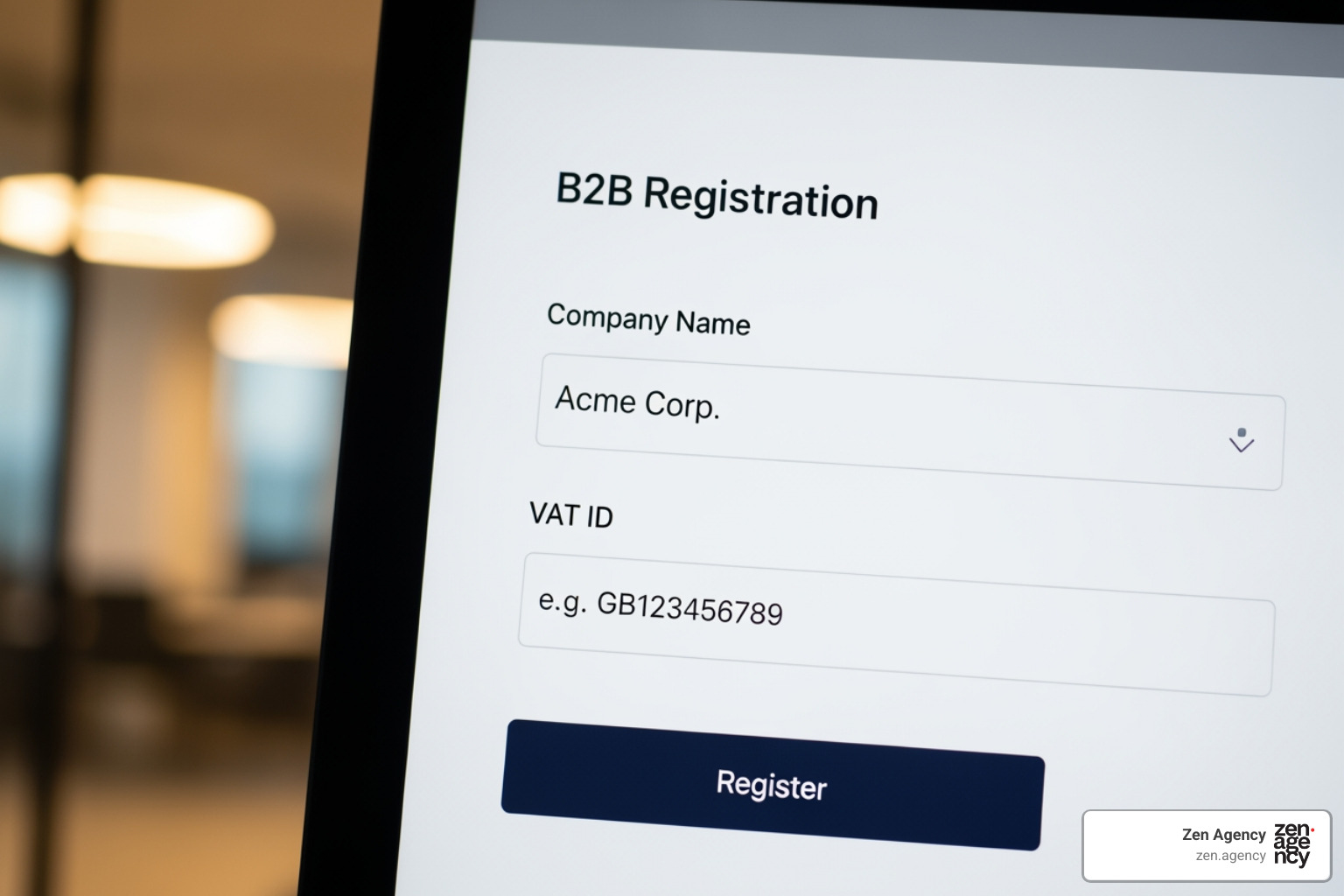
- Custom Registration Fields: Standard WooCommerce offers basic fields. B2B solutions extend this, allowing us to add fields for company name, VAT ID, business type, reseller license number, and more. This ensures we gather all necessary information upfront.
- Manual Approval Process: Unlike instant B2C account creation, many B2B businesses require new wholesale registrations to be manually reviewed and approved by an administrator. This is vital for verifying business credentials and ensuring only legitimate partners gain access to wholesale pricing and features. Some solutions even allow for email notifications to keep the customer updated on their application status.
- Role Selection at Registration: We can configure the registration form to allow applicants to select their intended role (e.g., “Wholesale Buyer,” “Distributor”). This helps streamline the approval process and automatically assign them to the correct pricing tiers upon approval.
- Tax Exemption Forms and VAT Number Validation: For businesses operating in regions with VAT or sales tax exemptions for B2B transactions, these plugins are invaluable. They allow customers to submit their tax exemption certificates or VAT numbers during registration or checkout. Crucially, some solutions offer real-time VAT validation (e.g., VIES validation for EU VAT), automating a complex compliance step. This can be a huge time-saver and prevent costly errors.
Enhancing the B2B Account and Ordering Experience
Once registered and approved, the B2B customer’s journey continues with a rich, self-service account experience designed for efficiency.
- Subaccounts and Multiple Buyers per Company: Large organizations often have multiple employees responsible for purchasing. WooCommerce B2B solutions can facilitate this by allowing a single company account to have multiple subaccounts. The company owner can then manage these subaccounts, assigning different permissions—some might only be able to view orders, others to place them, and still others to manage company-wide settings. This empowers our B2B clients and reduces administrative overhead.
- Purchase Lists and Quick Reordering: B2B purchasing is often repetitive. Customers frequently reorder the same items. Plugins can enable features like “purchase lists” where customers can save frequently ordered products for easy reordering. A “one-click reorder” function for past orders further streamlines this process, saving valuable time for our business clients.
- Shared Carts: For collaborative purchasing, some solutions offer shared cart functionality. This allows one team member to build a cart, share it with a manager for approval, or with colleagues for additions, before finalizing the order. This mirrors real-world B2B procurement workflows.
- Company Dashboards: A dedicated company dashboard within the “My Account” area provides a centralized hub for B2B customers. Here, they can view their order history, manage subaccounts, track quotes, update company information, and access their specific price lists. This self-service portal significantly improves the user experience and reduces direct support inquiries.
By providing these advanced features, we can create an online environment that truly caters to the professional buyer, making their purchasing process as efficient and straightforward as possible.
Optimizing the Woo Commerce B2B Order and Checkout Process
The actual act of ordering and checking out in a B2B context is often more involved than a simple B2C transaction. WooCommerce B2B solutions are specifically designed to manage these complexities, from facilitating large, quick orders to handling specialized payments and intricate tax rules.
Facilitating Bulk Orders and Quick Purchases
For our wholesale customers, speed and efficiency are paramount, especially when ordering large quantities or a wide variety of products. WooCommerce B2B plugins offer several tools to streamline this process:
- Wholesale Order Forms: Instead of browsing individual product pages, B2B customers often prefer a consolidated list where they can quickly enter quantities for multiple items. Wholesale order forms provide a table-like interface, often with instant search and filters, allowing buyers to add numerous products to their cart from a single page. This is a massive time-saver for bulk buyers.
- Quick Order Tools: Some solutions go a step further with quick order tools that allow customers to search by SKU or product name, add quantities, and rapidly build their order. This is particularly useful for customers who already know exactly what they need.
- CSV Bulk Upload: Imagine a customer needing to order hundreds of different items. Manually adding each one would be a nightmare. Many WooCommerce B2B plugins support CSV bulk upload, allowing customers to upload a spreadsheet with product SKUs and quantities, and have their cart populated instantly. This is a game-changer for large, complex orders.
- Live Search by SKU: To complement wholesale order forms and quick order tools, live search functionality (often extended to SKU search) allows customers to find products rapidly, even within a vast catalog. This instant feedback helps prevent errors and speeds up the ordering process.
- Minimum Order Quantities (MOQs): To ensure profitability on wholesale orders, we often need to enforce minimum order quantities or values. WooCommerce B2B solutions allow us to set these restrictions globally, per product, per category, or even per customer group. For instance, we could require a minimum order of 150 units for resellers, but only 50 units for partners, tailoring the rules to specific relationships.
Advanced Quoting, Payment, and Tax Features
The financial aspects of B2B transactions are rarely as simple as a credit card payment. WooCommerce B2B plugins provide the necessary flexibility:
- Request a Quote Functionality: This is a cornerstone of B2B e-commerce. For large, custom, or negotiated orders, a direct purchase might not be suitable. The “Request a Quote” feature allows customers to add items to a quote basket (instead of a cart) and submit it for custom pricing. We can then review the request, negotiate, adjust pricing, and send a formal quote back to the customer, who can then accept and pay for it. This is crucial for maintaining margins and building strong B2B relationships.
- Invoice Payment Gateways: Many B2B clients operate on credit terms. WooCommerce B2B allows us to offer “Invoice Payment” or “Purchase Order” options. This means approved customers can place an order and receive an invoice, with payment due within agreed-upon terms (e.g., Net 30). This is a standard B2B practice that builds trust and facilitates ongoing business.
- Net Terms and Purchase Orders: These payment methods are often integrated with the invoice system. They provide the flexibility that B2B buyers expect, allowing them to adhere to their own procurement processes.
- Tax Exemptions and VAT Handling: Navigating sales tax and VAT for B2B can be complex. WooCommerce B2B solutions offer robust features to handle this:
- Role-Based Tax Exemption: We can exempt specific user roles or individual customers from taxes based on their verified tax status (e.g., non-profit, reseller).
- VAT Validation: For international B2B transactions, especially within the EU, plugins can integrate with services like VIES to validate VAT numbers in real-time during registration or checkout. This ensures compliance and automates the process of applying or exempting VAT.
- Price Display (Inclusive/Exclusive of Taxes): We can configure prices to be displayed inclusive or exclusive of taxes, depending on the customer’s role or location, providing clarity and meeting legal requirements.
These advanced features ensure that the financial and logistical aspects of B2B ordering are handled professionally, efficiently, and compliantly.
Choosing and Scaling Your B2B Solution
Implementing WooCommerce B2B is a strategic decision that can significantly impact your business’s future growth. The key is choosing the right solution and ensuring it can scale with your ambitions.
The Benefits of a Dedicated B2B Plugin
When faced with the need for B2B functionalities, some businesses might consider extensive custom development. However, we’ve found that a dedicated WooCommerce B2B plugin offers distinct advantages:
- Consolidated Features: Instead of cobbling together multiple individual plugins for pricing, user roles, and quoting, a dedicated solution bundles all these features into one comprehensive package. This reduces compatibility issues and simplifies management. Some solutions integrate features from five or more best-selling extensions into a single product.
- Cost-Effectiveness: While there’s an investment, a well-chosen plugin is typically far more cost-effective than custom development from scratch. One leading solution, for example, offers a suite of features that would cost over $330 if purchased as individual extensions, but are bundled for a fraction of that price.
- Ongoing Support and Development: Reputable plugin developers continuously update their products, ensuring compatibility with the latest WooCommerce and WordPress versions, adding new features, and providing expert support. This means your B2B platform remains cutting-edge without constant redevelopment costs.
- Faster Implementation: Dedicated plugins are designed for quick setup and configuration, allowing you to launch your B2B store much faster than with custom coding.
- Compatibility with Themes: Most leading WooCommerce B2B plugins are built to be compatible with popular WooCommerce themes, ensuring a seamless look and feel for your store.
When choosing a WooCommerce B2B solution, we recommend considering the following key criteria:
- Feature Set: Does it cover all your essential B2B needs (pricing, roles, quotes, ordering, tax)?
- Ease of Use: Is the interface intuitive for both administrators and customers?
- Flexibility and Customization: Can it be custom to your unique business logic and branding?
- Performance: Is it optimized for speed and scalability, especially with large catalogs or high order volumes?
- Support and Documentation: Is there reliable support and comprehensive documentation available?
- Reviews and Reputation: What do other users say about the plugin’s stability and effectiveness? Many solutions boast high ratings, with one trusted by over 14,000 businesses and another rated 4.93 out of 5 based on 134 reviews, indicating strong user satisfaction.
- Integration Capabilities: How well does it integrate with other essential plugins and services you use?
Ensuring Long-Term Growth and Scalability
Implementing a WooCommerce B2B strategy isn’t a one-time fix; it’s an investment in long-term growth. Scalability is crucial, especially for businesses in Pennsylvania, Montana, and across the USA, looking to expand their reach.
- Integration with ERP/CRM: For true enterprise-grade operations, your WooCommerce B2B platform needs to integrate seamlessly with your existing Enterprise Resource Planning (ERP) or Customer Relationship Management (CRM) systems. This ensures data consistency across sales, inventory, and customer records, preventing silos and improving operational efficiency.
- API Access: Robust API (Application Programming Interface) documentation and access are vital for custom integrations and for extending functionality beyond what the plugin offers out-of-the-box. This future-proofs your solution, allowing for bespoke connections with other business tools as your needs evolve.
- Performance Considerations: As your business grows, so will your website traffic and transaction volume. Choosing a WooCommerce B2B solution built for performance, with features like dynamic caching and smart usage detection, is crucial to maintain speed and reliability.
- Multisite Support: For businesses operating both B2B and B2C models, or managing multiple brands, solutions that offer multisite support can be invaluable. This allows you to run separate B2B and B2C sites, or even multiple B2B sites, from a single WordPress installation, centralizing management while providing distinct experiences.
- Future-Proofing Your B2B Strategy: The e-commerce landscape is constantly evolving. A good WooCommerce B2B strategy involves selecting a solution with a clear roadmap, continuous development, and a commitment to integrating new technologies. This proactive approach ensures your platform remains competitive and capable of supporting your business’s evolving needs for years to come.
By carefully considering these factors, we can help ensure that your WooCommerce B2B solution is not just a tool, but a strategic asset that drives sustained growth and efficiency.
Frequently Asked Questions about WooCommerce for B2B
Can I run a hybrid B2B and B2C store on one WooCommerce site?
Yes, WooCommerce B2B solutions allow you to run a hybrid store. You can show different pricing, products, and content to B2C customers versus logged-in B2B users, creating a seamless experience for both audiences from a single website. Many leading plugins are designed specifically for these “B2B+B2C” contexts, offering granular control over visibility and pricing based on user roles or customer groups.
How do WooCommerce B2B plugins handle tax exemptions?
They typically allow you to create rules to exempt specific user roles or individual customers from taxes. This often involves collecting and validating a VAT or tax ID number during registration or at checkout and can be automated or require manual admin approval. Some advanced solutions integrate with external services (like VIES for EU VAT) for real-time validation, streamlining compliance.
What is ‘Request a Quote’ functionality and why is it important for B2B?
‘Request a Quote’ allows B2B customers to submit a list of products for custom pricing instead of checking out directly. This is crucial for large volume orders, custom products, or negotiated pricing, which are common in B2B transactions. It replaces the standard “Add to Cart” button with a “Request a Quote” option, initiating a negotiation workflow that leads to a custom offer and payment link, vital for relationship-based B2B sales.
Conclusion
The journey to open uping your store’s full potential in the B2B landscape begins with a robust WooCommerce B2B strategy. We’ve explored how dedicated solutions transform standard WooCommerce into a powerful platform, addressing the unique challenges of wholesale trade. From dynamic pricing and granular user role management to streamlined bulk ordering and sophisticated quoting systems, these tools are indispensable for businesses aiming to thrive in the B2B e-commerce space.
The long-term benefits are clear: increased operational efficiency, improved customer loyalty through custom experiences, and scalable growth that positions your business for future success. By adopting a comprehensive WooCommerce B2B approach, you’re not just selling products; you’re building lasting business relationships.
At Zen Agency, we understand the intricacies of digital commerce and the power of a well-implemented WooCommerce B2B solution. With over two decades of experience, our team specializes in providing enterprise-grade solutions and innovative strategies to help businesses like yours—from Wilkes Barre, Scranton, and Wyoming, PA, to Billings, MT, and across the USA—increase visibility, profitability, and ROI. Let us help you steer the complexities and harness the immense potential of B2B e-commerce.