From Idea to Extension: Mastering WooCommerce Plugin Creation
Why WooCommerce Plugin Development Transforms Your Online Store
WooCommerce plugin development creates custom extensions to improve your store’s functionality, improve customer experience, and provide a competitive edge. Here’s what you need to know:
Key Steps in WooCommerce Plugin Development:
- Plan Your Extension – Define goals, research the market, and identify required features.
- Set Up Your Environment – Install Node.js, Docker, Composer, and use tools like
create-woo-extensionandwp-env. - Build Your Plugin – Write clean, secure code using WooCommerce hooks, filters, and best practices.
- Test Thoroughly – Use the Quality Insights Toolkit (QIT) for reliability, security, and compatibility checks.
- Deploy and Maintain – Launch your extension and keep it updated with the latest WooCommerce versions.
WooCommerce powers over 3.8 million online stores and accounts for 30% of all e-commerce sites. When off-the-shelf extensions fall short, custom plugin development is essential for advanced product customization, unique checkout experiences, specialized integrations, or automated workflows that generic solutions can’t address.
Modern development tools have made the process more accessible. The @woocommerce/create-woo-extension package scaffolds your plugin structure, reducing setup time. The wp-env tool creates local WordPress and WooCommerce environments in minutes using Docker. The Quality Insights Toolkit (QIT) provides managed testing suites and custom E2E testing capabilities that integrate into your workflow.
I’m Joseph Riviello, and with over 22 years of digital marketing and e-commerce leadership, I’ve guided countless businesses through WooCommerce plugin development projects that drive real ROI and competitive advantage. Throughout this guide, I’ll share the proven strategies we use at Zen Agency to help businesses like yours build custom extensions that solve real problems and drive growth.
What is a WooCommerce Plugin?
A WooCommerce plugin, or “extension,” is a specialized WordPress plugin. While WordPress provides the website foundation, WooCommerce transforms it into an online store. A WooCommerce extension specifically interacts with and extends these e-commerce capabilities.
Unlike a standard WordPress plugin that might add a contact form or improve SEO, a WooCommerce plugin leverages WooCommerce’s extensive set of hooks, filters, and core classes (like WC_Product, WC_Customer, and WC_Cart). This allows it to introduce e-commerce-specific features, such as a new payment gateway, advanced shipping rules, or a custom product configurator. It’s designed to improve the shopping experience, streamline store management, or integrate with e-commerce services. For a deeper dive into general plugin development, you can Get familiar with WordPress Plugin Development.
The Power of Customization for Your Store
In today’s competitive market, off-the-shelf solutions often fall short. Custom WooCommerce plugin development makes your store perform better, smarter, and more uniquely suited to your business model.
Here are the primary benefits of custom development:
- Unique Features & Functionality: Implement features custom to your specific operational needs, like a bespoke loyalty program or an advanced product configurator that no generic plugin offers.
- Improved User Experience (UX): A seamless shopping experience is paramount. Custom plugins can improve every touchpoint, from personalized product recommendations to a streamlined checkout process, boosting conversions and customer retention.
- Streamlined Operations: Automate routine tasks like inventory management, order processing, or tax calculations. Integrate directly with your CRM or ERP systems to free up your team for growth-focused activities.
- Scalability & Future-Proofing: Custom plugins are built with your future needs in mind, ensuring your store can handle increased traffic and evolving business processes without hitting a wall.
- Gaining a Competitive Advantage: A custom plugin can provide a distinctive feature—like an innovative subscription model or unique product bundling—that sets you apart from competitors using standard solutions.
- Increased Conversions & Profitability: A better user experience, efficient operations, and unique features combine to reduce cart abandonment, increase average order value, and boost overall sales.
By investing in custom WooCommerce plugin development, you’re building a strategic asset that improves functionality, improves user experience, and secures a lasting competitive edge.
Gearing Up: Prerequisites and Essential Skills
Developing custom WooCommerce plugins is a rewarding journey that requires the right preparation and tools. Before diving into the development process, let’s ensure you’re equipped with the necessary foundational knowledge and technical skills.
Essential Prerequisites for WooCommerce Plugin Development
Crafting robust and effective WooCommerce plugins requires a solid understanding of several core areas. Mastering these prerequisites helps build more stable, secure, and maintainable extensions.
- WordPress Basics: Since WooCommerce runs on WordPress, familiarity with its architecture is essential. This includes themes, plugins, the WordPress Loop, database structure, and especially hooks.
- Hooks (Actions and Filters): These are the lifeblood of customization. Actions let you insert code at specific points, while filters let you modify data. Mastering them is crucial for extending WooCommerce without altering core files. Learn more in the WordPress Plugin Developer Handbook.
- PHP Proficiency: As the backbone of WordPress and WooCommerce, strong object-oriented programming (OOP) skills in PHP are highly beneficial for writing server-side logic and database interactions.
- JavaScript Knowledge: Modern WooCommerce and the Block Editor rely heavily on JavaScript. A good grasp of JavaScript (including ES6+ and potentially React) is essential for rich, interactive user experiences.
- HTML/CSS Fundamentals: A basic understanding of HTML for structure and CSS for styling is necessary for any front-end elements or custom admin screens your plugin includes.
- Problem-Solving Mindset: The ability to break down complex requirements, debug issues, and find creative solutions is invaluable in development.
- UI/UX Focus: Even for back-end plugins, consider the user experience. An intuitive admin interface makes your plugin more user-friendly for store owners.
Key Developer Tools and Environment Setup
The right tools can significantly boost your efficiency and help you adhere to best practices. Here’s what we recommend for a streamlined development environment:
- Code Editor: A powerful code editor like Visual Studio Code, Sublime Text, or PHPStorm is your best friend, offering features like syntax highlighting, code completion, and debugging.
- Local Development Environment: Never develop on a live site. A local environment, like one created with
wp-env, mimics your live server, allowing you to build and test safely. - Docker:
wp-envrelies on Docker to create isolated, consistent development environments. You’ll need Docker installed and running. - Node.js with NPM: For modern JavaScript development, task runners, and package management, Node.js and its package manager (NPM) are indispensable.
- Composer: This is the dependency manager for PHP, helping you manage any third-party PHP libraries your plugin uses.
- Version Control (Git): We cannot stress this enough: use Git! It tracks code changes, allows you to revert to previous versions, and facilitates collaboration.
Leveraging wp-env for Efficiency:
wp-env is a fantastic tool that instantly spins up a local WordPress development environment with Docker. This allows you to quickly create a sandbox for your plugin, complete with WordPress and WooCommerce, without complex server configurations. You can Learn more about wp-env here.
To get started with wp-env:
- Ensure you have Node.js with NPM, Docker (running), and Composer installed.
- Install
wp-envglobally:npm -g i @wordpress/env. - Steer to your extension’s folder and run
wp-env startto launch your local environment.
This setup provides a robust foundation for building high-quality WooCommerce plugins.
The Core Process of WooCommerce Plugin Development
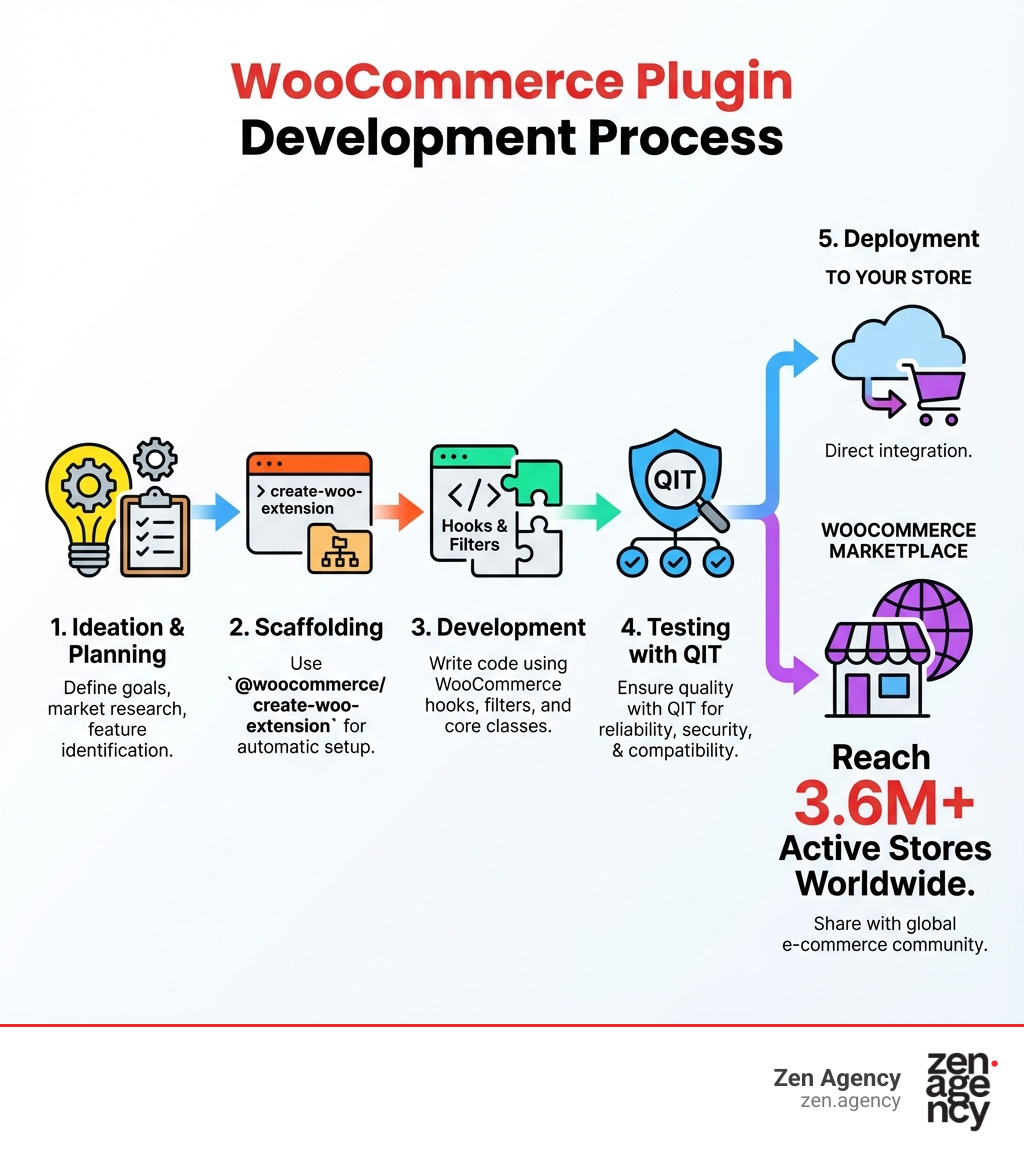
Developing a WooCommerce plugin is an iterative process. From the initial idea to deployment and ongoing maintenance, each stage is crucial for creating a successful extension. We’ll walk you through our structured and effective approach.
Step 1: From Ideation to Planning
Every great plugin begins with a clear idea and meticulous planning. This phase is about defining the problem and outlining the solution.
- Defining Purpose: What specific challenge does your plugin address? Clearly defining its purpose is the first step.
- Market Research: Before coding, research existing solutions. What are their strengths and weaknesses? This helps establish your plugin’s necessity and unique selling proposition.
- Feature List: Create a detailed list of features, prioritizing them into “must-haves,” “nice-to-haves,” and “future considerations.”
- User Flow & UI/UX Design: Sketch out how users will interact with your plugin and design mockups for any new interfaces, focusing on an intuitive experience.
- Project Scope: Define the project’s boundaries to manage expectations and prevent feature creep.
Step 2: Scaffolding and Setup with Modern Tools
Once your plan is solid, it’s time to lay the technical groundwork. We highly recommend using @woocommerce/create-woo-extension to scaffold your new WooCommerce plugin. This package generates a basic plugin structure, supports modern features like Blocks, and pre-configures tools for code quality.
To scaffold your extension, run this in your terminal:
npx @wordpress/create-block -t @woocommerce/create-woo-extension my-extension-name
After scaffolding, steer into your new directory (cd my-extension-name) and install dependencies: npm install.
Key files in a scaffolded plugin:
my-extension-name.php: The plugin’s main entry point.block.json: Metadata for Block Editor blocks.build/: Compiled and optimized assets (JavaScript, CSS).src/: Source code for uncompiled JavaScript and SCSS.includes/: For reusable PHP code and classes.languages/: For translation files.package.json: Manages Node.js dependencies and scripts.composer.json: Defines PHP dependencies.README.md: A high-level overview of your extension.webpack.config.js: Configuration for bundling JavaScript assets..eslintrc.js&.prettierrc.json: Configuration for code linting and formatting.
After scaffolding, use wp-env start in your plugin’s root directory to spin up your local development environment. For more details, Visit @woocommerce/create-woo-extension on NPM for package reference.
Step 3: Development and Best Practices
This is where your plugin comes to life. Writing good code that is reliable, secure, and compatible is key. We adhere to several best practices:
- Coding Standards: Follow WordPress and WooCommerce coding standards for readable, maintainable, and compatible code.
- Namespacing: Correctly namespace your functions, classes, and variables to prevent conflicts with other plugins.
- Security Measures: Security is paramount. Block direct file access, define user roles and capabilities, and always sanitize, validate, and escape data to protect against vulnerabilities like XSS and SQL injection.
- Using WooCommerce Hooks: Integrate your code without modifying the core. Actions (
woocommerce_after_add_to_cart_button) execute code at specific points, while Filters (woocommerce_product_price_html) modify data. Minimize the impact of hooks to prevent side effects. For a comprehensive list, see the WooCommerce Hook Reference. - Data Handling: Use existing WordPress tables and the Transients API for caching whenever possible to reduce overhead and improve performance.
- Creating Admin Panels: If your plugin needs configuration, design a simple, user-friendly admin panel. Modern WooCommerce admin experiences often use React-powered components.
- Plugin Lifecycle Management: Ensure your plugin handles deactivation and uninstallation gracefully by cleaning up scheduled actions, temporary data, or custom database entries.
- Declare Supported Versions: Always declare the supported WooCommerce and WordPress versions in your plugin’s metadata to inform users about compatibility.
Step 4: Testing for Quality and Compatibility
Rigorous testing ensures your WooCommerce plugin is reliable, secure, and compatible.
- Quality Insights Toolkit (QIT): Developed by WooCommerce, QIT is a testing platform offering managed test suites and custom End-to-End (E2E) testing. It integrates into your workflow via CLI and GitHub Actions for continuous quality checks. Currently in closed beta for marketplace extensions, it’s a powerful tool for ensuring quality. Learn more about QIT.
- Unit Testing: Test individual functions and methods in isolation to ensure each component works as expected.
- Integration Testing: Verify that different parts of your plugin work correctly together and with WordPress/WooCommerce core.
- End-to-End (E2E) Testing: Simulate real user scenarios, from adding a product to the cart to completing a purchase, to ensure a smooth user journey.
- Cross-Browser and Device Testing: Test across different browsers and devices. With mobile e-commerce sales hitting $1.7 trillion in 2023, mobile optimization is critical.
Advanced Concepts and Future Trends
The world of e-commerce is constantly evolving, and so is WooCommerce plugin development. Staying ahead means understanding the emerging trends and advanced concepts that will shape the future of online retail.
Future Trends in WooCommerce Plugin Development
As technology advances, so do the opportunities for innovation. Here are key trends we’re watching:
- AI-Powered Personalization: AI and machine learning are changing online shopping. Future WooCommerce plugins will use AI for hyper-personalized experiences, like dynamic product recommendations, custom pricing, and predictive inventory management.
- Mobile-First Optimization: With mobile devices dominating online shopping (sales hit $1.7 trillion in 2023), plugins must prioritize mobile users. This means developing for fast load times, touch-friendly navigation, and seamless mobile payments. The bounce rate increases by 32 percent as page load time goes from one to three seconds, highlighting the need for performance.
- Voice Commerce Integration: As voice assistants become more common, plugins enabling voice-activated shopping will gain traction.
- Headless Architecture: Headless WooCommerce, where the front-end is decoupled from the back-end, allows for highly customized and performant user experiences. Plugins in this space will focus on API-driven integrations.
- Improved User Experience (UX): The focus will remain on creating friction-free shopping experiences, such as simplified checkouts and improved on-site search, to reduce cart abandonment.
These trends represent exciting new avenues for WooCommerce plugin development, allowing for truly innovative client solutions.
Submitting to the WooCommerce Marketplace
Once your WooCommerce plugin is polished and tested, consider submitting it to the WooCommerce Marketplace. This platform offers an incredible opportunity to reach a massive audience.
Why the WooCommerce Marketplace?
- Massive Reach: The marketplace gets extensions in front of 3.6M+ active stores worldwide, offering unparalleled visibility.
- Trust and Credibility: Extensions on the official marketplace undergo a rigorous review, which builds trust with users.
- Quality Assurance: The marketplace requires compliance with high standards, often encouraging the use of tools like QIT.
The Submission Process:
- Understand the Vendor Agreement: First, thoroughly review the WooCommerce Vendor Agreement to understand the terms and conditions.
- Ensure Compliance: Your plugin must meet WooCommerce’s technical, security, and quality standards.
- Licensing: If your extension is open-source, include a
LICENSEfile. Plugins on WordPress.org must be GPLv2-compatible (or later). - Code Review: Your plugin will undergo a comprehensive code review by the WooCommerce team.
- Marketing Your Extension: Once approved, create compelling descriptions, screenshots, and a potential demo to showcase your plugin.
Submitting to the marketplace is a strategic move to maximize your impact. For detailed steps, you can Submit your extension.
When to Hire a Professional Development Agency
While DIY WooCommerce plugin development is appealing, there comes a point when professional help becomes essential. Knowing when to call in experts can save you time, money, and headaches.
Deciding Between DIY and Professional Services
When should a business hire professional WooCommerce development services? The decision depends on your project’s complexity, internal resources, and strategic goals.
| Feature | DIY Development | Professional Development Agency |
|---|---|---|
| Project Complexity | Best for simple, generic needs, or minor customizations. | Ideal for unique, complex features, custom integrations, or innovative solutions. |
| Budget Constraints | Lower upfront cost, but potential for higher long-term maintenance/fixes. | Higher upfront investment, but often delivers greater ROI through efficiency and unique features. |
| Timeline | Can be slow if learning as you go; prone to delays. | Faster and more efficient development and deployment. |
| Skillset Required | Requires significant technical knowledge (PHP, JS, WP, WC). | Agency brings diverse, expert skills (developers, designers, project managers). |
| Quality & Security | Risk of bugs, performance issues, and security vulnerabilities. | Ensures robust, secure, high-performing code adhering to best practices. |
| Maintenance | Responsibility falls entirely on your team. | Often includes ongoing support, updates, and optimization services. |
| Competitive Edge | Limited by available off-the-shelf solutions. | Creates unique features that differentiate your store. |
Many businesses, especially those in Wilkes Barre, Scranton, Wyoming PA, Billings MT, Pennsylvania, and Montana, start with DIY solutions. However, they realize the value of professional services when they need custom features, want to launch faster, or are busy with core operations. If you need complex integrations, advanced functionalities, or are concerned about performance and security, an agency is likely your best bet.
Types of WooCommerce Development Services
Professional WooCommerce development services tap into a wide range of expertise to optimize your online store. Here are the types of services typically available:
- Custom Plugin Creation: We develop bespoke WooCommerce plugins from scratch when off-the-shelf solutions don’t fit. This includes custom product builders, unique shipping calculators, subscription tools, or specialized API integrations.
- Theme Customization & Design Development: We go beyond basic themes to create pixel-perfect, mobile-first designs with an improved user experience (UX), ensuring your store is both beautiful and highly functional.
- Performance Optimization: We diagnose and fix performance bottlenecks to ensure your store loads quickly. A slow site increases bounce rates; we optimize databases and leverage caching to improve speed, as a 3-second load time can increase bounce rates by 32%.
- Security Audits & Implementation: Protecting your store is paramount. Our services include security audits, fraud detection, malware scanning, and ensuring compliance with privacy regulations.
- Third-Party Integrations: We seamlessly connect your WooCommerce store with essential business tools like CRMs, ERPs, marketing automation platforms, and accounting software.
- Store Migration: Moving to WooCommerce? We ensure a smooth, data-loss-free migration of products, customers, and order history from other platforms.
- Ongoing Maintenance & Support: We offer maintenance packages that include regular updates, bug fixes, security monitoring, and performance tuning to keep your store running optimally.
By leveraging these services, businesses can ensure their WooCommerce store is a powerful, secure, and highly optimized sales engine.
Conclusion: Build Your Competitive Edge
We’ve covered the essentials of WooCommerce plugin development, showing how custom plugins are strategic assets that empower your store to stand out, perform better, and scale effectively.
Custom development provides unique functionality, a superior user experience, and streamlined operations that generic solutions can’t match. This creates a strong competitive edge and drives sustained business growth.
At Zen Agency, we understand the nuances of the e-commerce landscape and the power of custom solutions. Our team, serving businesses across Wilkes Barre, Scranton, Wyoming PA, Billings MT, Pennsylvania, and Montana, is dedicated to crafting enterprise-grade WooCommerce plugins that solve your specific challenges and drive measurable results.
Don’t let off-the-shelf limitations hold your business back. It’s time to transform your online store with solutions built precisely for your success.