From Static to Stellar: Crafting Dynamic WordPress Websites
From Static to Stellar: Crafting Dynamic WordPress Websites
Why Interactive WordPress Websites Are No Longer Optional
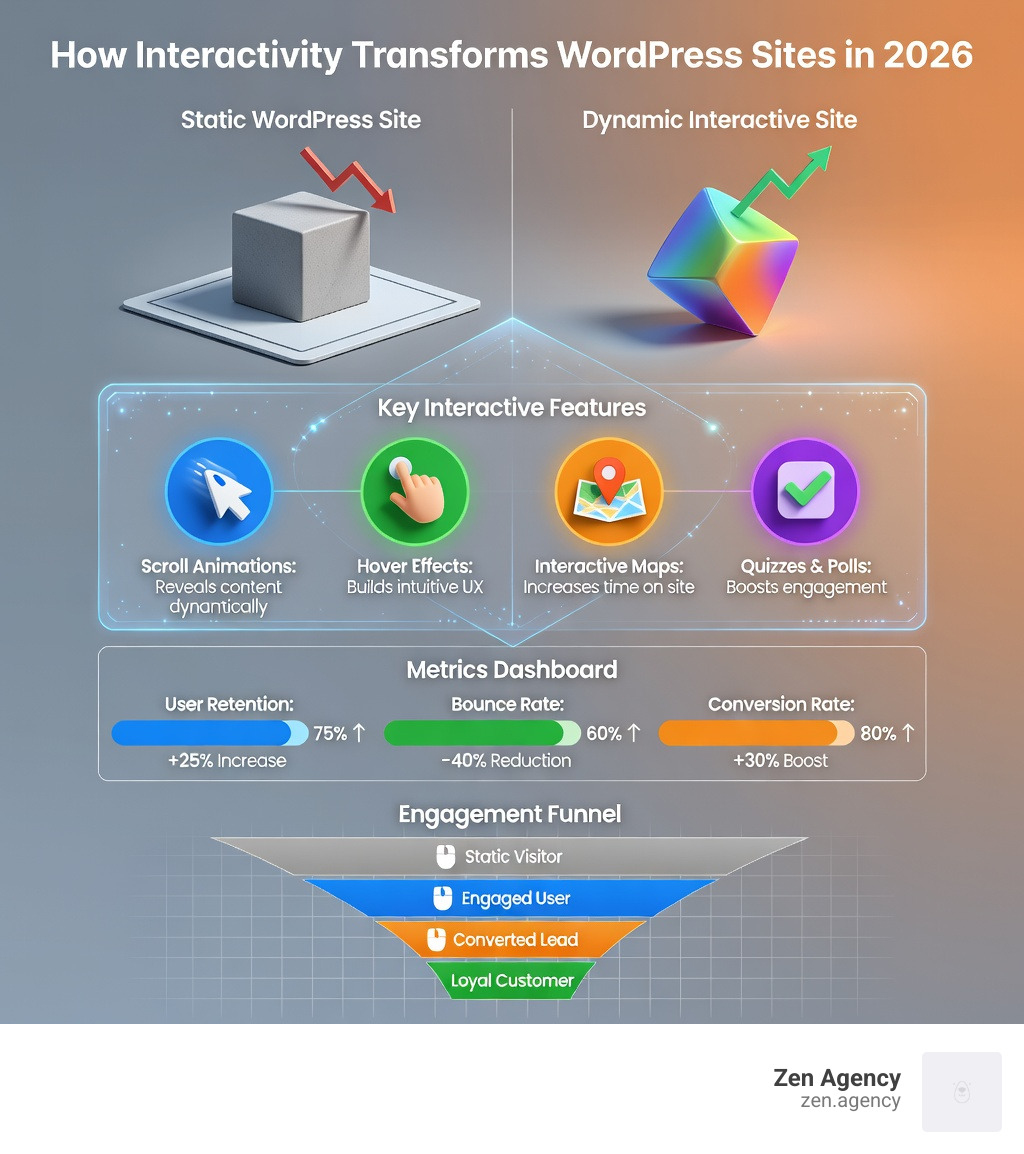
Interactive WordPress websites are sites that respond to user actions — through animations, hover effects, scroll triggers, quizzes, maps, and more — turning a passive visit into an engaging experience.
Here’s a quick look at what makes a WordPress site interactive and why it matters:
| Feature | What It Does | Why It Matters |
|---|---|---|
| Scroll animations | Reveals content as users scroll | Guides attention to key messages |
| Hover effects | Responds to mouse movement | Builds intuitive, tactile UX |
| Interactive maps | Lets users explore geographic data | Increases time on site |
| Quizzes and polls | Invites participation | Boosts engagement and conversions |
| Lightbox galleries | Opens media without page reload | Improves content experience |
| Animated text reveals | Displays text dynamically | Strengthens brand storytelling |
WordPress powers 43% of all websites on the internet. Yet most of those sites are still largely static — blocks of text and images that just sit there. In 2026, that’s a problem.
Users skim. Attention spans are short. And if your site doesn’t respond to people, they leave. Bounce rates climb, conversions drop, and your marketing spend goes to waste.
The good news? WordPress has evolved dramatically. From the native Interactivity API introduced in WordPress 6.5 to powerful no-code builders and premium themes, the tools to build genuinely dynamic sites are more accessible than ever — whether you’re a developer or a business owner with zero coding experience.
I’m Joseph Riviello, CEO and Founder of Zen Agency, with over 22 years of experience helping businesses scale through digital strategy — including building interactive WordPress websites that drive real engagement and measurable ROI. In this guide, I’ll walk you through exactly how to transform your static WordPress site into something that captivates visitors and converts them into customers.
Interactive WordPress websites terms you need:
Why Website Interactivity is Essential in 2026
In the current digital landscape, a website that just sits there is a website that’s being ignored. By 2026, interactivity has moved from a “nice-to-have” luxury to a fundamental requirement for business growth. When we build Interactive WordPress websites, we aren’t just adding “bells and whistles”; we are creating a communication channel between the brand and the visitor.
Elevating User Experience (UX) and Trust
Modern users have what we jokingly call “goldfish attention spans.” If they land on a wall of static text, they bounce. Interactivity provides instant gratification. When a button subtly scales on hover or a menu slides out smoothly, it validates the user’s action. This creates a sense of “tactile” feedback that builds trust. High-profile organizations like NASA and Rolling Stone use these techniques to guide users through massive amounts of information without overwhelming them.
Boosting Metrics that Matter
From a data perspective, interactivity is a powerhouse for your Google Analytics (GA). Interactive elements:
- Increase Time on Site: Features like ambient sound mixers or virtual room furnishers keep users engaged for minutes rather than seconds.
- Reduce Bounce Rates: Engaging content encourages users to click through to the next step.
- Drive Conversions: Tools like cost calculators or interactive product viewers remove friction from the buying process, leading to higher ROI.
Mastering the WordPress Interactivity API
For a long time, adding interactivity to WordPress meant stacking dozen of plugins or writing messy, custom JavaScript that would break during the next update. That changed with WordPress 6.5 and the introduction of the Interactivity API.
This API is a standardized framework that allows developers to create rich, “app-like” experiences within the block editor. It uses Preact, a lightweight version of React, to ensure that interactions are lightning-fast without bloating your site.
How the API Works: Directives and Declarative Code
The Interactivity API uses “directives”—special attributes added to your HTML. Instead of writing complex “if-then” logic in JavaScript, you use a declarative approach. You tell WordPress what should happen, and the API handles the how.
Key core blocks already utilize this:
- Image Block: Now supports a native lightbox that opens high-res images without a page refresh.
- Query Loop: Allows for seamless filtering and pagination.
- Search Block: Can provide instant results as the user types.
Comparing the API to React and Vue for Interactive WordPress Websites
While many developers are used to React or Vue, the Interactivity API offers a more “WordPress-native” way to build.
| Feature | Interactivity API | React / Vue | Alpine.js |
|---|---|---|---|
| Weight | Very Light (Preact) | Heavy | Light |
| SSR Support | Native Server-Side Rendering | Requires extra setup | Limited |
| Logic | Declarative Directives | Component-based | Directive-based |
| Integration | Built-in to WP Core | External library | External library |
The biggest advantage of the Interactivity API is that it reduces “logic duplication.” You can render the initial state in PHP for SEO and performance, then let the API take over on the client side for a smooth experience. You can see this in action via the WP Movies demo. For a deeper dive into the technical specs, check out the Interactivity API reference.
Essential Plugins for Interactive WordPress Websites
If you aren’t a developer, you can still harness the power of interactivity through specialized plugins.
- H5P: Perfect for creating interactive videos, complex quizzes, and memory games.
- Sensei Interactive Blocks: Great for educational sites needing hotspots and accordions.
- GSAP (GreenSock): For those looking to master high-end animations, we often recommend the Master JavaScript animation with GSAP course.
Top Tools and Plugins for Interactive WordPress Websites
Building interactive WordPress websites shouldn’t feel like a chore. Depending on your needs, there are several “no-code” and “low-code” paths you can take.
No-Code Animation and Visual Builders
Tools like Droip are changing the game. Droip allows you to create Webflow-level animations—like cursor trails, spring transitions, and parallax effects—directly inside WordPress. It offers a visual interaction builder where you can define triggers (like a click or a scroll) and actions (like a fade or a move) without touching a single line of code.
If you’re looking for a head start, you can explore WordPress templates from Droip or check out their pricing plans to see which features fit your agency or business needs.
Specialized Themes and Addons
Themes like the Bridge Theme have powered over 1 million websites by offering a massive catalog of interactive elements. Similarly, Qi Addons for Elementor provides the largest free library of custom widgets to make your Elementor-based site more dynamic.
Practical Examples of Interactive WordPress Websites
To get inspired, look at how these sites use motion to tell a story:
- Age of Union: Uses stunning environmental imagery combined with smooth scroll animations to drive their conservation message.
- Orchestre Métropolitain: Features a beautiful, fluid interface that feels as rhythmic as the music they play.
- Hover Feedback: Subtle changes in color or shape when a user hovers over a team member’s photo.
- Animated Text Reveal: Words that slide into view as you scroll down a page, keeping the reader’s eyes moving.
Performance and Hosting Considerations for Dynamic Sites
Interactivity is great, but not at the cost of speed. If your site takes five seconds to load all its fancy animations, your visitors will be gone before the first frame renders.
Optimizing for Core Web Vitals
When building interactive WordPress websites, performance must be a priority.
- Minification: Always minify your JavaScript and CSS.
- Conditional Loading: Only load interactive scripts on the pages where they are actually used.
- Asset Loading: Use modern formats like WebP for images and ensure your “heavy” animations don’t block the main thread.
Scalability and Hosting
For high-traffic, interactive sites, standard shared hosting often won’t cut it. You need enterprise-grade solutions that support modern workflows like GitHub Deployments and client-side navigation. This ensures that as you add more dynamic features, your site remains stable and fast for every user, regardless of their device.
Frequently Asked Questions about Interactive WordPress Websites
How does interactivity impact SEO and conversion metrics?
Interactivity is an SEO “secret weapon.” While Google’s bots primarily read text, they also track user signals. When users spend more time on your site (Dwell Time) and interact with your content, it signals to Google that your page is high-quality. This can lead to better rankings. Furthermore, interactive conversion funnels (like a step-by-step quiz) often have much higher completion rates than a standard, boring contact form.
Can I build advanced animations without writing custom code?
Absolutely. With the rise of visual builders like Droip and plugins like “Interactions,” you can use drag-and-drop timelines to create complex motion. You can set up triggers—like “when the user scrolls 50% down the page, slide this image in from the left”—all through a user-friendly interface.
Which core WordPress blocks already support the Interactivity API?
As of the latest updates, the Image (for lightboxes), Search (for live results), and Query Loop (for seamless filtering) blocks are the primary adopters. However, the roadmap for WordPress core includes expanding this to the Navigation block and others, eventually enabling full client-side navigation where the header and footer stay put while only the content area changes.
Conclusion
The shift from static pages to interactive WordPress websites is the most significant trend in web development as we head toward 2026. By embracing tools like the Interactivity API, no-code builders, and performance-first design, you can create a digital presence that doesn’t just inform but actually engages.
At Zen Agency, we specialize in taking businesses from “just another site” to a high-performing, dynamic powerhouse. Whether you need custom development or a strategic overhaul, our WordPress development services are designed to help you scale with impact.
Ready to make your website stellar? Let’s build something together that your users won’t just visit—they’ll experience.