WordPress for Educational Institutions: Themes, Hosting, and Plugins to Ace Your Website
WordPress for Educational Institutions: Themes, Hosting, and Plugins to Ace Your Website
Why Schools and Universities Are Choosing WordPress in 2026
WordPress for educational institutions is one of the most powerful and cost-effective ways to build a campus web presence — whether you’re running a single K-12 school or a network of university departments.
Here’s a quick answer to what makes WordPress the right choice for education:
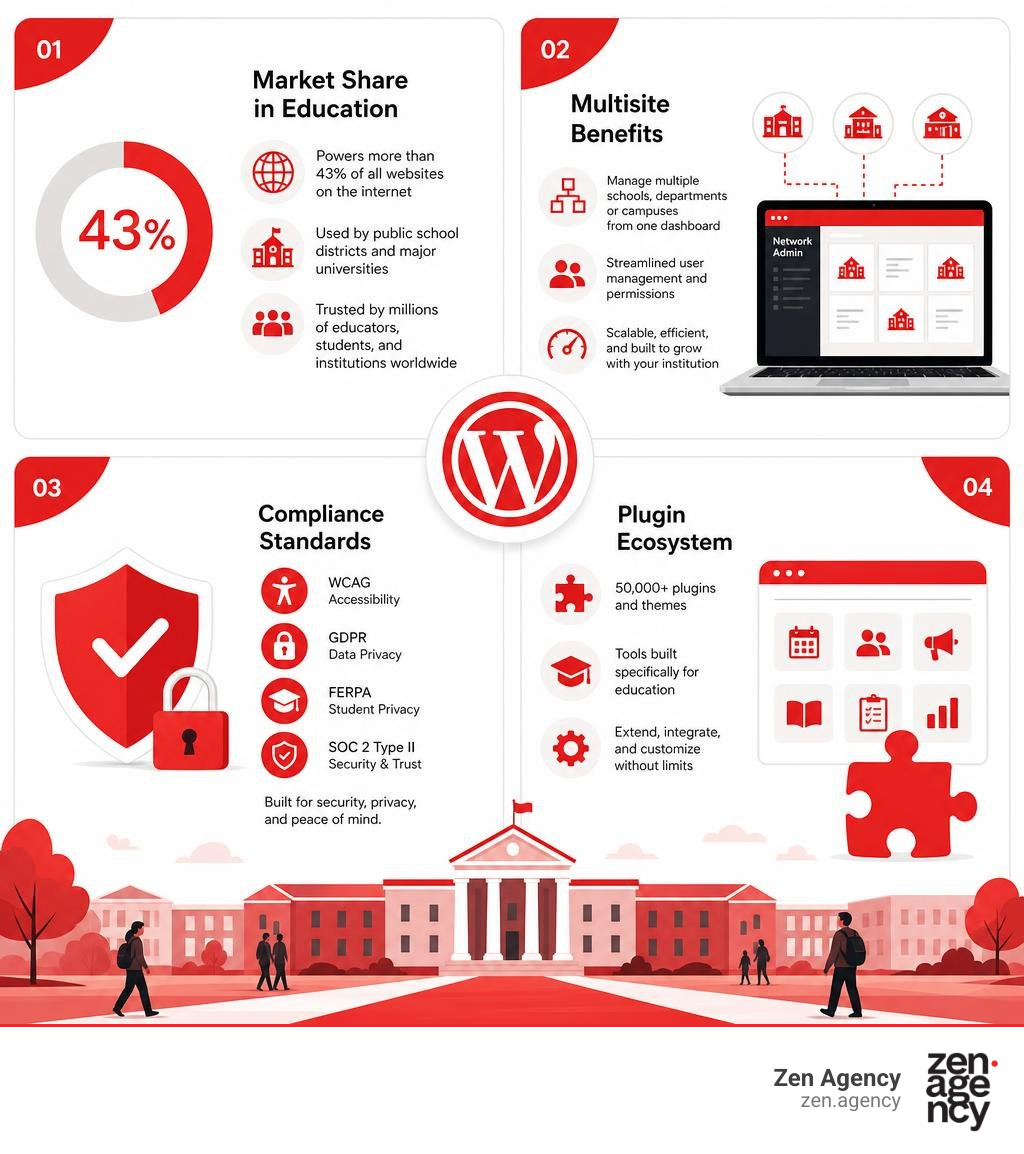
- Market share: WordPress powers more than 43% of all websites on the internet, including public school districts and major universities
- Scale: Platforms like CampusPress power more than 20 million sites for schools and universities worldwide
- Adoption: 35 of the top 100 universities in the USA use WordPress multisite hosting
- Cost: The core platform is free and open-source, with flexible hosting options to fit any budget
- Flexibility: Over 50,000 plugins and themes are available, including tools built specifically for education
- Compliance: Leading managed WordPress hosts support WCAG, GDPR, FERPA, and SOC 2 Type II standards
Managing a school or university website is not like running a typical business site. You’re dealing with dozens of departments, thousands of users, strict data privacy rules, and traffic spikes every time admissions season hits. On top of that, your staff — teachers, administrators, faculty — often have little to no technical background. You need a platform that’s powerful enough for IT teams and simple enough for everyone else.
WordPress checks both boxes. That’s why it has become the default choice for educational institutions of every size.
I’m Joseph Riviello, CEO and Founder of Zen Agency, and with over 22 years of experience in digital strategy and WordPress development, I’ve helped organizations build scalable, high-performing web platforms — including institutions that rely on WordPress for educational institutions to manage complex networks and drive real results. In this guide, I’ll walk you through everything you need to make the right decisions for your school or university website.
Quick look at WordPress for educational institutions:
Why WordPress for Educational Institutions is the Future-Proof Choice
When choosing a Content Management System (CMS), educational institutions must look far into the future. A university website built today needs to adapt to changing technology, evolving security standards, and new teaching methods over the next decade. Choosing a proprietary CMS often locks you into expensive licensing fees and rigid development cycles.
WordPress, on the other hand, is built on open-source technology. This means your institution retains complete ownership over its content, data, and code. If you want to change your hosting provider, redesign your portal, or build a custom student application, you can do so without asking permission from a proprietary vendor.
With a vast global community of developers constantly improving the core software, WordPress is incredibly reliable and future-proof. Initiatives like the WordPress Community Education Programs ensure that the next generation of creators and educators are continuously integrated into this ecosystem.
For schools located near our Pennsylvania offices in Scranton and Wilkes-Barre, or out near Billings, Montana, finding skilled local talent to manage your site is easy. Because WordPress is so widely taught, you can easily enroll staff in local programs like WordPress Courses in Pennsylvania – American Graphics Institute or utilize online training series like the Creating WordPress Websites Series | Missoula College of … – Ed2Go to keep your internal team highly skilled.
To explore what makes this CMS the premier choice for enterprise-grade applications, check out our guide on Professional WordPress Websites.
Scalability and Traffic Management for Large Universities
A university website experiences incredibly volatile traffic patterns. On a typical Tuesday morning, traffic might be steady and predictable. But on the day class registration opens, or when final exam grades are posted, your servers can experience massive, sudden traffic spikes.
To prevent your site from crashing during these critical windows, your hosting infrastructure must scale instantly. Enterprise-grade WordPress hosting environments address this by utilizing:
- Global Content Delivery Networks (CDNs): Distributing cached versions of your website across global servers so pages load instantly, no matter where the student is located.
- Intelligent Caching Layers: Reducing the load on your database by serving pre-rendered HTML pages to visitors.
- Auto-Scaling Infrastructure: Dynamically allocating server resources to handle traffic that jumps from ten hits per minute to hundreds of thousands of hits per minute.
- 99.9% Uptime SLAs: Guaranteeing that your critical student portals and admissions pages remain online when they are needed most.
User-Friendly Content Management for Non-Technical Staff
One of the biggest hurdles in school web management is content delegation. IT departments simply do not have the time to update every single faculty bio, club announcement, or sports schedule. The updates must be made directly by teachers, department heads, and student contributors.
WordPress solves this with the Block Editor (Gutenberg). Editing a page is as simple as dragging and dropping blocks for text, images, videos, and accordions. Users get a real-time preview of how the content will look on the live site, removing the guesswork entirely.
Content governance is maintained through a robust, built-in hierarchy of user roles:
- Super Administrator: Full control over the entire network of sites (ideal for the university IT director).
- Administrator: Complete control over a single department or school site.
- Editor: Can publish and manage posts, including those written by other users.
- Author: Can write, upload media, and publish their own posts.
- Contributor: Can write and edit their own posts but cannot publish them without approval.
This granular control prevents well-meaning staff members from accidentally changing the site’s main navigation or breaking global design elements. For administrators looking to establish clear training pipelines, resources such as the Website Training Introduction – Wyoming Department Of Education offer excellent frameworks for teaching non-technical staff how to maintain compliance and quality control.
Harnessing WordPress Multisite for Campus-Wide Networks
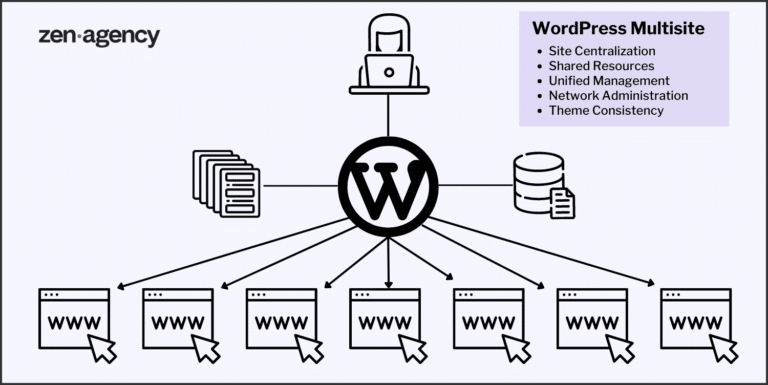
For large universities and school districts, managing dozens of individual, isolated websites is an administrative nightmare. Each site requires separate updates, individual security monitoring, and unique hosting bills. This is where WordPress Multisite functionality becomes indispensable.
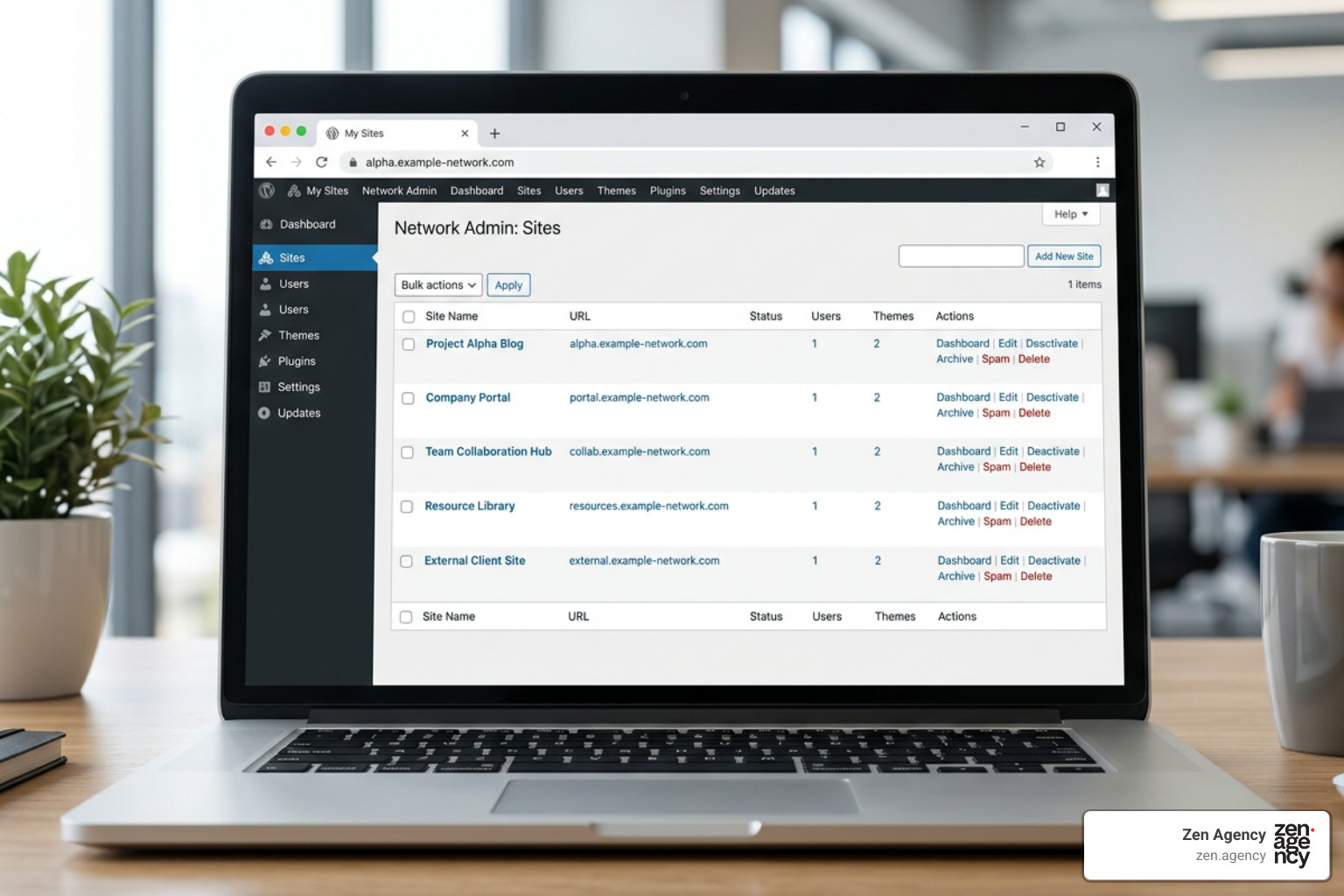
A multisite network allows you to run hundreds or even thousands of individual websites from a single WordPress installation. This architecture is trusted by some of the largest higher education institutions in the world. For instance, the University of Texas utilizes WordPress Multisite to give thousands of students and faculty members their own independent blogs and portfolio sites.
To streamline this scale, many top-tier universities partner with specialized hosting platforms. In fact, 35 of the top 100 universities in the USA use CampusPress – WordPress For Education | Higher Ed | Schools & K12, a platform that powers more than 20 million educational sites globally.
Centralized Administration and Brand Consistency
From a single dashboard, a “Super Admin” can manage the entire network. This centralized control provides incredible operational efficiency:
- One-Click Updates: Update the WordPress core, security patches, or global plugins across thousands of department sites simultaneously.
- Shared Theme Directory: Deploy pre-approved, accessible, and on-brand themes that departments can use. Individual site owners can customize their content, but they cannot alter the institutional header, footer, or core styling.
- Consolidated Security: Monitor security vulnerabilities, enforce strong password policies, and manage Single Sign-On (SSO) integrations across the entire network in one place.
Empowering Departments and Students with WordPress for Educational Institutions
While the IT department maintains centralized control, individual colleges, student organizations, and research labs still enjoy the independence they need.
For students, having a personal portfolio site is a massive advantage when entering the job market in June 2026. WordPress.com’s education program supports this by offering students a free Business plan during their studies. This plan includes professional development tools like SFTP, SSH, and GitHub deployments, along with a free .blog domain.
When the academic term ends, students can choose to keep their portfolio online at a discounted rate, transitioning their academic work into a professional personal brand.
Customizing the Academic Experience: Themes and Plugins
To turn a standard WordPress site into an interactive hub for learning, you need the right combination of themes and plugins. Whether you are building an online academy, a high school home page, or a university portal, customization is key.
Because mobile devices are the primary way students access information, your design must be completely responsive. To understand why a mobile-first approach is non-negotiable, read our article on Why Your Site Needs Responsive WordPress Web Design to Survive.
Selecting the Best Themes for School Websites
When selecting a theme, you can choose between highly tailored, pre-made education themes or a completely custom-built theme designed around your school’s unique identity.
For pre-made options, collections like the 20 Best WordPress Themes for an Education Website – ColibriWP Blog or older classic roundups like WordPress Education Themes in 2016: 8 Great Examples showcase themes featuring course directories, event calendars, and staff profiles. Modern block-based options, such as the Patterns Education theme, leverage WordPress’s Full Site Editing (FSE) capabilities, allowing you to edit global headers and templates visually.
However, large institutions with strict branding guidelines often find pre-made themes limiting. Custom theme design allows you to build a lightweight, fast, and accessible digital home that matches your exact brand specifications. Discover our approach to building tailored, high-performance designs in our guide to Mastering Custom WordPress Theme Design.
Essential Plugins for WordPress for Educational Institutions
Plugins add critical functionality to your academic website. To manage classrooms, student data, and grading, schools rely on specialized educational plugins:
- Learning Management Systems (LMS): Plugins like LearnDash, Masteriyo, Tutor LMS, and Sensei LMS turn your site into a virtual classroom. They allow teachers to build structured courses, deliver quizzes, track progress, and issue certificates.
- School Management Systems: For K-12 schools, the School Management System – WPSchoolPress – WordPress plugin | WordPress.org offers a robust, free framework. It provides role-based dashboards for administrators, teachers, students, and parents to manage timetables, grades, and attendance. With paid add-ons, you can even integrate automatic parent SMS alerts for student absences.
- Event Calendars: Keep the campus community informed about sports games, academic deadlines, and guest lectures with dynamic, searchable calendars.
Streamlining Admissions and Lead Generation
For private schools, universities, and online course providers, the website is your primary enrollment funnel. Managing admissions, student directories, and board reporting requires structured data handling.
Using a drag-and-drop tool like GravityKit for education — directories, admissions, and reporting for schools allows non-technical staff to build admissions pipelines, front-end student directories, and automated compliance reports without writing a single line of code.
To maximize your application rates, combine these databases with highly optimized forms. Learn how to convert casual site visitors into enrolled students by exploring The Ultimate Guide to WordPress Lead Generation Forms, Funnels, and Free Plugins and our advice on how to Stop Using Boring Forms: A Guide to Custom WordPress Form Builders.
Security, Compliance, and Accessibility in Education Web Design
Educational institutions handle sensitive student data and must provide equal access to all users. This makes security, legal compliance, and accessibility the top priorities for any school web development project.

Protecting Student Data and Privacy
In the United States, schools must strictly comply with the Family Educational Rights and Privacy Act (FERPA), which protects the privacy of student education records. If your website serves international students, you must also comply with the General Data Protection Regulation (GDPR).
To secure student information, your WordPress development team must implement:
- End-to-End Encryption: Enforcing SSL/HTTPS across all domains.
- Strict Access Controls: Restricting database access and utilizing Single Sign-On (SSO) integrated with your campus active directory.
- HECVAT Assurance: Utilizing hosting providers that have completed the Higher Education Community Vendor Assessment Toolkit (HECVAT) to verify security compliance.
- Regular Security Scanning: Automating malware scans, file integrity monitoring, and immediate security patching.
Ensuring Digital Accessibility for All Learners
Web accessibility is not just a best practice; it is a legal requirement under Section 508 of the Rehabilitation Act and the Americans with Disabilities Act (ADA). Your website must achieve Web Content Accessibility Guidelines (WCAG) 2.1 AA compliance.
This means your site must support screen readers, keyboard navigation, high-contrast text ratios, and alt-text for all visual assets. Additionally, because campuses are increasingly diverse, your site should be translation-ready, supporting multiple languages to accommodate international students and families.
| Standard / Regulation | Primary Focus | Key Requirement for Web Developers |
|---|---|---|
| WCAG 2.1 AA | Digital Accessibility | Keyboard navigation, screen-reader compatibility, high-contrast ratios. |
| FERPA | Student Data Privacy | Strict user roles, secure databases, encrypted form submissions. |
| GDPR | Data Protection (EU) | Cookie consent banners, user data deletion rights, secure data storage. |
Real-World Success: WordPress in Higher Education
Some of the most prestigious academic institutions in the world rely on WordPress to power their complex digital ecosystems. Let’s look at how universities utilize the flexibility of this platform to solve major operational challenges.
To see how we bring these dynamic, high-performing websites to life, read our article on Crafting Dynamic WordPress Websites.
Centralized Networks in Action
At major universities, individual departments often hire different web agencies, resulting in a fragmented web presence with inconsistent branding and security risks.
To solve this, institutions like Texas A&M AgriLife implemented a WordPress Multisite network. This allowed their central IT team to serve hundreds of internal clients with unique, departmental sites while maintaining a single, secure, and pre-vetted codebase.
For an in-depth look at how schools transitioned from chaotic legacy platforms to structured, accessible WordPress networks, watch the presentation by industry expert Cameron Barrett: WordPress for Schools.
By integrating campus-wide tools, social media feeds, and RSS news updates directly into the multisite network, universities can distribute information instantly. When a central administrator posts an urgent campus announcement, it can automatically populate across every single department site, ensuring clear communication in real-time.
Frequently Asked Questions about WordPress for Schools
Is WordPress secure enough for universities and K-12 schools?
Yes. While WordPress is sometimes unfairly targeted in security discussions due to poorly maintained personal blogs, the enterprise-level core is incredibly secure. When hosted on managed, SOC 2 Type II certified infrastructure and maintained by professional developers, WordPress meets the highest cybersecurity standards in the world. Enforcing strong password policies, keeping plugins updated, and utilizing secure user permissions make it exceptionally safe for school environments.
How does WordPress compare to proprietary school management systems in cost?
WordPress offers immense cost advantages. Proprietary systems often charge hefty annual licensing fees, per-user seat fees, and expensive custom development rates. Because WordPress is open-source, the core software is free. Your budget is spent purely on hosting, custom design, and specific plugins. This eliminates vendor lock-in and allows schools to manage complex data without an enterprise IT budget.
Can WordPress integrate with existing student information systems (SIS)?
Absolutely. WordPress features a highly robust REST API, allowing it to sync seamlessly with legacy student databases, payment gateways, and custom campus tools. Whether you need to pull class rosters from an external database or push admissions applications directly into your school’s administrative software, custom integrations can be engineered to bridge the gap.
Conclusion
Building and managing a website for an educational institution requires balancing administrative control, user-friendliness, strict compliance, and budget constraints. WordPress for educational institutions provides the ideal foundation to meet these challenges, offering a future-proof, scalable, and highly customizable platform that grows alongside your school.
At Zen Agency, we have been delivering enterprise-grade web development, custom branding, and digital strategies since 2008. From our locations in Pennsylvania and Montana, we help institutions build beautiful, accessible, and secure WordPress websites that simplify administration and elevate the student experience.
If your school or university is ready to transition to a modern, responsive, and compliant digital home, we are here to help. Discover how to choose the right partner in our guide on How to Find a WordPress Web Design Agency, or take the next step and Partner with Zen Agency for WordPress Development Services today.