The Best Database Backup Service for Your Peace of Mind
The Best Database Backup Service for Your Peace of Mind
Why Every Business Needs a Reliable Database Backup Service
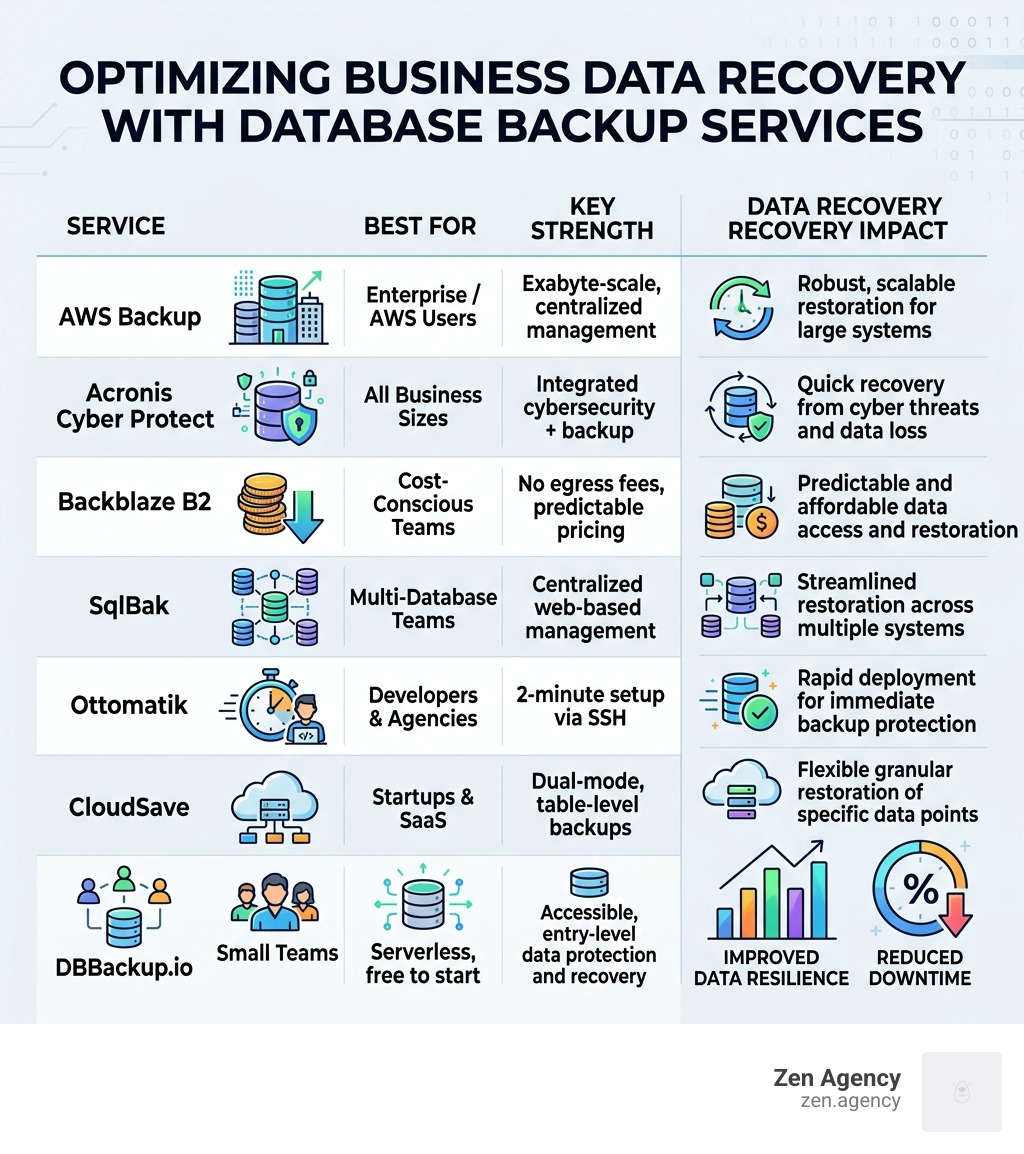
A database backup service is a solution that automatically copies and stores your database data so you can restore it after a disaster, cyberattack, or human error. Here are the top options at a glance:
| Service | Best For | Key Strength |
|---|---|---|
| AWS Backup | Enterprise / AWS users | Exabyte-scale, centralized management |
| Acronis Cyber Protect | All business sizes | Integrated cybersecurity + backup |
| Backblaze B2 | Cost-conscious teams | No egress fees, predictable pricing |
| SqlBak | Multi-database teams | Centralized web-based management |
| Ottomatik | Developers & agencies | 2-minute setup via SSH |
| CloudSave | Startups & SaaS | Dual-mode, table-level backups |
| DBBackup.io | Small teams | Serverless, free to start |
Data loss is not just a technical problem. It is a business problem.
A single developer mistake, a ransomware attack, or a corrupted update can wipe out weeks — or years — of work in seconds. And the numbers back this up: over 4.3 billion attempts to exploit vulnerabilities were recorded in a single year on WordPress alone. That is not a fringe risk. That is a daily reality.
The truth is, most businesses do not think about backups until they desperately need one. By then, it is often too late.
“Carbonite saved me from the Palisades Fire,” one user wrote after losing their home and computer in the Pacific Palisades Fire — and recovering all 171GB of their data because they had a backup in place before disaster struck. That is the difference a backup makes: not just recovering files, but recovering your livelihood.
Whether you run a WordPress site, a SaaS platform, or a multi-database enterprise environment, choosing the right database backup service is one of the most important decisions you can make for your business continuity.
I’m Joseph Riviello, CEO and Founder of Zen Agency, and with over 22 years in digital marketing and web infrastructure, I’ve helped hundreds of businesses protect their data and avoid costly downtime by implementing the right database backup service strategy. In the sections below, I’ll break down the best options on the market so you can make a confident, informed choice.
Easy database backup service word list:

Why Your Business Needs a Reliable Database Backup Service
In our experience serving businesses from Scranton, PA to Billings, MT, we have seen that data is the most valuable asset a company owns. Yet, it is also the most fragile. Relying on “hope” as a strategy is a recipe for disaster.
A professional database backup service acts as a digital insurance policy. The risks are everywhere:
- Ransomware Protection: Modern attackers don’t just steal data; they lock it away. Immutable backups provided by top-tier services ensure that even if your live database is encrypted by hackers, your backup remains untouched and ready for restoration.
- Human Error: It happens to the best of us. A developer accidentally runs a “DROP TABLE” command on a production server instead of staging. Without a point-in-time recovery option, that data could be gone forever.
- WordPress Vulnerabilities: If you use WordPress, the risks are heightened. Research shows that third-party plugins and themes account for 96.22% of detected security vulnerabilities. In 2021 alone, nearly 4,000 plugin vulnerabilities were discovered.
- System Failures: Hardware dies. Cloud regions go dark. A reliable service ensures your data is stored off-site, away from the point of failure.
With over 4.3 billion recorded attempts to exploit WordPress vulnerabilities in a single year, the question isn’t if you will face a threat, but when.
Key Benefits of Professional Database Backup Solutions
When we implement a database backup service for our clients, we look for these core advantages:
- Automated Scheduling: Gone are the days of manual exports. You can set backups to run hourly, daily, or weekly, ensuring your Recovery Point Objective (RPO) is met.
- Point-in-Time Recovery: This allows you to “roll back the clock” to the exact minute before a corruption or error occurred.
- Regulatory Compliance: For businesses in Pennsylvania or Montana handling sensitive data, services support HIPAA or GDPR requirements by providing audit trails and encrypted storage.
- End-to-End Encryption: Your data should be encrypted both while it is traveling to the storage provider (in transit) and while it is sitting on their disks (at rest).
Common Challenges and Disadvantages
While essential, managing backups isn’t without its hurdles:
- Storage Costs: As your database grows, so does the cost of keeping years of history.
- Resource Consumption: Running a massive backup during peak hours can slow down your website or application.
- Management Complexity: Managing different backup tools for MySQL, PostgreSQL, and MongoDB can become a “multi-database chaos.”
- Silent Failures: This is the most dangerous challenge. A backup script might fail due to a full disk or changed password, but if you aren’t monitoring it, you won’t know until you try to restore and find nothing there.
Understanding Different Types of Database Backups
Not all backups are created equal. Choosing the right type is a balance between storage efficiency and recovery speed.
| Backup Type | Description | Best For | Recovery Speed |
|---|---|---|---|
| Full | A complete clone of the entire database. | Weekly baselines | Fastest |
| Differential | Captures all changes made since the last Full backup. | Daily updates | Moderate |
| Incremental | Captures only the changes made since the previous backup (of any type). | Hourly snapshots | Slowest |
Full Backups vs. Incremental Strategies
A full backup is the safest bet but takes the most space. To optimize, many services use an incremental strategy. This tracks changes at the block level, meaning you only upload what has actually changed.
For enterprise-level reliability, services like AWS Backup offer 11 9’s of durability (99.999999999%), ensuring that the chance of losing a backup file is statistically near zero. This level of data redundancy is what allows business owners to sleep soundly.
Cloud-Based vs. Traditional Local Backups
We always recommend off-site cloud backups over local ones. If your office in Wilkes-Barre or your data center in Montana suffers physical damage (like fire or flood), a local backup on a nearby server will likely be destroyed along with the original data.
Cloud-based services offer:
- Off-site Security: Data is stored in geographically diverse locations.
- Scalability: You never have to worry about running out of disk space on a backup drive.
- Disaster Recovery Latency: While downloading a massive backup from the cloud can take time, it is infinitely faster than trying to recover data from a melted hard drive.
How to Choose the Best Database Backup Service for Your Needs
When selecting a provider, don’t just look at the price tag. Consider these critical factors:
Essential Features of a Top-Tier Database Backup Service
- Immutable Backups: These are “write-once, read-many” files that cannot be deleted or altered for a set period, providing the ultimate defense against ransomware.
- Automated Testing: A backup is only as good as its ability to restore. Top-tier services automatically perform “restore tests” to validate that the data is actually usable.
- Centralized Management: If you manage multiple servers or clients, you need a “single pane of glass” to see the status of every backup job in one place.
- Compliance Auditing: Tools like AWS Backup Audit Manager allow you to track and demonstrate compliance with data protection policies automatically.
Evaluating Provider Security and Compliance
Look for providers that boast SOC 2 Type II reports, which prove they follow strict security procedures. If you are in the healthcare or legal sectors, ensure they support HIPAA or GDPR.
Another key term to look for is Zero-knowledge architecture. This means the service provider cannot see your data; only you hold the encryption keys. This ensures that even if the backup service itself is compromised, your database remains encrypted and unreadable to the attackers.
Implementing a Robust Data Recovery Strategy
A database backup service is just a tool; you need a strategy to make it work. We recommend the 3-2-1 rule:
- Keep at least 3 copies of your data (the production data and two backups).
- Store the backups on 2 different media types (e.g., cloud storage and a local disk).
- Keep 1 copy off-site (in a different geographic region).
Setting Up and Automating Your Database Backup Service
Modern tools make setup incredibly fast—often under five minutes.
- Cron Expressions: For those who want granular control, services like DBBackup.io allow you to use Cron expressions to schedule backups at highly specific intervals (e.g., “every Tuesday at 3:15 AM”).
- API Integration: Developers can use REST APIs to trigger backups as part of a deployment pipeline.
- Serverless Deployment: Some services connect directly to your database via a connection string, requiring zero software installation on your server.
- Notification Triggers: Set up alerts via email, Slack, or SMS so you are immediately notified if a backup fails.
The Role of Testing and Monitoring in Reliability
You must treat your backups like a fire extinguisher: you hope you never need it, but you’d better be sure it works.
- Restore Validation: Periodically restore a backup to a staging environment to ensure the data is complete.
- Failure Alerts: Monitor for “silent failures” where the script runs but the resulting file is 0 bytes or corrupted.
- Performance Impact: Monitor your server’s CPU and RAM during backup windows. If the impact is too high, consider scheduling backups during low-traffic hours or using a service that offloads the processing power.
Frequently Asked Questions about Database Backups
How often should I back up my database?
For most businesses, a daily full backup and hourly incremental snapshots are the standard. However, if you run a high-traffic e-commerce site or a transactional SaaS platform, you may need backups every 15 minutes to minimize data loss.
What is the difference between replication and a true backup?
Replication (like RAID or database mirroring) is for high availability. It copies data in real-time. If a user accidentally deletes a row, that deletion is “replicated” instantly to the other server. A true backup is a point-in-time snapshot that allows you to recover that deleted row. You need both for a complete strategy.
How do backups support regulatory compliance?
Many regulations require you to keep data for several years. A database backup service provides the long-term archival and audit trails necessary to prove to regulators that your data is secure, residency-compliant, and recoverable.
Conclusion
At Zen Agency, we understand that your database is the heart of your business. Whether you are a startup in Scranton or a growing enterprise in Montana, the peace of mind that comes from a professional database backup service is priceless.
We specialize in providing enterprise-grade solutions that take the “nightmare” out of data management. From custom WordPress security to full-scale cloud infrastructure, we ensure your business remains resilient in the face of any disaster.
Don’t wait for a “single command” disaster to strike. Contact us today to explore our professional website maintenance and security services and let us help you build a backup strategy that actually works.