
Mastering Negative Keywords: A Beginner’s Guide to Smarter PPC
Mastering Negative Keywords: A Beginner’s Guide to Smarter PPC
Why Your PPC Budget Is Leaking — and How a Negative Keyword Strategy Fixes It
A solid negative keyword strategy is one of the fastest ways to stop wasting money in Google Ads and start getting real returns from your ad spend.
Here’s a quick summary of what it involves:
| Step | What To Do |
|---|---|
| 1. Understand the basics | Negative keywords block your ads from showing on irrelevant searches |
| 2. Choose match types | Use broad, phrase, or exact match negatives to control how strictly terms are filtered |
| 3. Find your negatives | Mine your Search Terms Report, use Keyword Planner, and analyze search intent |
| 4. Add at the right level | Apply negatives at account, campaign, or ad group level depending on scope |
| 5. Maintain regularly | Review weekly or monthly and update as your campaigns evolve |
Here’s a hard truth: almost half of advertisers don’t add a single negative keyword to their accounts in any given month. That means their ads are showing up for searches that will never convert — and they’re paying for every one of those clicks.
Think of your ad budget like a bucket. Positive keywords are the water you pour in. Irrelevant search queries are the holes in the bottom. Without negative keywords, it doesn’t matter how much you pour in — you’re losing it just as fast.
A PPC manager once shared a story about running ads for a human haircare brand. Everything looked dialed in — until they realized their shampoo ads were triggering for pet shampoo searches. A simple oversight, but an expensive one. That’s exactly the kind of waste a negative keyword strategy is designed to prevent.
The good news? It’s not complicated to fix. Once you understand how negative keywords work and build a system for managing them, you’ll spend less, reach better audiences, and convert more.
I’m Joseph Riviello, CEO and Founder of Zen Agency, and over my 22+ years in digital marketing I’ve used negative keyword strategy to help businesses across industries cut wasted ad spend and dramatically improve their PPC ROI. In this guide, I’ll walk you through everything — from the basics to advanced tactics — so you can build a smarter, leaner campaign.
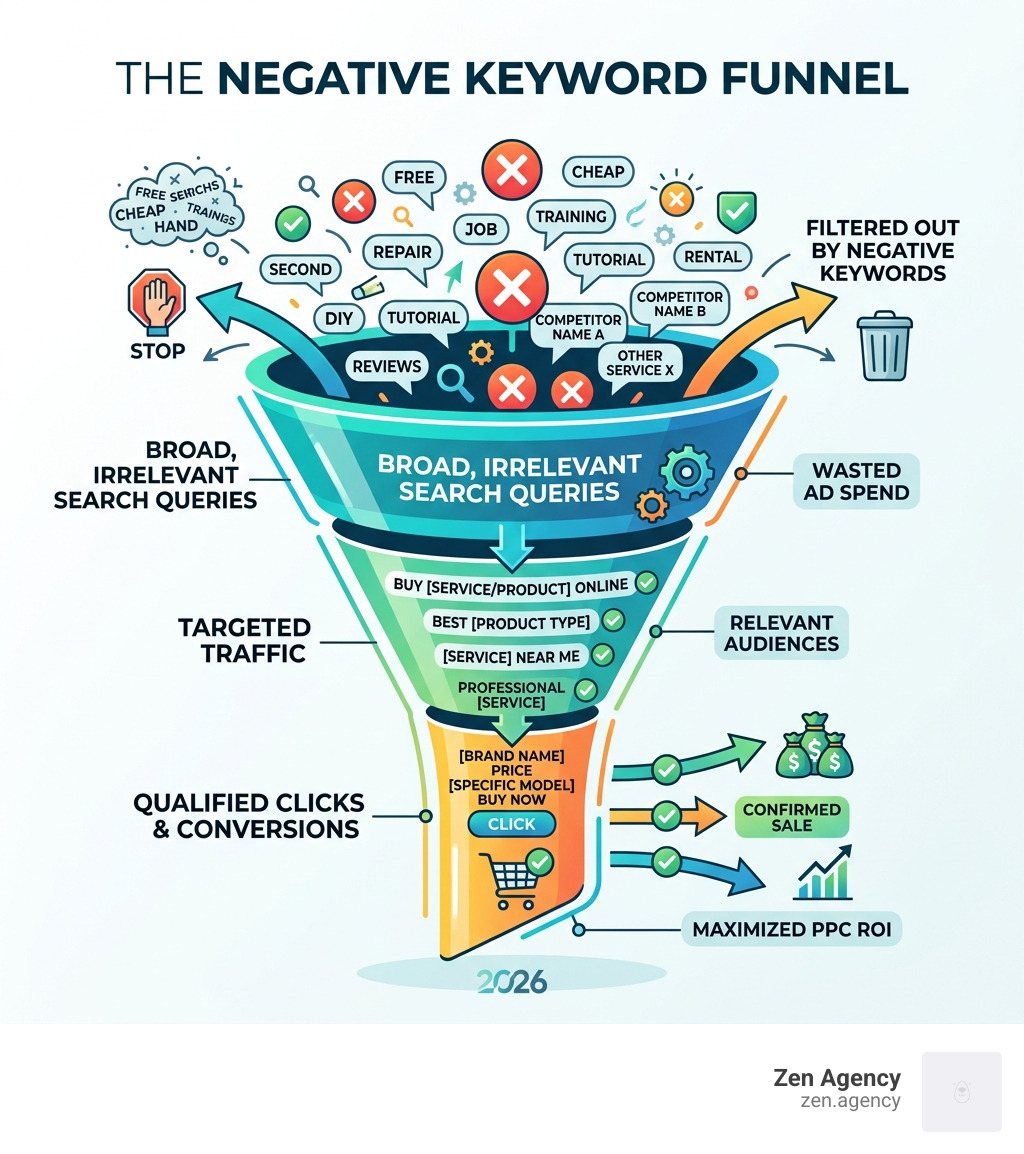
Negative keyword strategy terms explained:
What Are Negative Keywords and How Do They Work?
At its simplest, a negative keyword is a filter. While regular keywords tell Google, “Show my ad when someone searches for this,” negative keywords tell Google, “Do NOT show my ad if the search includes this word.”
In the Google Ads auction mechanics, every time a user types a query, Google looks for relevant ads. If your positive keyword matches the query, you enter the auction. However, if that query contains one of your negative keywords, you are immediately excluded. This happens before the auction even begins, saving your budget from impressions that have zero chance of converting.
According to Google Ads Help, negative keywords work differently depending on the network. On the Search Network, they are highly precise. On the Display and Video networks, they act more like a topical exclusion, steering your ads away from content that deals with those specific themes.
One critical thing to remember: unlike positive keywords, negatives do not account for close variants. If you exclude “shoe,” your ad could still show for “shoes.” You must manually add plurals, common misspellings, and synonyms to your list to be fully protected.
Understanding Negative Match Type Mechanics
Just like positive keywords, your negative keyword strategy relies on three primary match types. Choosing the wrong one can either let too much “trash” traffic through or accidentally block your best customers.
| Match Type | Symbol | How It Works | Example (Negative: “running shoes”) |
|---|---|---|---|
| Negative Broad | None | Blocks ad if the search contains all your negative terms, in any order. | Blocks “blue running shoes” but allows “running gear” or “blue shoes.” |
| Negative Phrase | ” “ | Blocks ad if the search contains the exact phrase in the same order. | Blocks “best running shoes” but allows “shoes for running.” |
| Negative Exact | [ ] | Blocks ad only if the search is the exact term with no extra words. | Blocks “running shoes” but allows “buy running shoes.” |
Using symbols correctly is vital. For instance, ampersands (&) and asterisks (*) are recognized by Google, but most other symbols like periods or plus signs are ignored.
Negative Keywords in Display and Video Campaigns
When we move beyond search, negative keywords shift from query-filtering to contextual targeting. In Display and Video campaigns, a negative keyword tells Google to avoid placing your ad on pages or videos that are topically related to that term.
For these campaigns, Google considers a maximum of 1,000 negative keywords. They are always treated as broad match, meaning you can’t use phrase or exact match symbols to refine them. For better control here, we often recommend using site category exclusions or specific placement targeting to keep your brand away from sensitive or irrelevant content.
Why a Robust Negative keyword strategy is Essential for ROI
If you’re not using a negative keyword strategy, you’re essentially leaving your wallet open on a busy sidewalk. Research from Semrush highlights that negative keywords are the primary defense against “wasted spend”—money spent on clicks from people who have no intention of buying what you offer.
The benefits of a well-maintained list include:
- Reduced Wasted Spend: You stop paying for “window shoppers” and irrelevant queries.
- Higher CTR (Click-Through Rate): Since your ads only show to relevant users, a higher percentage of people who see your ad will click it.
- Improved Quality Score: Google rewards relevance. High CTR and high relevance lead to better Quality Scores, which can actually lower your cost-per-click (CPC).
- Better Conversion Rates: You’re driving “high-intent” traffic to your landing pages.
- Brand Protection: You prevent your ads from appearing next to content that could damage your reputation.
Improving Quality Score and CTR
Quality Score isn’t just a vanity metric; it determines your Ad Rank and how much you pay. By implementing a negative keyword strategy, you ensure that your ads are only triggered by searches that align with your landing page experience. When Google sees that users find your ads highly relevant (proven by a high CTR), it lowers your costs. In some cases, poor alignment can result in a $5 CPC, whereas great alignment—bolstered by negatives—can drop that to $1 or $2.
Protecting Your Brand Image
Brand safety is a major concern for our enterprise-grade clients at Zen Agency. You don’t want your luxury brand appearing for searches like “cheap” or “knockoff.” Similarly, B2B companies often exclude terms like “jobs,” “salary,” or “training” to avoid paying for clicks from job seekers instead of decision-makers. In one 2024 study, 77% of PPC pros agreed that removing negatives would immediately tank an account’s performance.
How to Find and Implement Negative Keywords
Finding the right negatives requires a mix of data analysis and creative brainstorming. You aren’t just looking for “bad” words; you’re looking for words that signal a different intent than what you provide.
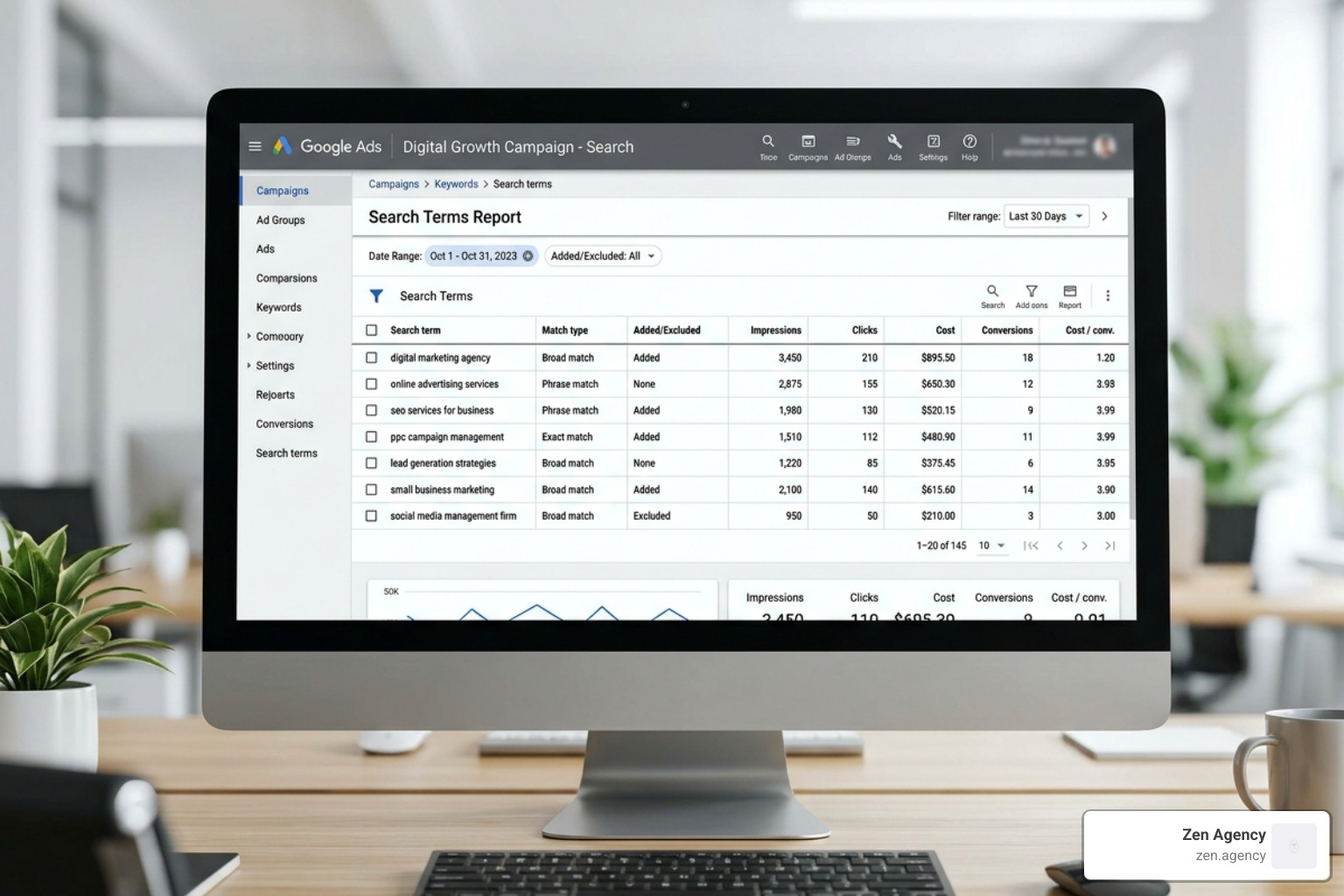
A great place to start is the Search Terms Report. This shows you the actual queries that triggered your ads. We recommend sorting this list by “Impressions” or “Cost.” If you see a term that has cost you $50 but has zero conversions and a low CTR, it’s a prime candidate for your negative list.
Another advanced technique is N-gram analysis. This involves breaking down search queries into fragments (1-word, 2-word, or 3-word strings). If the word “free” appears in 500 different queries that collectively spent $200 without a sale, N-gram analysis makes that pattern obvious, allowing you to negate the word “free” across your entire account.
Finding Opportunities for Your Negative keyword strategy
According to Optmyzr, you should look for “low-intent modifiers.” These are words that suggest the user is just researching or looking for something you don’t offer. Common examples include:
- Informational: “how to,” “tutorial,” “guide,” “review.”
- Bargain Hunting: “free,” “cheap,” “clearance,” “used.”
- Employment: “jobs,” “hiring,” “salary,” “internship.”
- Education: “class,” “course,” “degree.”
Don’t forget to use Google Autocomplete. Type in your main keyword and see what Google suggests. If you sell “leather jackets” and Google suggests “leather jacket repair,” and you don’t offer repairs, “repair” goes on your negative list immediately.
Step-by-Step Implementation at Every Level
Once you’ve found your keywords, you need to put them in the right place. Google Ads allows for three levels of application:
- Account-Level: These apply to all Search and Shopping campaigns. Use this for “evergreen” negatives like “nude,” “torrent,” or “free” (if you only sell premium products). Google allows up to 1,000 account-level negatives.
- Campaign-Level: Best for terms that are irrelevant to a specific product line. If you have a campaign for “Running Shoes,” you might add “Hiking” as a campaign-level negative.
- Ad Group-Level: Use these for “traffic sculpting.” If you have one ad group for “Men’s Running Shoes” and another for “Women’s Running Shoes,” you’d add “women” as a negative in the men’s ad group to ensure the right ad shows for the right query.
- Shared Negative Lists: This is a huge time-saver. You can create a master list (e.g., “Competitor Names”) and apply it to multiple campaigns at once. You can have up to 20 shared lists per account, with 5,000 keywords each.
Advanced Tactics for Scaling PPC Campaigns
For struggling-to-scale businesses, basic negative lists aren’t enough. You need advanced tactics to truly dominate the auction.
- Traffic Sculpting: This involves using exact match negatives to force Google to show the most relevant ad. By negating specific terms in certain ad groups, you “sculpt” the traffic toward the ad group with the highest conversion rate for that query.
- Performance Max (PMax) Exclusions: While PMax is highly automated, you can still apply account-level negatives to prevent it from bidding on branded terms or irrelevant junk. A 2024 study showed that PMax campaigns using exclusions maintained a ROAS of over 425%.
- Seasonality Adjustments: Your negative list shouldn’t be static. A tax prep service might block “free tax software” during the peak season to focus on high-value clients but remove that block in the off-season to nurture leads.
- AI and Automation: Tools can now analyze search terms in real-time, flagging potential negatives based on performance thresholds (like “Cost > $X and Conversions = 0”).
Maintaining a Long-Term Negative keyword strategy
A negative keyword strategy is not a “set it and forget it” task. At Zen Agency, we recommend a tiered review schedule:
- Weekly: For new or high-spend campaigns. Review the Search Terms Report and add obvious “junk” queries.
- Monthly: Audit your shared lists. Are you accidentally blocking new products you’ve started carrying?
- Quarterly: Perform N-gram analysis to find deep-seated waste that isn’t obvious on a line-by-line basis.
Be careful of “over-exclusion.” Adding too many negatives, especially broad match ones, can “choke” your campaign and prevent you from reaching potential customers. Always base your exclusions on data, not just assumptions.
Negative Keywords for SEO and Organic Search
While “negative keywords” is a PPC term, the philosophy applies to SEO too. You can’t “block” organic traffic in the same way, but you can refine your content to stop ranking for irrelevant terms.
If you find your site is ranking for “cheap watches” but you only sell luxury items, you should audit your content. Are you using the word “cheap” too often? You can also use noindex tags for pages that attract the wrong audience or use robots.txt to prevent search engines from crawling irrelevant sections of your site. This ensures your “organic” authority is focused on the terms that actually drive business.
Frequently Asked Questions about Negative Keywords
Do negative keywords account for misspellings and synonyms?
No. This is a common trap for beginners. While positive keywords have “close variant” matching, negative keywords are literal. If you want to block “purple,” you must also manually add “purpule,” “purpel,” and “violet.” Google will account for casing (Upper vs. Lower case), but that’s about it.
What is the limit for negative keywords in Google Ads?
You can have up to 10,000 negative keywords per campaign. For shared lists, you can have 20 lists per account with 5,000 keywords each. Account-level exclusions are limited to 1,000 terms. For most businesses, this is more than enough room to build a comprehensive defense.
How often should I update my negative keyword lists?
For a new campaign, check your Search Terms Report daily or weekly. Once the campaign is stable and you’ve filtered out the most common irrelevant terms, a bi-weekly or monthly review is usually sufficient. High-volume accounts spending thousands per day should be reviewed more frequently to catch spikes in wasted spend.
Conclusion
Mastering a negative keyword strategy is the difference between a PPC campaign that just “spends money” and one that “makes money.” By being proactive—identifying irrelevant intent before it costs you a cent—you can transform your Google Ads account into a lean, high-ROI machine.
At Zen Agency, we specialize in these enterprise-grade solutions. Since 2008, we’ve helped businesses in Pennsylvania, Montana, and across the USA find the “leaks” in their marketing buckets and plug them with innovative strategies. Whether you are in Wilkes Barre, Scranton, or Billings, our team is ready to help you scale your visibility and profitability.
Ready to stop wasting your ad budget? Explore our PPC management services and let’s build a strategy that actually converts.