The Ultimate Guide to Email Campaign Design Templates
The Ultimate Guide to Email Campaign Design Templates
Why Email Campaign Design Templates Are the Foundation of Scalable Marketing
Email campaign design templates are pre-built email frameworks that define the layout, visual structure, and branding of your messages — so you can produce consistent, professional emails faster without starting from scratch every time.
Here are the most common types and when to use them:
| Template Type | Best For |
|---|---|
| One-column | Welcome emails, newsletters, mobile-first audiences |
| Two-column | Product showcases, side-by-side comparisons |
| Inverted pyramid | Promotions, single-focus announcements |
| Zig-zag | Product launches, weekly updates |
| Hybrid | Events, multi-section campaigns |
| Plain text | Transactional emails, password resets |
| Dynamic product feed | Abandoned cart, personalized recommendations |
Email marketing delivers an average ROI of $36 for every $1 spent. But that return doesn’t happen by accident. It comes from sending the right message, to the right person, in a format that looks great on any device.
Most marketing teams waste hours rebuilding emails from scratch — only to end up with inconsistent branding, broken layouts on mobile, and campaigns that underperform. A well-designed template system fixes all of that.
The problem isn’t that teams don’t care about design. It’s that they don’t have a scalable foundation to work from.
That’s exactly what this guide covers.
I’m Joseph Riviello, CEO and Founder of Zen Agency, and over my 22+ years in digital marketing I’ve helped businesses across industries build and scale email campaign design templates that drive measurable results. In the sections ahead, I’ll walk you through everything — from layout structures and customization tools to modular systems and 2026 design trends.
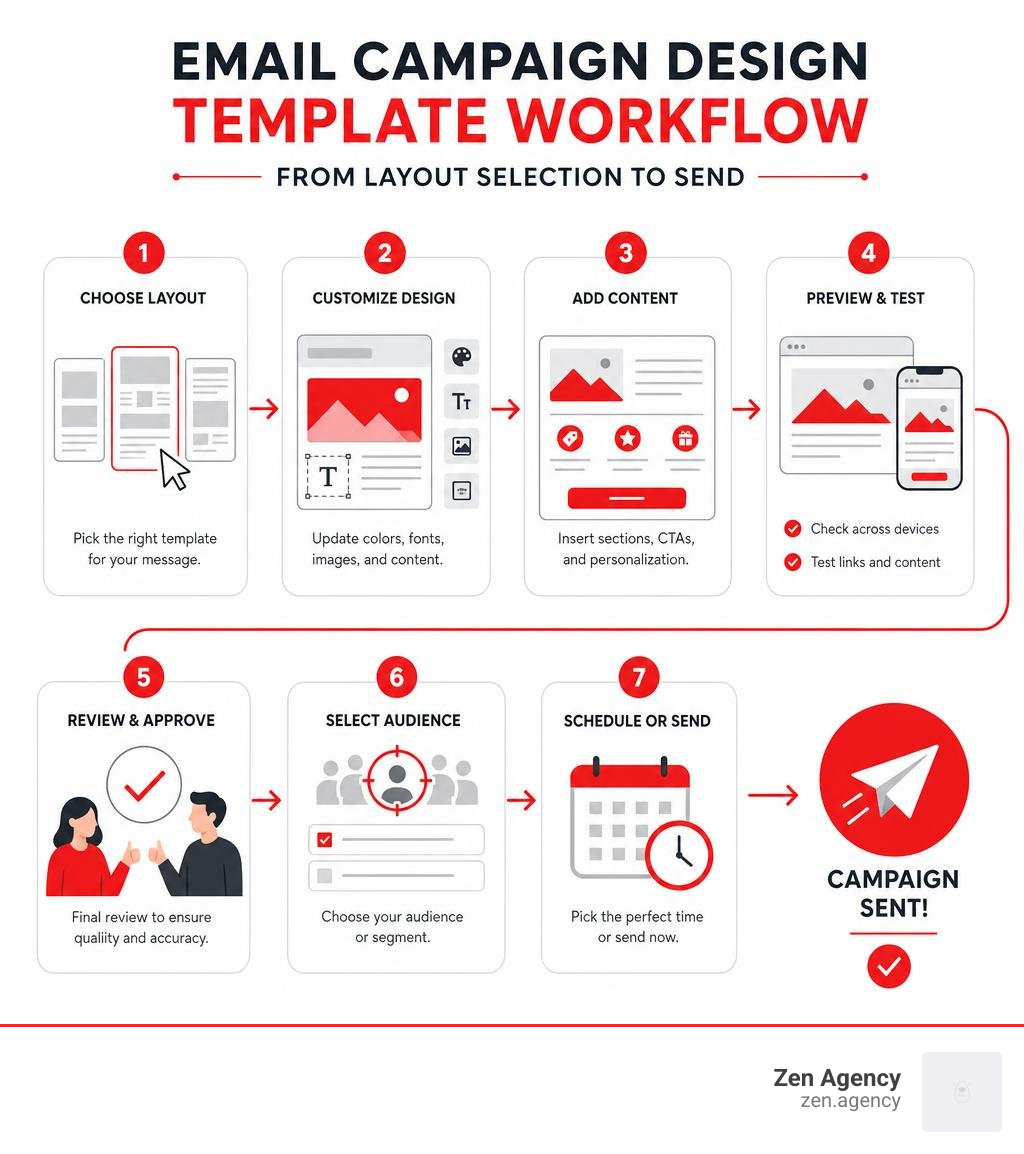
Email campaign design templates terms at a glance:
Anatomy of High-Converting Email Layouts
Good design is never about mere decoration. It is about creating a visual flow that supports your message, respects the reader’s limited attention span, and gently guides them toward a single, clear action. When we structure email campaign design templates, we balance several critical elements: visual hierarchy, white space, call-to-action (CTA) placement, and mobile responsiveness.
Visual hierarchy determines the order in which a reader processes information. By using contrasting colors, varying font weights, and strategic placement, you can control where the eye lands first, second, and last. White space is equally powerful; it is not “empty” space, but rather a functional design element that gives your content room to breathe, preventing cognitive overload and making your layouts feel modern and clean.
Every high-converting layout must also prioritize mobile responsiveness. With mobile-optimized emails generating up to 15% higher click-through rates than non-optimized designs, your templates must adapt automatically to smaller screens. If you want to dive deeper into maximizing user action across all your digital assets, explore The Ultimate Guide to Improving Your Conversion Rate.
The Inverted Pyramid and One-Column Layouts
The inverted pyramid is one of the most effective structural frameworks for driving clicks. This layout works by grabbing attention with a broad, bold element at the top (usually a compelling header image or headline), narrowing down with supporting copy in the middle, and pointing directly to a prominent CTA button at the bottom. It forms a visual funnel that guides the reader’s eye straight to the point.
Single-column layouts are the perfect companion to this approach. Because they stack content linearly, they are incredibly easy to read and inherently mobile-friendly. There are no complex multi-column tables to collapse or distort on smartphone screens. For welcome campaigns, simple announcements, or direct promotional offers, a one-column inverted pyramid design keeps your audience focused on a single, clear goal.
Multi-Column, Hybrid, and Zig-Zag Patterns
When your campaign requires you to present multiple items—such as a curated content roundup or a diverse product line—alternative layouts can help structure the visual flow:
- Two-Column Layouts: Excellent for side-by-side product comparisons or showing two distinct options. However, they must be coded carefully so they stack vertically on mobile devices.
- The Zig-Zag Pattern: This layout alternates text and images from left to right as the reader scrolls down. It creates a dynamic visual rhythm that keeps the eyes engaged, making it perfect for storytelling, weekly updates, or showcasing a series of new product features.
- The F-Pattern Layout: Based on natural screen-reading behavior, readers often scan the top horizontal line, move down the left side, and scan a shorter horizontal line further down. Structuring your templates to align with this natural scanning behavior ensures that your most critical details are placed where readers naturally look.
- Hybrid Layouts: These combine a prominent, single-column hero section at the top with a two-column grid below. This is highly effective for newsletters where you want to highlight a primary story before displaying secondary resources.
Choosing the Right Email Campaign Design Templates for Your Brand
Selecting the ideal template starts with understanding your specific campaign goals and brand guidelines. An email flooded with heavy graphics and complex layouts will not suit a brand that values minimalist elegance. Conversely, a plain text email might fall flat for a visually driven e-commerce lifestyle brand.
To find inspiration and see how top brands structure their messaging, platforms like Really Good Emails offer an incredible library of curated email designs. When selecting or building your templates, you must also ensure they integrate seamlessly with your tech stack. For a comprehensive look at choosing the right platform to manage these templates, check out The Ultimate Email Marketing Services Provider Guide: Mailchimp, HubSpot, and Beyond.
Why You Need Reusable Email Campaign Design Templates
Creating a brand-new layout for every single campaign is a recipe for operational bottlenecks and inconsistent branding. Reusable email campaign design templates solve this by acting as a pre-designed “shell.” The outer structure, header, footer, social media links, and font styles remain locked, while the inner content layer changes.
This structural consistency builds trust. When subscribers open your emails, they should immediately recognize your brand’s visual identity.
Furthermore, reusable templates save your team hours of QA and development time. You also need to ensure that every HTML template has an automatically generated or manually verified plain text equivalent. Plain text versions are vital for accessibility, smartwatches, and overcoming strict spam filters. To learn more about managing these assets efficiently, consult this guide on Email Templates: Design & Manage Email Campaigns – Maildroppa.
How to Customize Email Campaign Design Templates for Maximum ROI
Customizing your templates does not require you to write complex code from scratch. Modern design tools and drag-and-drop builders have democratized email creation:
- Figma: A brilliant starting point for design teams. You can design highly customized, pixel-perfect email mockups, collaborate in real-time, and use plugins to export your designs directly into responsive HTML code.
- Unlayer: A powerful drag-and-drop editor that allows marketing teams to customize event-specific templates, adjust color palettes, and export clean HTML directly to major email service providers without touching a line of code.
- Personalization and Dynamic Feeds: True customization goes beyond changing colors. High-ROI templates use dynamic fields to pull in the recipient’s name, localized offers, or personalized product recommendations.
By streamlining the design process and focusing on personalized, high-performing elements, you directly improve your conversion rates. To discover more ways to capture and convert traffic, dive into these Stop Losing Leads with These CRO Secrets.
Scaling Production with Modular and Master Templates
If your business is scaling rapidly, managing dozens of individual templates can quickly become a nightmare. This is where modular and master email templates come to the rescue.
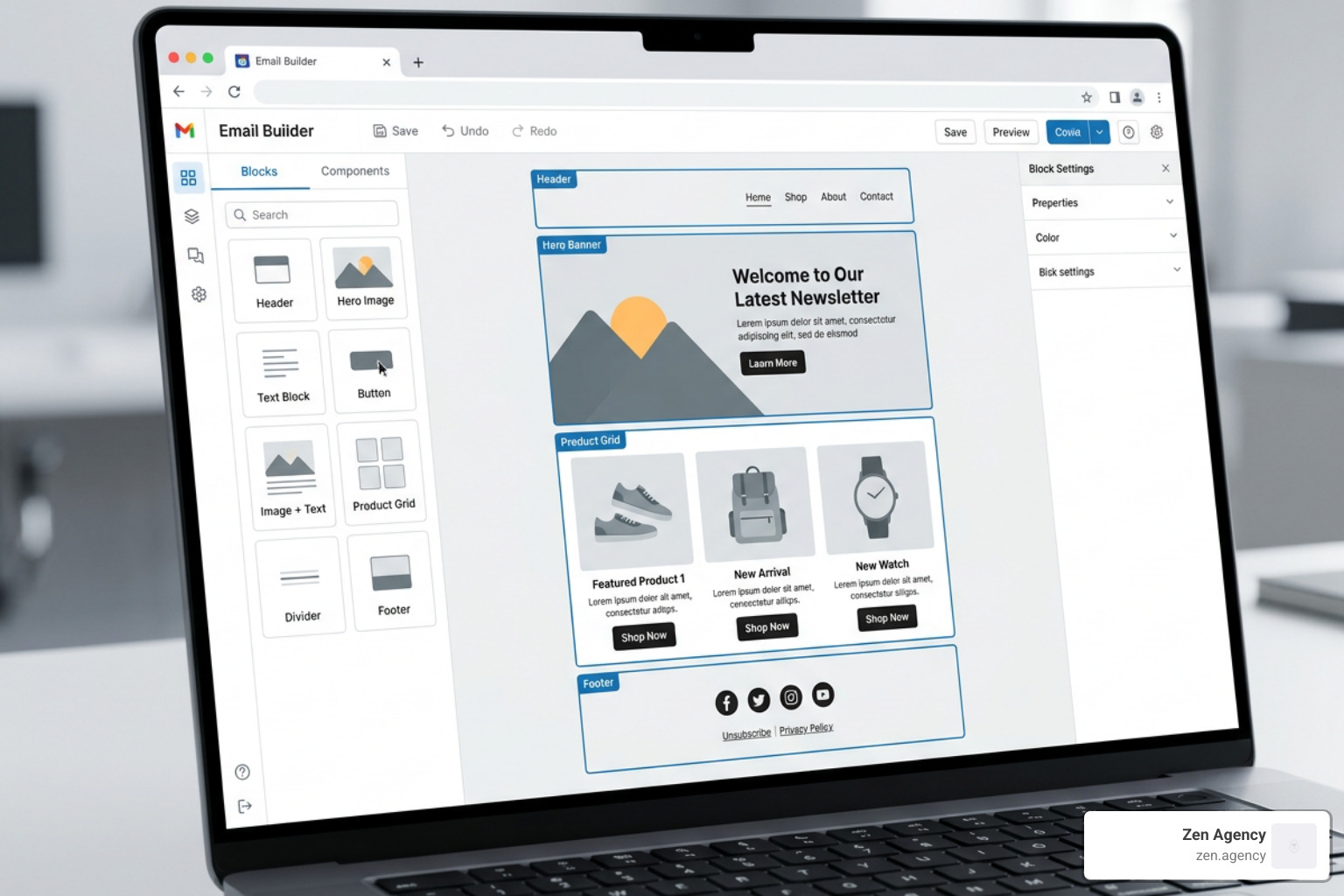
Instead of maintaining a separate template for every conceivable campaign type, you build one comprehensive master template that contains a library of reusable modules. These modules are pre-tested, pre-approved design blocks—such as headers, hero banners, product grids, text blocks, and footers—that can be stacked, rearranged, or hidden depending on the campaign’s needs.
This approach completely eliminates developer bottlenecks and ensures that non-technical team members can build flawless emails in minutes. To see how a master system works in practice, explore the concept of a Master Modular Email Template – MailBakery.
Building a Reusable Module Library
A robust module library typically includes 15 to 25 core components. When building yours, focus on the following foundational blocks:
- Headers: Standard brand headers, minimalist transactional headers, and headers with simple navigation links.
- Hero Sections: Image-first layouts, text-over-color blocks, and split-screen hero designs.
- Content Blocks: Single-column editorial blocks, two-column side-by-side product cards, and zig-zag story modules.
- Call-to-Action (CTA) Blocks: High-contrast buttons, inline text links, and full-width promotional banners.
- Footers: Standard compliance footers containing physical addresses, unsubscribe links, preference centers, and social media icons.
By building these blocks to be highly flexible, you ensure your design system can adapt to any message while maintaining strict brand standards.
Streamlining Campaign Workflows
Using a modular master template radically transforms your production workflow. Instead of designing, coding, and testing a new layout for every send, your team simply selects the modules needed for the specific campaign, drops in the copy and imagery, and runs a quick QA check.
Because every module in your library has already been rigorously tested across dozens of email clients (including notoriously difficult clients like older versions of Outlook), your QA process is cut down to a fraction of the time. This allows your team to move from concept to launch in hours rather than weeks, freeing up valuable resources to focus on strategy, segmentation, and copy optimization.
Industry-Specific Email Templates and 2026 Design Trends
As we navigate June 2026, email design continues to evolve. Modern templates are leaning heavily into hyper-personalization, clean typography, interactive elements, and strategic minimalism. To help you visual how different industries approach template design, we have broken down the core requirements below:
| Industry | Primary Template Focus | Critical Modules Needed | Key 2026 Design Trend |
|---|---|---|---|
| E-commerce | Visual product showcases & conversion | Dynamic product feeds, cart recovery, seasonal sales | Interactive product carousels, dark mode optimization |
| SaaS & Tech | User onboarding, retention & product updates | Feature highlights, step-by-step guides, feedback loops | Minimalist typography, subtle micro-animations |
| Nonprofit | Storytelling & donation drives | Impact metrics, hero storytelling blocks, clear donate CTAs | Warm color palettes, authentic photography, progress bars |
To make the most of these trends, you will want to pair your designs with a sophisticated automated delivery system. Learn how to implement this by reading The Advanced Email Marketing Automation Strategy Guide for Overachievers.
E-commerce and Retail Templates
E-commerce templates must be highly visual, fast-loading, and built to drive immediate action. Key templates every retailer needs include abandoned cart reminders, personalized product recommendations, and seasonal promotional layouts.
To maximize sales during key times of the year, retail brands rely on beautifully themed holiday designs. For instance, you can capture seasonal traffic with a tailored Mother’s Day Email Template | EmailBuilder.ai or a romantic, high-converting Valentine’s Day Email Template | EmailBuilder.ai.
Additionally, integrating dynamic product feeds that pull real-time inventory and pricing directly into your emails ensures your campaigns are always accurate and highly relevant. To unlock more e-commerce growth strategies, read The Ultimate Playbook to Skyrocket Ecommerce Conversion Rates.
SaaS and Technology Templates
SaaS and tech companies require templates that simplify complex information, guide users through software features, and encourage product adoption. Two of the most critical templates in a SaaS toolkit are:
- Onboarding Templates: First impressions matter. A clean, structured welcome sequence helps users take their first steps with your software. You can jumpstart this process using a professional Onboarding Email Template | EmailBuilder.ai.
- Product Update Templates: Keeping your users informed about new features and bug fixes is vital for retention. A structured layout helps highlight these improvements clearly. Check out this Product Update Email Template | EmailBuilder.ai to see a great example of functional tech communication.
Technical Best Practices: Deliverability, Accessibility, and Compliance
Even the most beautiful email template is useless if it ends up in the spam folder or cannot be read by your subscribers. Ensuring your templates are technically sound is just as important as their visual design.
Designing for Mobile and Accessibility
Accessibility is no longer optional; it is a fundamental design requirement. Your templates should be built with clean, responsive code (like MJML or fluid HTML) to render beautifully across all screen sizes.
To make your emails accessible to everyone, including those using screen readers:
- Maintain a logical visual reading order.
- Use strong color contrast between your text and background.
- Set your body copy to a highly readable size (at least 14px to 16px).
- Always include descriptive alt text for your images so readers know what the visuals represent even if they do not load.
- Provide a clean plain text version for every campaign.
Ensuring Deliverability and Compliance
To protect your sender reputation and ensure your emails actually reach the inbox, your templates must strictly adhere to global privacy regulations like CAN-SPAM and GDPR.
Every template you use must include a visible, easy-to-use unsubscribe link and your business’s physical mailing address in the footer. Furthermore, keep an eye on your image-to-text ratio. Templates that consist entirely of one large image with no live text are frequently flagged by spam filters. Aim for a healthy balance of live HTML text and supporting imagery to keep your deliverability rates high.
Frequently Asked Questions about Email Templates
What is the difference between a master template and a standard email template?
A standard email template is a fixed layout built for a single type of campaign (like a monthly newsletter). A master template is a comprehensive system containing a wide array of pre-designed, reusable modules (headers, product grids, CTAs) that can be mixed, matched, and rearranged to create endless unique campaigns without writing new code.
How do I ensure my email templates render correctly across all devices?
The best way to guarantee cross-device compatibility is to build your templates using responsive HTML or frameworks like MJML. Before sending any campaign, always test your layouts using rendering tools like Litmus or Email on Acid, which show you exactly how your email will look across dozens of different inbox clients and mobile devices.
Why is a plain text version of an email template necessary?
A plain text version is crucial for several reasons: it is required by spam filters to prove you are a legitimate sender, it is necessary for accessibility tools like screen readers, and it is often the only format displayed on smartwatches and certain legacy email clients.
Conclusion
Building a high-performing system of email campaign design templates is one of the smartest investments your business can make. By focusing on clean layouts, brand consistency, modular scaling, and technical best practices, you can dramatically reduce your campaign production times while significantly boosting your marketing ROI.
At Zen Agency, we specialize in providing custom website development, branding, and enterprise-grade digital marketing solutions designed to help scaling businesses increase visibility and profitability. We serve clients across the country, with dedicated local expertise in regions like Scranton, PA and Billings, MT. Whether you need custom-coded responsive templates, a comprehensive master modular system, or a complete digital marketing overhaul, we are here to help you succeed.
Ready to take your email marketing to the next level? Let’s build something incredible together. Reach out to us today through our Zen Agency Digital Marketing Services to get started!