Show Me the Money: A Step-by-Step Payment Integration Guide
Show Me the Money: A Step-by-Step Payment Integration Guide
Why Payment Gateway Integration Is the Foundation of Every Successful Online Store
Payment gateway integration is the process of connecting a payment provider to your website so customers can securely pay for your products or services online.
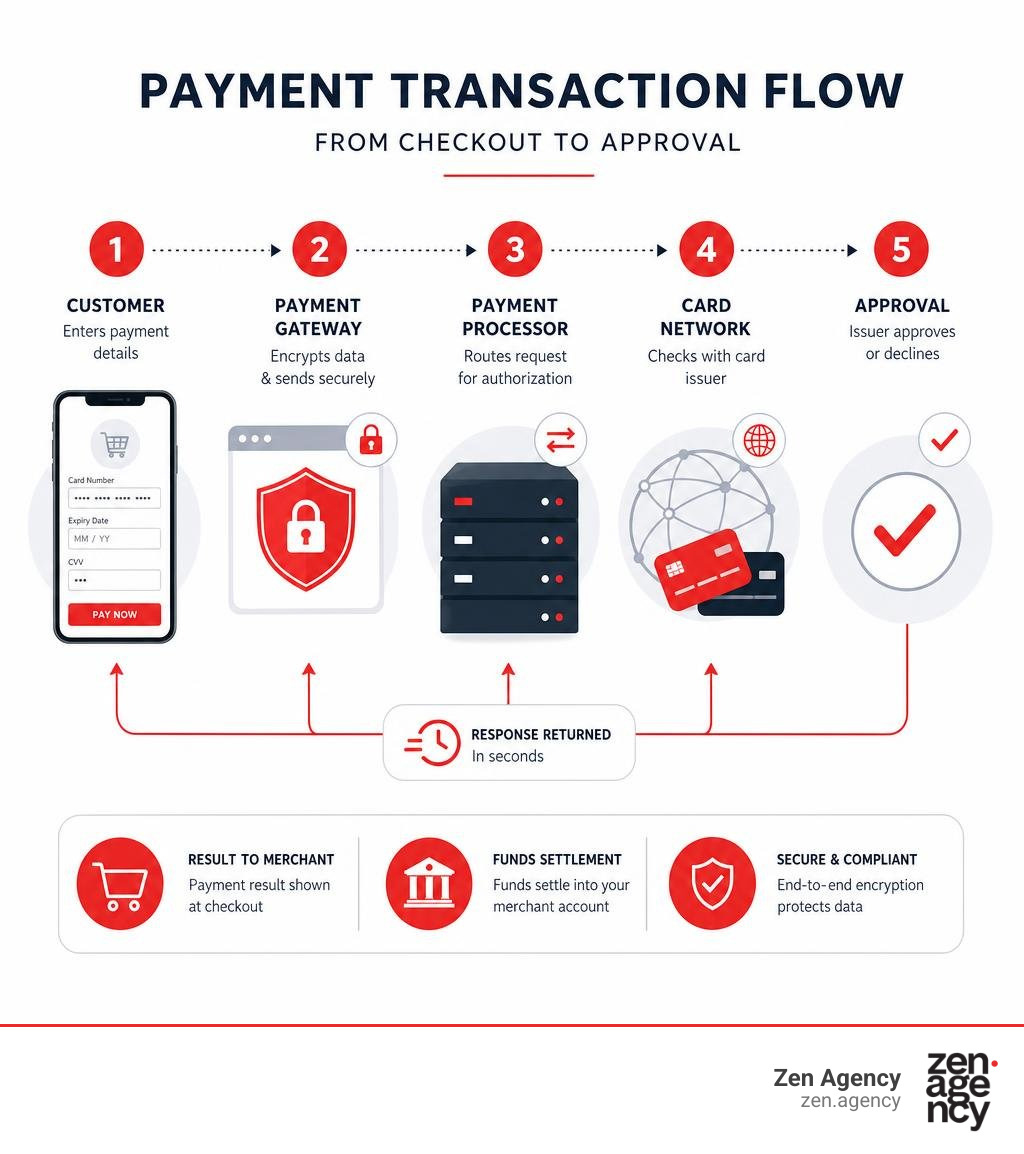
Here’s a quick overview of how it works:
- Customer enters payment details at checkout
- The gateway encrypts the data and sends it to the payment processor
- The processor contacts the card network (Visa, Mastercard, etc.)
- The card issuer approves or declines the transaction
- The result is sent back to your website in seconds
- Funds are settled into your merchant account
The stakes are real. Global e-commerce sales are forecast to hit nearly $7.4 trillion in 2025 — a 74% jump from 2020. Two-thirds of adults worldwide now use digital payments. If your site can’t accept payments smoothly and securely, you’re leaving money on the table.
A poorly set-up payment integration means friction at checkout, abandoned carts, and lost revenue. Getting it right means faster sales, happier customers, and fewer headaches.
I’m Joseph Riviello, CEO and Founder of Zen Agency, and with over 22 years of experience helping businesses scale their digital presence, payment gateway integration is one of the most critical technical decisions I help clients navigate. Let’s walk through everything you need to know to get it done right.
Payment gateway integration vocab explained:
Demystifying Payment Gateway Integration: What It Is and How It Works
To understand how money moves from your customer’s wallet to your bank account, we need to break down the key players in the digital transaction flow.
At its core, a payment gateway is the digital equivalent of a physical card-swiping terminal at your local grocery store. It acts as the secure middleman, taking sensitive credit card details, encrypting them, and routing them to the right financial institutions.
Here are the key components involved in every transaction:
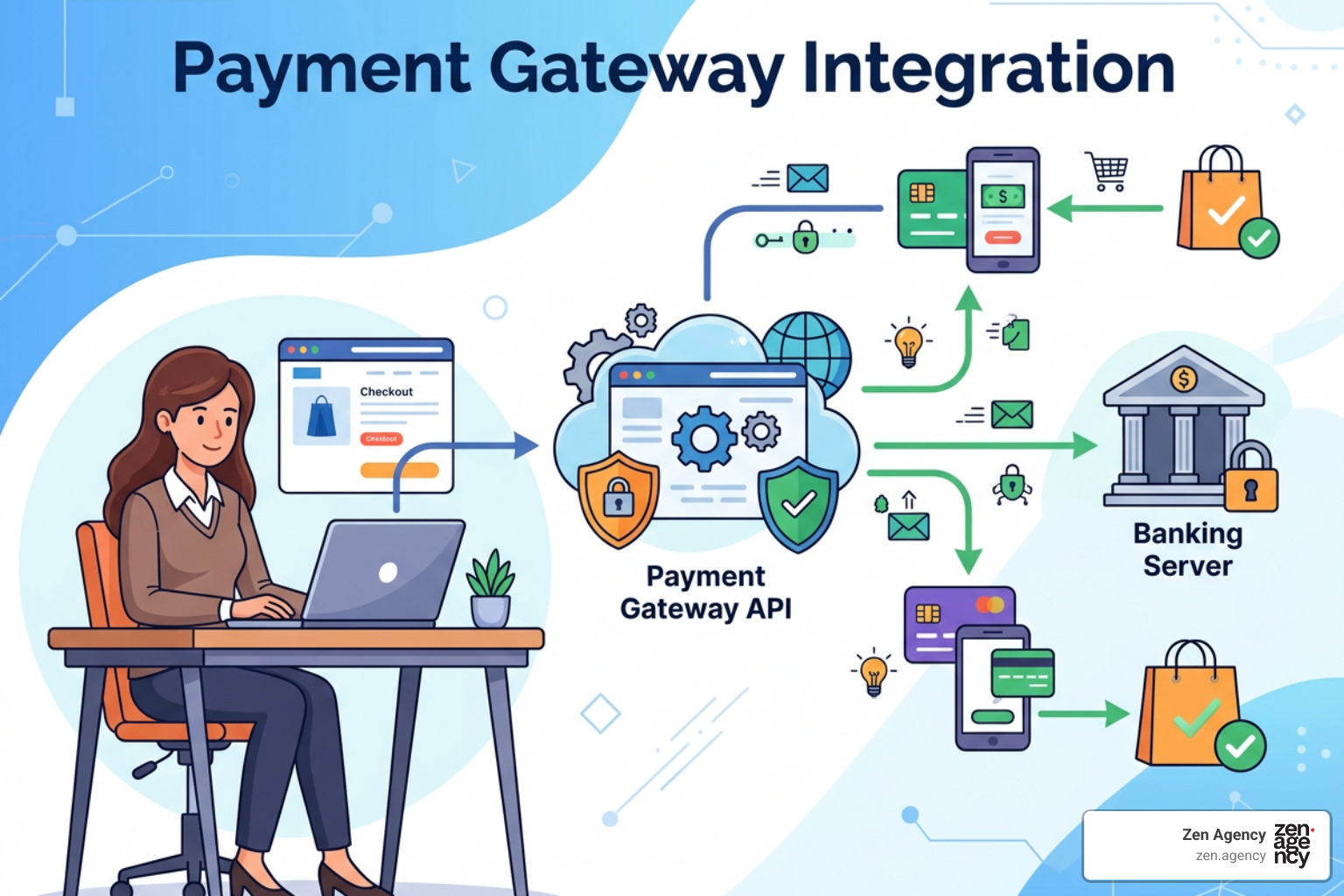
- The Payment Gateway: Captures, encrypts, and transmits payment data from the customer’s browser to the payment processor.
- The Payment Processor: Receives the transaction data, routes it through the card network (like Visa or Mastercard) to the customer’s issuing bank, and returns the approval or denial status.
- The Merchant Account: A specialized bank account that allows your business to accept credit and debit card payments. Once a transaction is approved, funds are temporarily held here before being settled into your primary business bank account.
Many modern payment solutions (such as Stripe or Square) combine the gateway and merchant account functionalities into a single, developer-friendly package. This makes it much easier to manage your cash flow and get your store up and running quickly.
If you are looking to scale your business, establishing a robust transaction flow is one of the easiest ways to Unlock Your E-commerce Potential: Simple Steps to Increase Online Sales.
Types of Payment Gateways: Hosted vs. Integrated
Choosing the right type of gateway determines how much control you have over your customer’s checkout experience and how much technical heavy lifting your team will need to do.
- Hosted Payment Gateways (Redirection):
These gateways redirect your customers away from your website to a secure checkout page hosted by the payment provider. Once the payment is complete, the customer is redirected back to your site.
- Pros: Extremely easy to set up; the provider handles all security and PCI compliance.
- Cons: You lose control over the checkout branding, and the redirect can hurt conversion rates if customers don’t trust the external page.
- Integrated / API-Based Gateways:
With integrated gateways, customers enter their payment information directly on your website. The data is securely passed to the payment provider behind the scenes via an API.
- Pros: Seamless, professional customer experience; keeps users on your site throughout the entire buying journey.
- Cons: Requires more technical expertise to set up and a higher level of responsibility for web security.
- Self-Hosted Gateways: The merchant collects the payment details directly on their own server before sending them to the gateway. This is usually reserved for larger enterprise businesses with dedicated security teams.
- Mobile SDKs: If you are building a custom mobile app, mobile Software Development Kits (SDKs) allow you to embed secure checkout forms directly into your iOS or Android applications.
To help you decide, here is a quick comparison:
| Feature | Hosted Gateways | Integrated (API-Based) | Self-Hosted Gateways |
|---|---|---|---|
| Setup Effort | Low (Plug-and-play) | Medium | High |
| User Experience | Redirects off-site | Seamless on-site | Seamless on-site |
| PCI Compliance Scope | Minimal | Medium (using iframe/elements) | High (Full server audit) |
| Customization | Very Limited | High | Complete |
Choosing the Right Provider and Estimating Costs
Before you write a single line of code, you need to understand the financial reality of accepting credit cards online. Payment processing is not free, and the fees can eat into your profit margins if you don’t plan ahead.
When evaluating providers, you will typically encounter three types of costs:
- Setup Fees: A one-time fee to activate your account (rare among modern providers like Stripe or PayPal, but common with traditional merchant accounts).
- Transaction Fees: The bread and butter of payment processing. Most providers charge a flat fee plus a percentage of the transaction (for example, 2.9% + $0.30 per successful transaction).
- Maintenance Fees: Monthly or annual subscription fees for keeping your gateway active, accessing advanced reporting, or using premium fraud prevention tools.
Additionally, keep an eye out for currency conversion fees (if you sell internationally) and chargeback fees (typically $15 to $25 per dispute if a customer contests a charge).
Before committing to a specific gateway, make sure it aligns with your overall platform strategy. For a deeper dive into choosing the right foundations for your store, check out our guide on Choosing Your Digital Storefront: A WordPress E-commerce Deep Dive.
Key Selection Criteria for Businesses
How do you pick the perfect payment gateway out of dozens of options? Focus on these four pillars:
- Security Features: Ensure the provider offers advanced fraud detection, address verification (AVS), 3D Secure (3DS) authentication, and point-to-point encryption (P2PE).
- Supported Payment Methods: Don’t limit your customers to just credit cards. Look for gateways that support digital wallets (Apple Pay, Google Pay), local payment methods, bank transfers (ACH), and Buy Now, Pay Later (BNPL) options like Klarna.
- Geographic Coverage: Make sure the gateway supports the countries and currencies where your target customers live. If you are operating in the United States, check out the Top Payment Gateways in the US – GoCardless to compare local options.
- Customer Preferences: Understand how your audience likes to pay. For example, younger demographics heavily favor digital wallets and mobile-optimized checkouts, while B2B buyers may require ACH bank transfers.
For specialized setups, you might explore enterprise-grade solutions like the Elavon Payment Gateway | Accept Payments Seamlessly. If you are building platforms for local government or public institutions, resources like the Payment Portal | How To Resources for Helping State Agencies can guide you through regulatory compliance.
If you feel overwhelmed by the choices, partnering with experienced development professionals can save you weeks of research and ensure your integration is handled securely and efficiently.
Technical Requirements for Payment Gateway Integration
To build a secure payment system, you must meet strict technical standards. You cannot simply build a form and send credit card numbers directly to your database. That is a recipe for a massive security breach and heavy fines.
Here are the non-negotiable technical requirements:
- SSL Certificates (HTTPS): Your website must have an active SSL certificate to encrypt all data traveling between the user’s browser and your server. This is mandatory for any site handling payment info.
- PCI DSS Compliance: The Payment Card Industry Data Security Standard (PCI DSS) is a set of security requirements designed to ensure all companies processing card information maintain a secure environment. By using modern integration methods (like tokenization), you can drastically reduce your compliance burden.
- Tokenization: This security process replaces sensitive card data with a unique, one-time-use digital “token.” Your server never actually stores the raw credit card number; it only handles the token, which is useless to hackers.
- P2PE (Point-to-Point Encryption): Encrypts payment data from the moment it is captured until it reaches the secure decryption environment of the payment processor.
- API Keys & Webhooks: API keys allow your website to securely talk to the gateway. Webhooks are automated messages sent from the gateway back to your website to notify you of events (like a successful payment or a failed subscription renewal).

Step-by-Step Payment Gateway Integration
Ready to get your hands dirty? Let’s walk through the standard developer workflow for integrating an API-based payment gateway.
Step 1: Set Up Your Sandbox Environment
Never test your payment integration using real credit cards on a live website. Register for a developer account with your chosen gateway and retrieve your “Test Mode” API keys.
Step 2: Build the Client-Side Payment Form
Use the gateway’s secure JavaScript libraries to render the payment fields on your checkout page. For example, Stripe uses “Elements” to display secure, pre-styled credit card inputs directly on your site without exposing you to raw card data.
- To see how this works in practice, refer to the Accept a payment | Stripe Documentation.
- If you need to capture details before officially charging the customer, read up on how to Collect payment details before creating an Intent | Stripe Documentation.
- For general platform capabilities, see the broader Payments | Stripe Documentation.
Step 3: Create a Server-Side Endpoint
When a customer clicks “Pay,” your client-side form tokenizes the card details. Next, your website’s backend server must make a secure API call to the payment gateway to authorize and capture the payment using that token.
- If you are building a custom PHP site, working with an experienced development team can ensure your backend endpoints are secure, compliant, and highly optimized.
- If you are targeting international markets like India, you might follow the Standard Checkout – Integration Steps | Razorpay Payment Gateway | Razorpay Docs or utilize their Quick Integration – Steps | Razorpay Payment Gateway | Razorpay Docs.
- For a comprehensive business roadmap, consult the Payment Gateway Integration: Complete Guide for Businesses (2026).
Testing, Going Live, and Managing Transactions
Before you flip the switch to accept real money, you must thoroughly test every possible checkout scenario.
In your sandbox environment, use the provider’s designated test card numbers to simulate different outcomes. Don’t just test successful payments; you need to make sure your website responds correctly to:
- Declined cards (insufficient funds, expired cards, incorrect CVVs)
- Network timeouts and slow connections
- Abandoned checkouts (where the user closes the browser mid-transaction)
If you are integrating modern digital wallets, you will need to follow platform-specific developer guidelines. For example, you can learn how to implement Google’s payment button by following this Tutorial | Google Pay API | Google for Developers.
Once you have verified that everything works flawlessly, swap your Test API keys for your Live API keys, set up your production webhooks, and perform one final test transaction using a real credit card for a small amount (like $1.00) to confirm that the funds actually land in your merchant account.
Handling Success, Failures, Refunds, and Chargebacks
A transaction doesn’t end when the customer clicks “Submit.” You need a clear system for managing post-purchase events.
- Payment Success: When a payment is successful, your server must immediately update the order status to “Processing” or “Completed,” trigger an automated email receipt to the customer, and clear their shopping cart.
- Failed Transactions: If a payment fails, do not just show a generic “Error” message. Give the customer clear, actionable feedback (e.g., “Your card was declined. Please check your card number or try a different payment method”).
- Refund Processing: You should be able to issue full or partial refunds directly from your e-commerce dashboard (like WooCommerce or Shopify) without needing to log into your payment gateway portal every time.
- Chargeback Management: When a customer disputes a charge with their bank, the gateway will hold the disputed funds and charge you a fee. Set up webhook notifications so your team can quickly submit proof of delivery or service to fight fraudulent chargebacks.
If your checkout process feels sluggish or times out during high-traffic periods, it can cause duplicate charges or failed payments. If you are running on WordPress, take a look at our guide on how to Stop the Lag: A Guide to Fixing Slow WooCommerce Stores to keep your database running at peak performance.
Best Practices and Future Trends in Online Payments
To get the absolute best return on investment from your payment gateway integration, you should design your checkout experience to minimize friction.
Here are our top recommendations:
- Offer Guest Checkout: Forcing users to create an account before they buy is one of the leading causes of cart abandonment. Let them buy first, and offer to save their details after they have completed the purchase.
- Optimize for Mobile: Over half of all e-commerce traffic comes from mobile devices. Ensure your checkout form is responsive, uses large touch-friendly buttons, and supports one-touch mobile wallets.
- Minimize Form Fields: Only ask for the information you absolutely need to process the payment and ship the order. Every extra input field reduces your conversion rate.
- Display Security Signals: Place trust badges, SSL indicators, and accepted payment method icons near the payment button to reassure anxious shoppers that their data is safe.
For more proven strategies on turning visitors into paying customers, check out The Ultimate Playbook to Skyrocket Ecommerce Conversion Rates.
Future Trends in Payment Technology
The way people pay is shifting rapidly. As we navigate through 2026, keeping an eye on these emerging payment technologies will help you future-proof your digital storefront:
- Biometric Authentication: FaceID and fingerprint scans are rapidly replacing traditional passwords and SMS verification codes, making checkout faster and more secure than ever.
- AI Fraud Prevention: Machine learning models can analyze customer behavior in real-time to block fraudulent transactions before they even happen, saving you thousands in chargeback fees.
- Embedded Finance: Platforms are increasingly integrating financial services directly into their user interfaces, allowing for personalized, instant payment and financing options at the point of sale.
- Contactless and Blockchain Payments: While credit cards remain king, more merchants are starting to explore decentralized billing options and instant bank-to-bank settlement networks.
Staying ahead of these trends is crucial to maintaining a competitive edge. To explore these concepts in greater detail, see the Payment Gateway Integration: Complete Guide for Businesses (2026).
Frequently Asked Questions about Payment Integration
What is the difference between a payment gateway and a payment processor?
The payment gateway is the customer-facing software that securely captures, encrypts, and transmits payment data from your website. The payment processor is the backend system that receives this data, communicates with the card networks and issuing banks, and actually moves the funds from the customer’s account to your merchant account.
How long does it take to integrate a payment gateway into a website?
If you are using a standard plugin for a platform like WooCommerce or Shopify, the basic integration can be completed in a single afternoon. However, if you are building a highly customized checkout flow or integrating custom APIs, a secure development and testing cycle typically takes anywhere from one to three weeks.
What security measures are mandatory for processing online payments?
At a minimum, your website must have an active SSL certificate (HTTPS), and you must comply with the Payment Card Industry Data Security Standards (PCI DSS). Utilizing modern tokenization methods (such as Stripe Elements or Google Pay API) ensures that sensitive card data never touches your servers, which drastically simplifies your security compliance.
Conclusion
Integrating a payment gateway into your website is much more than just checking a technical box — it is the bridge that turns curious browsers into loyal, paying customers. Whether you are running a high-volume B2B wholesale operation or launching a boutique retail brand, a secure, frictionless checkout experience is non-negotiable.
If you are operating a business in the Wilkes Barre, Scranton, or broader Pennsylvania and Montana regions, you don’t have to navigate these complex technical waters alone. At Zen Agency, we have been helping businesses scale their digital storefronts since 2008. From custom website development to advanced platform integrations, we provide the enterprise-grade solutions you need to maximize your visibility, profitability, and ROI.
Ready to streamline your checkout process and skyrocket your sales? Let’s build something incredible together. Explore Zen Agency’s Website Design Services and contact us today to get started!