
WAVE Goodbye to Accessibility Woes: Top ADA Website Scanners Revealed
Why ADA Compliance Website Scanners Are Critical for Your Business
An ada compliance website scanner is an automated tool that tests your website against Web Content Accessibility Guidelines (WCAG) to identify barriers that prevent people with disabilities from using your site. Here are the top scanners and what you need to know:
Quick Answer: Best ADA Compliance Website Scanners
| Scanner Type | Best For | Key Feature | Limitation |
|---|---|---|---|
| Free Tools (WAVE, Lighthouse) | Quick single-page checks | Instant results, no setup | Only scans one page at a time |
| Browser Extensions | Testing protected pages | Direct in-browser testing | Manual page-by-page process |
| Automated Platforms | Ongoing monitoring | Scheduled scans, reports | Detects only ~57% of issues |
| Professional Audits | Full compliance | Human expertise, legal docs | Higher cost, longer timeline |
The stakes couldn’t be higher. 96% of websites have accessibility errors, with the average site containing 51+ issues. In 2024 alone, 8,800+ ADA lawsuits were filed, with settlements averaging $15,000. That’s a 120% increase in just two years.
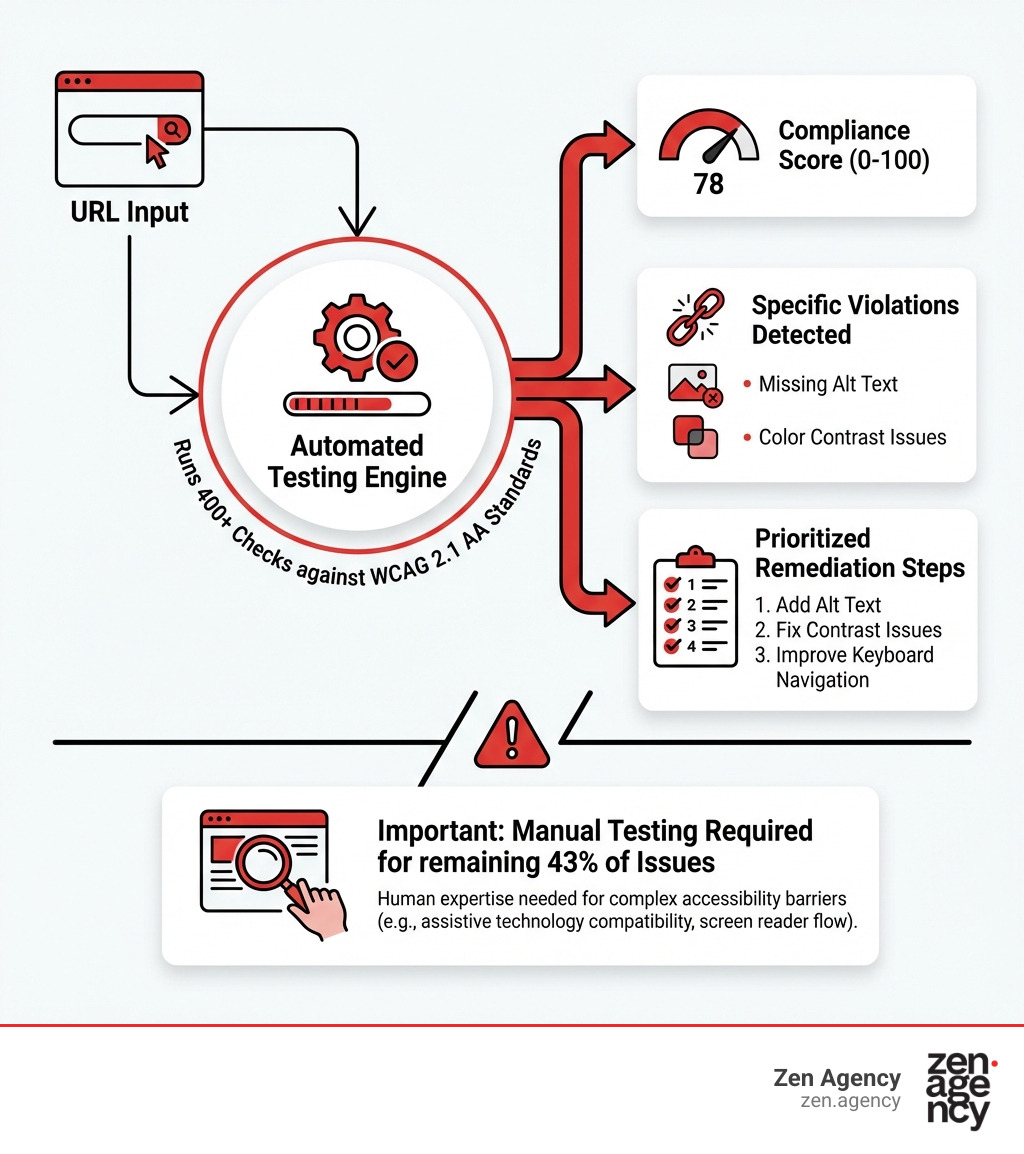
But here’s the reality: automated scanners can only detect about 57% of accessibility issues. The remaining problems require human judgment and manual testing with assistive technologies like screen readers.
Whether you’re facing an immediate lawsuit threat or trying to avoid becoming the next statistic, understanding how these scanners work—and their limitations—is essential for protecting your business and serving all your customers.
I’m Joseph Riviello, and over my 22+ years leading digital marketing strategy, I’ve helped companies navigate the complex landscape of ada compliance website scanner tools to achieve both legal protection and improved user experience. The key is combining automated scanning with expert human review for comprehensive accessibility.
The Legal Landscape: Why You Need an ADA Compliance Website Scanner
Navigating the digital world without an ada compliance website scanner is a bit like driving a car without a dashboard; you might be moving, but you have no idea when you’re about to hit a legal speed trap. In the United States, the Americans with Disabilities Act (ADA) is the primary legislation protecting the rights of individuals with disabilities. While the original 1990 act focused on physical spaces, the courts and the Department of Justice (DOJ) have made it clear that “places of public accommodation” include websites.
The legal pressure is mounting. On April 24, 2024, the U.S. DOJ published a final rule specifically requiring state and local government websites to meet stringent accessibility standards. But private businesses aren’t off the hook. ADA Title III applies to almost every business that communicates with customers online. If your site isn’t accessible, you’re not just excluding a portion of your audience—you’re opening the door to aggressive plaintiff attorneys.
The statistics are sobering. ADA lawsuits have increased by 120% in the last two years. High-risk states like Pennsylvania see significant activity, and even if your business is based in smaller hubs like Wilkes Barre, Scranton, or Billings, MT, your website is globally accessible, making you a potential target. To understand the full scope of these regulations, we recommend checking out our ADA Compliance Laws: Complete Guide to see how these rules apply to your specific industry.
Beyond the ADA, organizations that receive federal funding or provide services to government agencies must also adhere to Section 508 of the Rehabilitation Act. This adds another layer of complexity that an ada compliance website scanner can help unravel by identifying technical violations before they lead to six-figure fines. For more on how to protect your digital assets, read our guide on Don’t Get Sued: The ADA Website Standards You Need to Know.
Global Standards and WCAG 2.1 AA
If you operate internationally, the web of compliance grows even wider. The World Wide Web Consortium (W3C) created the Web Content Accessibility Guidelines (WCAG), which serve as the gold standard for digital accessibility worldwide. Most modern laws, including the ADA and Section 508, point toward WCAG 2.1 Level AA as the target for compliance.
Across the pond, the European Accessibility Act (EAA) will require private European websites to be accessible by June 2025. Closer to home, our neighbors in Canada must follow the Accessibility for Ontarians with Disabilities Act (AODA), which imposes fines as high as $100,000 per day for non-compliant corporations.
By using a scanner that tests against tag/wcag/ standards, you are essentially “future-proofing” your website against changing local and international laws.
Key Features of a Reliable Scanning Tool
When you’re shopping for an ada compliance website scanner, it’s easy to get overwhelmed by technical jargon. However, a truly reliable tool should do more than just point out errors; it should provide a roadmap for fixing them.
A high-quality scanner evaluates the “POUR” principles:
- Perceivable: Can users see or hear the content? (e.g., Alt text for images, color contrast).
- Operable: Can users navigate the site? (e.g., Keyboard-only navigation).
- Understandable: Is the language clear and the interface predictable?
- Robust: Does the code work with assistive technologies like screen readers?
The difference between a “good” scanner and a “great” one often comes down to the depth of the audit. While many free tools check for the basics, advanced solutions integrate directly with your CMS—like WordPress—to monitor changes in real-time. This is crucial because every time you upload a new blog post or product image, you risk breaking your compliance. We discuss this further in our Website Security Blueprint: Fortifying Your Digital Presence, as accessibility and security are two sides of the same coin when it comes to maintaining a professional web presence.
To help you decide which route to take, here is a comparison of what to expect from different scanning tiers:
| Feature | Free Scanners | Paid/Commercial Scanners |
|---|---|---|
| Scan Scope | Single page at a time | Entire website/domain |
| Fix Instructions | Basic technical descriptions | Detailed “Plain English” guides |
| Monitoring | Manual/One-off | Automated/Weekly/Daily |
| Legal Proof | None | VPAT reports & certificates |
| Integration | Browser-based | CMS plugins & API access |
For more tips on choosing the right tools, explore our tag/ada-compliance/ resources.
Automated Detection Capabilities
Modern scanners use AI-powered engines to perform over 400 distinct tests. These tests can instantly identify common “low-hanging fruit” like:
- Missing image alt text.
- Low color contrast between text and backgrounds.
- Empty buttons or links that lack descriptive text.
- Improper heading hierarchies (e.g., jumping from H1 to H3).
These tools often provide a 0-100 compliance score, giving you a baseline to measure your progress. However, it is vital to remember that a “100” on an automated scan does not mean your site is 100% compliant—it just means the bot didn’t find any errors it was programmed to see. Staying updated on tag/accessibility/ trends is the only way to ensure your automation keeps pace with new guidelines like WCAG 2.2.
Beyond Automation: Why Manual Testing Still Matters
Here is the “secret sauce” that many software companies won’t tell you: an ada compliance website scanner is only the first step. Research shows that even the best automated tools catch only about 57% of accessibility issues. Why? Because bots lack human context.
For example, a scanner can tell you if an image has “alt text.” But it can’t tell you if that text is helpful. A bot might see alt="image123" and give you a green checkmark, but a blind user hearing “image one two three” through a screen reader is left in the dark.
Manual testing involves human experts who actually use assistive technology to navigate your site. They look for:
- Keyboard Traps: Can a user get “stuck” in a menu or form?
- Logical Reading Order: Does a screen reader announce the content in an order that makes sense?
- Interactive Elements: Do pop-ups and modals work for everyone, or do they block access to the rest of the page?
At Zen Agency, we emphasize that true compliance is a blend of technology and human empathy. Our ADA Compliance Services combine rigorous automated scanning with expert manual audits to ensure nothing is missed. Automation finds the bugs; humans find the barriers.
Frequently Asked Questions
How accurate is an ada compliance website scanner?
The accuracy of an ada compliance website scanner depends on the complexity of your site. On average, these tools identify about 57% of WCAG violations. They are incredibly accurate at detecting “hard” errors like missing code attributes or specific color hex code ratios. However, they struggle with “soft” errors that require interpretation, such as whether a video transcript is accurate or if a navigation menu is intuitive. Because 96% of websites have errors, these scanners are excellent for identifying the 51+ issues the average site carries, but they should never be your only line of defense. Check out tag/ada-compliance/ for deeper dives into accuracy benchmarks.
Can an ada compliance website scanner generate legal certificates?
Many commercial scanners offer “certificates of compliance” or VPAT (Voluntary Product Accessibility Template) reports. While these documents are excellent for showing a “good faith effort” to a court or a potential client, they are not a legal “get out of jail free” card. No automated tool can grant you absolute legal immunity. However, having a documented history of scans and remediations can significantly strengthen your defense in a lawsuit. For more on the legal utility of these reports, see Don’t Get Sued: The ADA Website Standards You Need to Know.
How often should I scan my website for accessibility?
Accessibility is not a “one and done” project. Every time you update a plugin, add a new product to your e-commerce store, or change your brand colors, you could inadvertently create an accessibility barrier. We recommend setting up ongoing monitoring with weekly automated scans. For larger enterprises or sites with high content turnover, daily scans are often preferred. Regular monitoring ensures that you maintain your tag/accessibility/ score and catch errors before an auditor or a plaintiff’s attorney does.
Conclusion
In the modern digital economy, accessibility is no longer optional—it’s a prerequisite for success. Using an ada compliance website scanner is the most efficient way to begin your journey toward a more inclusive digital presence. By identifying the majority of WCAG errors automatically, you save time, reduce your legal risk, and open your doors to the millions of people living with disabilities.
At Zen Agency, we specialize in taking the “woe” out of web accessibility. Since 2008, we’ve provided enterprise-grade solutions to businesses in Pennsylvania, Montana, and across the USA. Whether you need a custom WordPress development that is accessible from the first line of code or a comprehensive audit of your existing site, we are here to help you increase your visibility and ROI while staying on the right side of the law.
Don’t wait for a legal notice to arrive in the mail. Take control of your digital future today. Explore our ADA Compliance Services and let’s make the web a better place for everyone, together.