How to Build ADA Compliant Websites Without the Stress
How to Build ADA Compliant Websites Without the Stress
Why Every Business Needs an ADA Compliance Checklist for Websites
An ada compliance checklist for websites is the fastest way to know whether your site is accessible to the 1 in 4 Americans living with a disability — and whether you’re exposed to legal risk right now.
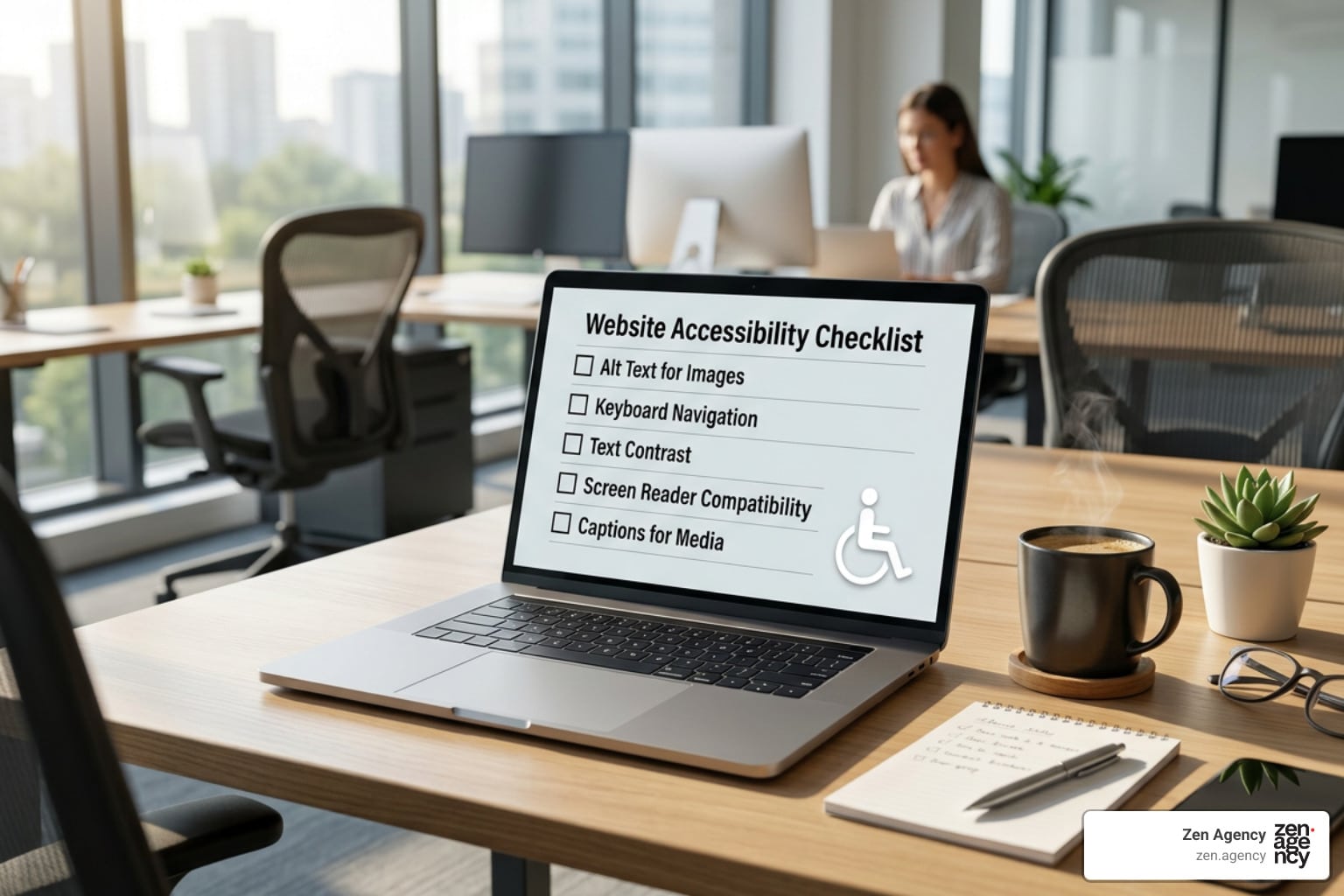
Here’s a quick-reference checklist of the core requirements:
- Alt text — All meaningful images have descriptive alternative text
- Keyboard navigation — Every page element is reachable without a mouse
- Color contrast — Text meets a minimum 4.5:1 contrast ratio against its background
- Form labels — Every input field has a programmatically associated label
- Captions — All videos have accurate, synchronized captions
- Heading hierarchy — Headings follow a logical H1 to H2 to H3 order
- Skip navigation — A “Skip to main content” link appears at the top of every page
- Error identification — Forms clearly describe what went wrong and how to fix it
- Text resizing — Content stays usable when zoomed to 200%
- Accessibility statement — A public-facing statement is published and easy to find
These items map to WCAG 2.1 Level AA — the standard the Department of Justice expects most websites to meet under the Americans with Disabilities Act.
The stakes are real. Over 8,600 ADA-related federal lawsuits were filed in a single recent year, targeting businesses of every size. An inaccessible website can exclude users just as effectively as a physical building without a wheelchair ramp — and courts have consistently agreed.
I’m Joseph Riviello, CEO of Zen Agency, and over my 22 years in digital marketing I’ve helped businesses navigate complex compliance challenges, including building and auditing sites against the ada compliance checklist for websites standards outlined by the DOJ and WCAG. Below, I’ll walk you through everything you need to act on this today.
Quick look at ada compliance checklist for websites:
Understanding ADA Website Compliance and the Law
When the Americans with Disabilities Act (ADA) was signed into law in 1990, the commercial internet was barely a whisper. Yet, Congress intentionally designed the ADA to keep pace with rapidly changing technology. Fast forward to July 2026, and our digital storefronts are just as vital as our physical doors.
The Department of Justice (DOJ) has consistently maintained since 1996 that the ADA applies directly to website content. Under the law, websites are categorized under two key areas:
- Title II: Applies to state and local government entities.
- Title III: Applies to businesses open to the public, also known as “places of public accommodation.”
Whether you run a local retail shop in Scranton, PA, a dental practice in Hazleton, or an enterprise e-commerce brand based out of Billings, MT, your website must be accessible. In April 2024, the DOJ signed a landmark final rule under Title II, establishing concrete Web Content Accessibility Guidelines (WCAG) compliance deadlines for local governments based on population size. For larger municipalities (50,000+ residents), the hard deadline is April 26, 2027, while smaller communities and special districts have until April 26, 2028. For private businesses under Title III, the pressure is equally intense as courts increasingly rule in favor of plaintiffs facing digital barriers.
Why You Need an ADA Compliance Checklist for Websites
Trying to make a website compliant without a structured plan is like trying to bake a soufflé without a recipe—you might end up with something, but it probably won’t be pretty (or legally sound). A comprehensive checklist bridges the gap between complex legal jargon and actual code.
By utilizing a structured checklist, webmasters and business owners can systematically audit their digital presence. To help you get your bearings, we suggest starting with our Beginners Guide To Ada Website Compliance to understand the core concepts of digital accessibility. For official regulatory context, you can also review the Department of Justice’s Guidance on Web Accessibility and the ADA, which outlines the federal expectations for digital inclusion.
The Legal Risks and Penalties of Non-Compliance
Ignoring digital accessibility is a massive financial gamble. If a user with a disability cannot navigate your site to buy a product, book an appointment, or read public information, they are being excluded. This exclusion frequently leads to demand letters and federal lawsuits.
The financial consequences are steep. First-time ADA violations can attract civil penalties of up to $75,000, with subsequent violations climbing up to $150,000. On top of federal fines, businesses must pay their own legal fees, the plaintiff’s attorney fees, and the cost of rushed website remediation. For a small business, a typical lawsuit settlement ranges from $5,000 to $75,000. In fact, one educational institution could have saved nearly $600,000 if they had proactively made accommodations before being sued.
Beyond the federal landscape, state-level regulations add another layer of complexity. If you operate in Pennsylvania or Montana, you must also be mindful of regional civil rights laws. To get a complete picture of your legal obligations, explore The Complete Guide To Ada Legal Requirements.
The Ultimate ADA Compliance Checklist for Websites
To make website accessibility manageable, the World Wide Web Consortium (W3C) organized the Web Content Accessibility Guidelines (WCAG) into three conformance levels: Level A (the bare minimum), Level AA (the standard for legal compliance), and Level AAA (the highest, most restrictive level).
Most legal frameworks, including the ADA and Section 508, target WCAG 2.1 or 2.2 Level AA as the golden standard. Let’s break down the essential checklist items you must address to secure your site.
Level A: Essential Accessibility Requirements
Level A addresses the most critical barriers on a website. If your site fails Level A, users with assistive technologies like screen readers or keyboard-only setups will find it virtually impossible to use. To dive deeper into these core standards, read The A To Z Of Web Accessibility Understanding Wcag And Ada Guidelines or consult the official W3C WCAG 2.1 Quick Reference.
- Keyboard Navigability: Sighted and non-sighted users must be able to navigate your entire website using only the keyboard (Tab, Shift+Tab, Enter, and Escape). Sighted keyboard users rely on a visible focus indicator to see where they are on the page. Never use CSS to remove default outlines without replacing them with a high-contrast alternative.
- Alternative Text (Alt Text): Every meaningful image must have descriptive alt text within the HTML code so screen readers can describe the image to visually impaired users. Purely decorative images (like background swirls or accent lines) should use an empty alt attribute (alt=””) so screen readers know to skip them.
- Logical Heading Hierarchy: Use semantic HTML tags (H1, H2, H3, etc.) in a sequential, descending order. Do not skip levels (e.g., jumping from an H1 to an H3) just for visual styling.
- Form Labels and Inputs: Every form field must have a programmatically associated label. Do not rely solely on placeholder text inside the input box, as placeholders disappear when a user starts typing and are often ignored by screen readers.
- Seizure Prevention: Avoid any video or animation that flashes more than three times in a single second, as this can trigger physical reactions or seizures.
Level AA: The Standard for Legal Compliance
Level AA is the target most businesses aim for to satisfy the DOJ and minimize their lawsuit risk. It focuses on making content readable, understandable, and functional for a much broader audience. To keep your business safe from drive-by lawsuits, check out our guide on how to Dont Get Sued The Ada Website Standards You Need To Know.
- Color Contrast: Sighted users with low vision or colorblindness must be able to read your text easily. Standard body text must have a contrast ratio of at least 4.5:1 against its background. Large text (typically 18pt or 14pt bold) must have a contrast ratio of at least 3:1.
- Text Resizing: Users must be able to zoom in and scale text up to 200% using standard browser controls without breaking the layout, overlapping text blocks, or losing site functionality.
- Skip Navigation Links: Provide a visible or keyboard-accessible “Skip to main content” link at the very top of your HTML structure. This allows keyboard and screen reader users to bypass repetitive header menus and jump straight to the primary content of the page.
- Consistent Navigation: Keep repeated components, such as main menus, search bars, and footers, in the exact same order and location across all pages to help users with cognitive differences predict your layout.
How to Audit and Test Your Site for Accessibility
Now that you know what goes into a compliant website, how do you verify where your site currently stands? Auditing is not a one-time project; it is a continuous process of evaluation and refinement.
How to Implement the ADA Compliance Checklist for Websites
Achieving compliance requires a multi-phased testing strategy that combines automated scanning, manual code reviews, and real-world user testing. Here is how we recommend structuring your audit:
- Run Automated Scans: Use automated tools to scan your entire site for low-hanging fruit like missing alt tags, duplicate IDs, and basic contrast failures.
- Conduct Manual Keyboard Testing: Unplug your mouse. Use only the Tab, Enter, and arrow keys to navigate your homepage, contact forms, checkout pages, and navigation menus. Can you access everything? Do you get trapped in any modal popups?
- Test with Screen Readers: Turn on native screen readers like VoiceOver (macOS/iOS) or download NVDA (Windows) to experience your site the way a visually impaired user would.
- Log and Prioritize: Organize your findings by severity. Fix Level A blockers first, then address Level AA gaps.
To equip yourself with the right tools for this process, check out our resource on how to Scan Your Site The Ultimate Accessibility Audit Toolkit. For small businesses specifically, following a structured walkthrough can help streamline your remediation efforts.
The Limitations of Automated Accessibility Checkers
Automated checkers are fantastic for catching obvious technical errors, but they are far from perfect. On average, automated tools only detect about 25% to 30% of WCAG success criteria.
For example, an automated scanner can tell you if an image is missing an alt attribute. However, it cannot tell you if the alt text you wrote makes sense. If you have an image of a golden retriever and your alt text reads “image of a dog,” the automated tool will give you a green checkmark. But to a blind user, that description lacks critical context. Similarly, automated checkers struggle to evaluate subjective issues like logical keyboard reading order or the usability of interactive forms. To find the right balance, read our review of the Top 3 Ada Compliance Website Checker Options To Save Your Site.
Common Mistakes to Avoid in Digital Accessibility
When businesses rush to make their websites compliant, they often fall into common traps that actually increase their legal exposure rather than resolving the core issues.
Why Overlay Widgets and Plugins Fail
In recent years, many companies have turned to “quick-fix” accessibility overlays or AI-powered widgets. These tools promise to make any website instantly compliant with a single line of JavaScript. Unfortunately, they do not work, and relying on them is a critical mistake.
Overlay widgets do not fix the underlying HTML code of your website. Instead, they slap a temporary visual skin over the page. Advocacy groups like the National Federation of the Blind have formally condemned these overlays because they often interfere with native screen reader software, creating more barriers for disabled users rather than fewer. Furthermore, plaintiffs’ law firms actively target websites that use overlays because the presence of a widget is a clear indicator that the underlying website code is inaccessible. To understand how to perform a genuine check without relying on shortcuts, see The Quick And Painless Ada Compliance Check For Webmasters.
Neglecting PDFs and Third-Party Integrations
Another common blind spot is failing to audit non-HTML content. Websites often host dozens of downloadable PDF documents, such as menus, brochures, or public reports. When you convert a document from Microsoft Word to PDF, the built-in accessibility features (like heading tags and reading order) are often stripped away.
Additionally, third-party integrations like embedded Google Maps, review widgets, and customer chat windows frequently introduce accessibility failures that you cannot easily patch in-house. Always ensure your iframes have descriptive title attributes, and hold your third-party vendors to the same accessibility standards you hold yourself to. For federal compliance baselines that govern document accessibility, you can refer to the Section 508 Accessibility Standards and Requirements guidelines, as well as the historical Chapter 5 Addendum: Title II Checklist, (Website Accessibility) for government entities.
Frequently Asked Questions about Website Accessibility
Does the ADA apply to small business websites?
Yes. The ADA applies to all businesses that are considered “places of public accommodation,” regardless of their staff size or physical location. Sighted and disabled users alike must have equal access to your digital goods and services. If you operate a business open to the public, you have a legal obligation to maintain an accessible website. For more details, consult the Department of Justice Guidance on Web Accessibility.
What is the difference between WCAG Level A and Level AA?
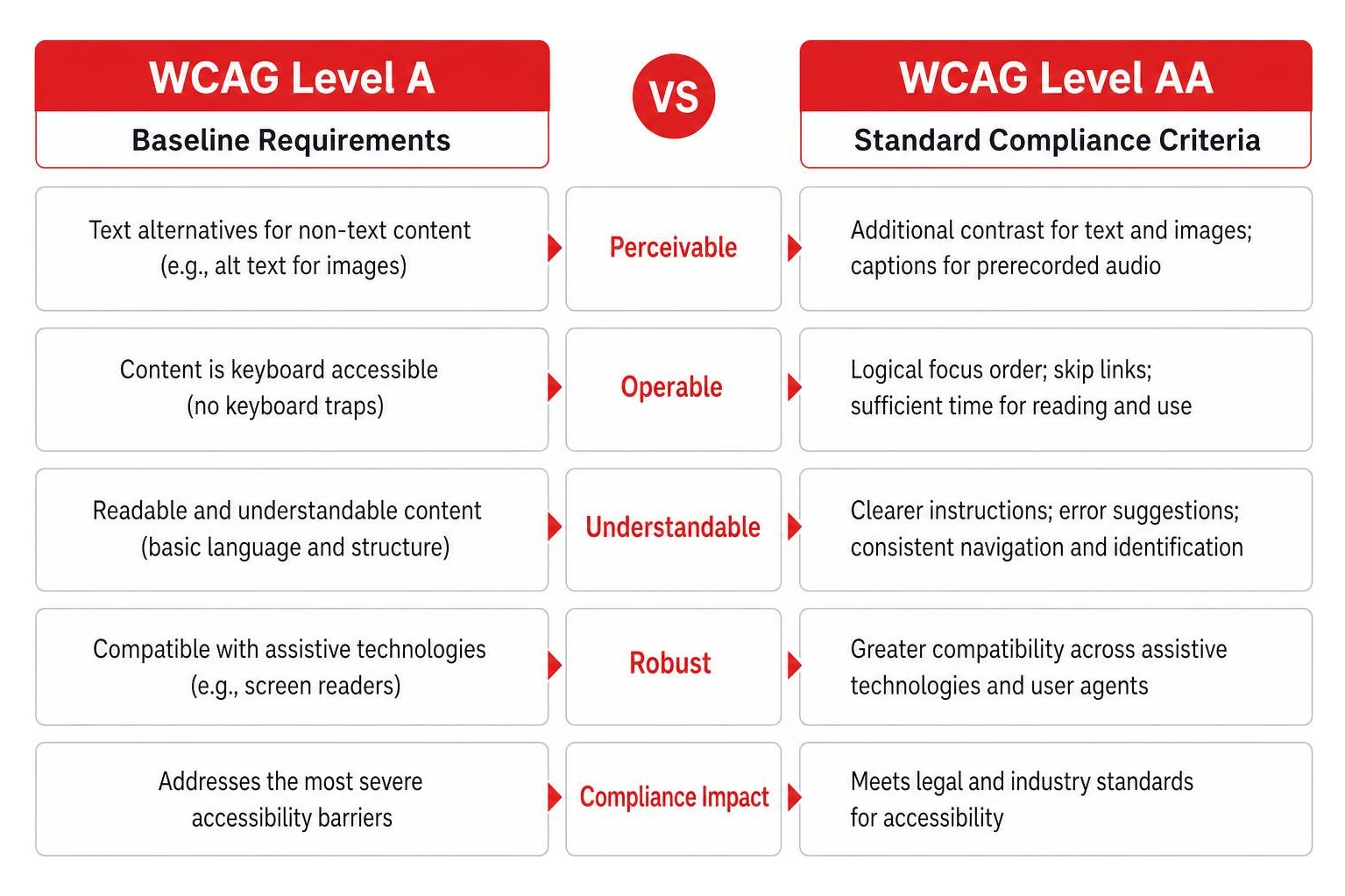
Level A represents the absolute baseline requirements for web accessibility, addressing the most severe barriers. Level AA builds upon those rules to establish the standard level of accessibility required for legal compliance under most global frameworks.
How much does it cost to make a website ADA compliant?
The cost of remediation depends entirely on the size and complexity of your website. A simple 5-to-10-page brochure website might cost between $500 and $2,000 to remediate. In contrast, a massive enterprise e-commerce platform with dynamic search filters, complex checkout funnels, and thousands of products can cost anywhere from $5,000 to $25,000 or more. However, building accessibility into your website from day one is always more cost-effective than trying to patch broken code after a lawsuit is filed.
Conclusion
Digital inclusion is not a trend, and it is certainly not a one-time development project. It is an ongoing business practice that ensures every single user—regardless of how they experience the physical world—enjoys equal access to your brand online.
At Zen Agency, we have been delivering enterprise-grade web development, custom branding, and robust accessibility solutions since 2008. We help struggling-to-scale businesses across Pennsylvania, Montana, and the United States eliminate digital barriers, boost search engine visibility, and maximize ROI. Don’t wait for a demand letter to arrive in the mail. Take control of your digital presence today by exploring our professional Zen Agency ADA Compliance Services.