A Field Guide to ADA Compliant Web Design for Modern Developers
ADA Compliant Web Design Starts With Usable, Inclusive Foundations
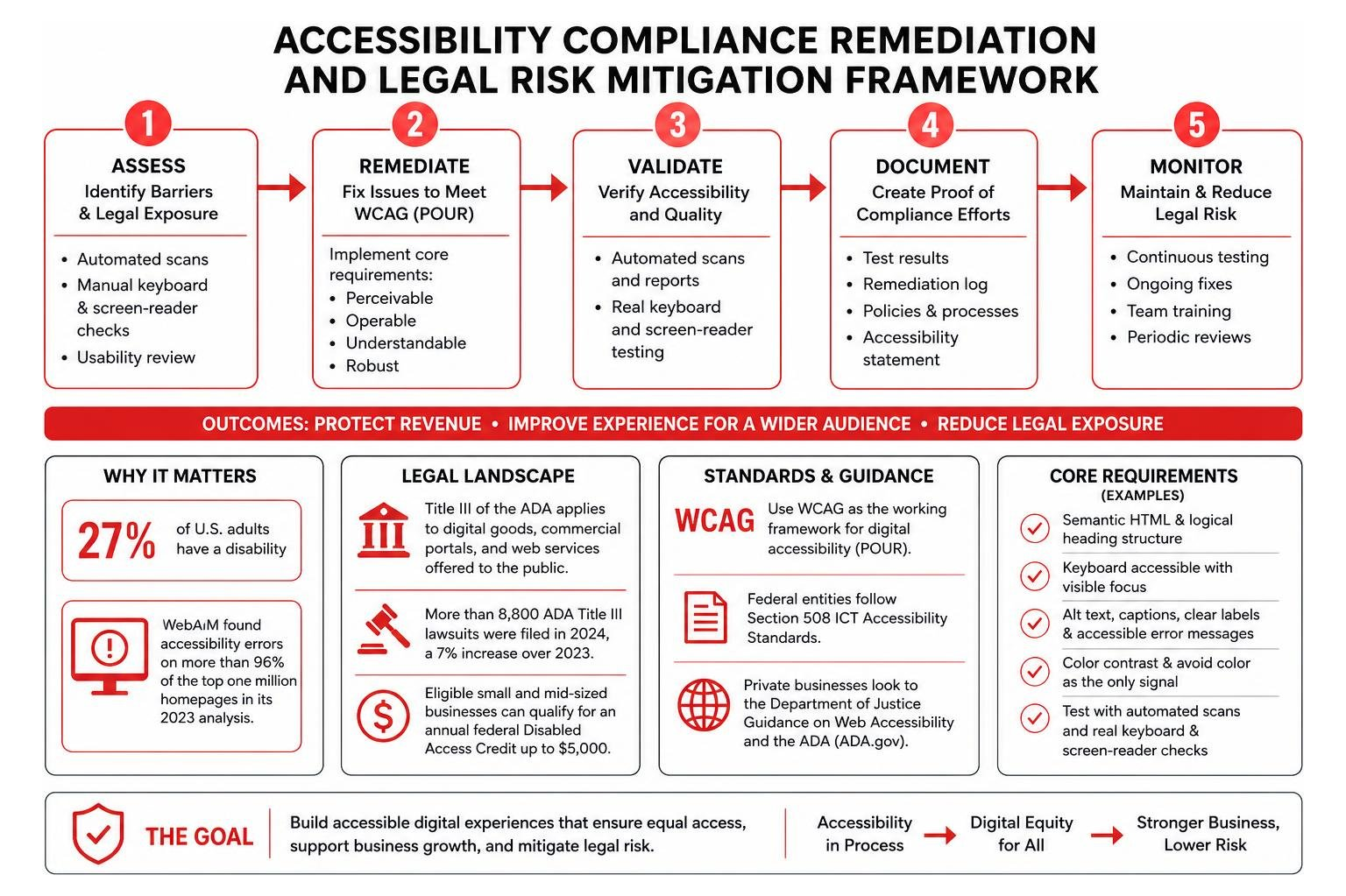
ADA compliant web design means building every page, form, menu, and checkout flow so people can use it with a keyboard, screen reader, captions, zoom, or other assistive technology. For most organizations, the practical target is WCAG 2.2 Level AA. Start by:
- Using semantic HTML and a logical heading structure.
- Making every interactive feature work by keyboard with visible focus.
- Adding useful alt text, captions, clear labels, and accessible error messages.
- Checking color contrast and avoiding color as the only signal.
- Testing with automated scans and real keyboard and screen-reader checks.
This work is not just about avoiding barriers. It protects revenue, improves the experience for a wider audience, and reduces legal exposure. The need is substantial: 27% of U.S. adults have a disability, while WebAIM found accessibility errors on more than 96% of the top one million homepages in its 2023 analysis.
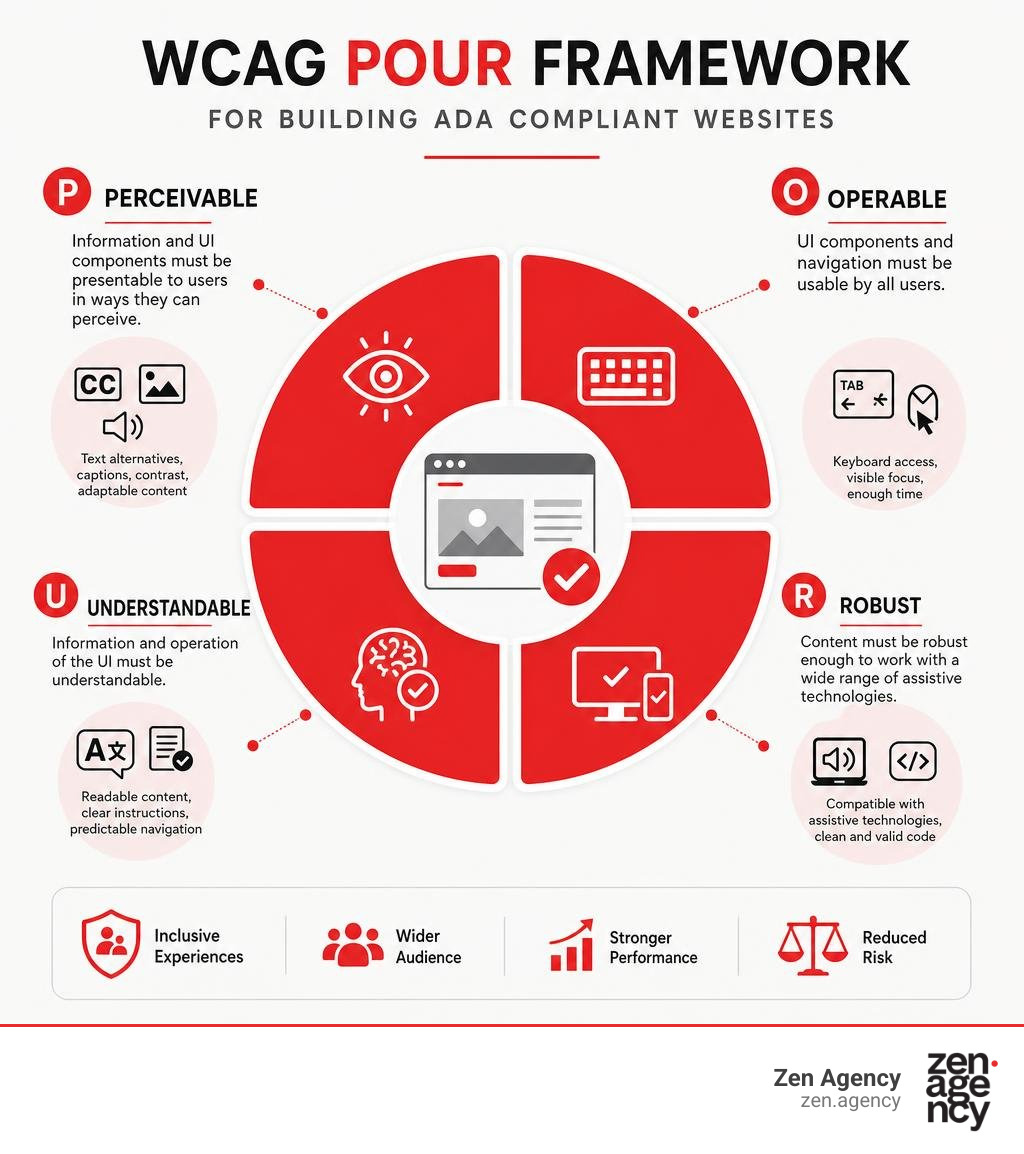
The ADA does not provide a single web-design checklist, but the Department of Justice has long treated accessible digital services as part of equal access. WCAG gives developers the clearest working framework: content should be perceivable, operable, understandable, and robust.
I am Joseph Riviello, CEO and Founder of Zen Agency, with more than 22 years of experience helping companies improve the full digital path from visibility and traffic to leads, conversions, and revenue. In this guide, I will show how ADA compliant web design can become a practical part of your development process rather than a costly last-minute repair.
Ada compliant web design word roundup:
Legal Landscape and the Technical Scope of Digital Accessibility
The legal conversation around digital accessibility has shifted dramatically over the last several years. The Americans with Disabilities Act was enacted in 1990 to prohibit discrimination against individuals with disabilities in everyday life. While the original statutory text did not explicitly mention internet architecture, the U.S. Department of Justice has consistently taken the official position since 1996 that Title III of the ADA applies to all digital goods, commercial portals, and web services offered to the general public.
Title III classifies private businesses open to the public as “places of public accommodation.” In modern commerce, your digital storefront, client portal, or software interface serves as your primary entryway. Inaccessible web architecture acts as a modern architectural barrier—locking people out just as effectively as concrete stairs outside a physical storefront. When an online store features an unlabelled checkout button or an application form cannot be navigated by keyboard, assistive technology users face immediate exclusion.
Federal courts have reinforced this principle. More than 8,800 ADA Title III lawsuits were filed in 2024 alone, marking a 7% increase over 2023 figures. Thousands of businesses receive pre-litigation demand letters every month seeking substantial settlements alongside forced platform remediation. To protect your business from unnecessary exposure, the complete guide to ADA legal requirements offers essential insight into statutory frameworks and liability risks.
Federal entities follow the Section 508 Information and Communication Technology Accessibility Standards, while private enterprises look to the official Guidance on Web Accessibility and the ADA | ADA.gov. Notably, eligible small and mid-sized businesses that invest in accessibility improvements can qualify for an annual federal Disabled Access Credit under Section 44 of the IRS Code, which provides a tax credit of up to $5,000 toward remediation expenses.
Core Principles and Requirements of ADA Compliant Web Design
True digital equity is achieved by aligning digital products with the Web Content Accessibility Guidelines (WCAG), developed through the World Wide Web Consortium (W3C). These standards rest on four foundational pillars known collectively as the POUR framework. To master the A to Z of Web Accessibility: Understanding WCAG and ADA Guidelines, we must examine how these four core pillars govern every user interface:
- Perceivable: Users must be able to comprehend the information presented through multiple sensory channels. Content cannot rely solely on visual cues or audio alone. If an image conveys meaning, equivalent alternative text must exist for screen readers; if a video provides audio dialogue, synchronized captions are required.
- Operable: All interface controls, links, sliders, buttons, and form inputs must be navigable and actionable through multiple input mechanisms, particularly keyboard interfaces. Users should never encounter keyboard traps where focus cannot escape a dynamic element.
- Understandable: The presentation and operation of your user interface must be intuitive. Navigation structures must remain predictable across pages, and input forms should provide unambiguous instructions and proactive error validation to guide users smoothly.
- Robust: Web markup must adhere to modern semantic standards so assistive technologies, mobile devices, and screen readers can interpret, parse, and render content reliably without code conflicts.
Understanding WCAG 2.2 Conformance Levels A, AA, and AAA
WCAG organizes technical success criteria across three distinct tiers of compliance:
| Conformance Level | Technical Purpose | Industry Benchmark & Legal Status |
|---|---|---|
| Level A | Essential foundational accessibility; addresses critical barriers that completely block user access. | Minimum baseline; insufficient by itself to satisfy legal public accommodation mandates. |
| Level AA | Comprehensive accessibility addressing the widest range of common operational barriers. | Recognized gold standard; benchmark utilized by courts, regulatory agencies, and the DOJ. |
| Level AAA | Advanced, specialized criteria including specialized sign-language video tracks and extreme contrast controls. | Ideal for dedicated disability services; often impractical to implement across entire complex platforms. |
Architectural Foundations for ADA Compliant Web Design
Building an accessible website begins in the HTML layer long before visual styling is applied. Modern web browsers and assistive software rely on semantic HTML5 elements to create a structured document outline.
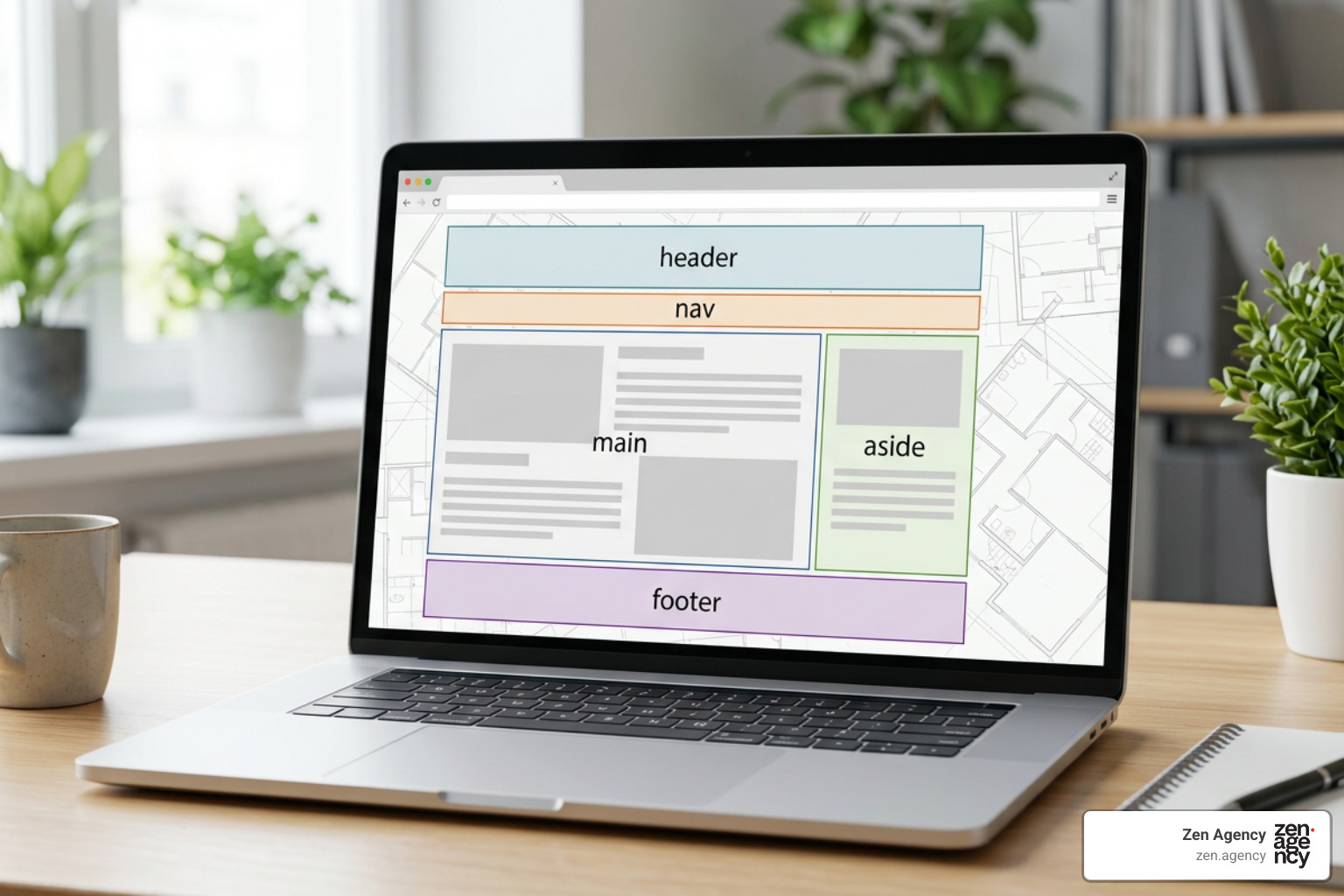
A well-structured platform should use native landmark regions:
: Designates main site navigation and pagination controls.: Contains the primary content unique to that specific page.: Contains secondary or related content sections.: Houses copyright statements, secondary site maps, and accessibility policy statements.
Implementing a hidden “Skip to Main Content” link at the very top of your document allows keyboard and screen-reader users to bypass repetitive navigation menus on every page load with a single keystroke.
Practical Step-by-Step Developer Implementation Guide
Transitioning digital accessibility from theoretical compliance into an agile development workflow requires clear best practices for component architecture. For a comprehensive walkthrough of foundational workflows, see our guide on how to build ADA compliant websites without the stress, and explore the Guide to Accessible Web Design & Development | Section508.gov for federal implementation insights.
Accessible Navigation, Semantic HTML, and ARIA Rules
Keyboard navigability is essential for users with motor disabilities, tremors, or visual impairments. A study by the World Bank indicates that accessible technology makes digital navigation possible or easier for 57% of all computer users.
When managing user focus, follow these foundational standards:
- Always preserve visible focus rings. Avoid global CSS rules like
outline: none;unless you replace them with distinct styles using the:focus-visiblepseudo-class. - Adhere to the First Rule of ARIA: Never use an ARIA attribute if a native HTML5 element can fulfill the required semantic role natively. Use native
andelements rather than generictags with custom JavaScript click listeners. - Use
aria-live="polite"to dynamically inform screen readers of real-time page updates (like cart total adjustments or search results counts) without interrupting active speech output.
Forms, Input Validation, and Dynamic Content Handling
Online forms represent the primary vehicle for e-commerce transactions, inquiries, and customer interactions. When a form barrier prevents completion, both user access and business revenue suffer.
Ensure form accessibility with the following implementation practices:
- Bind each input explicitly to a descriptive
using the matchingforandidattributes. Placeholder attributes alone are not a replacement for permanent labels. - Group related options (such as radio buttons or shipping selectors) using
containers paired with a descriptive. - Provide inline error identification. When validation fails, associate clear error messages with input fields using
aria-describedbyand automatically shift focus to the first invalid field with clear suggestions for resolution. - Ensure modal dialogs trap keyboard focus securely within the active container while open, and return keyboard focus to the triggering element upon dismissal.
Color Contrast, Typography, and Media Assets
Visual design elements directly influence usability for individuals with color blindness, low vision, and age-related visual impairments. More than 46% of adults aged 55 and older experience challenges browsing the web due to low vision, hand tremors, or memory conditions.
Design systems must incorporate the following standards:
- Contrast Thresholds: WCAG 2.2 Level AA requires a minimum contrast ratio of 4.5:1 for standard text and 3:1 for large typography (at least 18pt regular or 14pt bold).
- Multi-Sensory Cues: Never use color as the sole indicator for error states, required inputs, or interactive links. Pair color variations with bold text, icons, or underline treatments.
- Descriptive Alt Text: Every informative image requires a concise
altdescription conveying its purpose. Purely decorative graphics should contain empty alt tags (alt="") so screen readers ignore them. - Accessible Multimedia: Provide synchronized closed captions and accessible text transcripts for recorded video and audio assets.
- Motion Safety: Avoid any animations or visual elements that flash more than three times per second, which can trigger seizures.
Testing, Auditing, and Ongoing Remediation Strategies
Maintaining an accessible digital ecosystem requires continuous validation rather than a one-time launch audit. Teams must incorporate scan your site: the ultimate accessibility audit toolkit into ongoing development sprints.
Step-by-Step Testing Workflow for ADA Compliant Web Design
Follow this practical testing workflow across your staging and production environments:
- Conduct a Keyboard-Only Audit: Unplug your mouse and navigate the entire website using only the
Tab,Shift + Tab,Enter,Space, and arrow keys. Ensure all buttons, links, dropdowns, and form inputs receive visible focus and are fully functional without getting stuck in a keyboard trap. - Evaluate Text-Only Rendering: Disable images and stylesheets in your browser to confirm that alt text is descriptive, navigation remains readable, and document reading order flows logically.
- Run Screen Reader Verification: Test primary conversion funnels using built-in assistive technology such as NVDA on Windows or VoiceOver on macOS and iOS to evaluate page hierarchy, label announcements, and form field readability.
- Validate High-Zoom Layouts: Zoom the page magnification to 200% and 400% in your browser settings to verify that text reflows cleanly without breaking functionality or causing awkward horizontal scrolling.
Automated Scanners vs. Manual Screen Reader Verification
While automated accessibility scanning engines are helpful for flagging missing attributes, low-contrast text, and broken HTML landmarks, they catch only 30% to 50% of real-world accessibility issues. Automated tools cannot determine whether alt text contextually describes an image or if complex interactive components are easy to understand.
Using a reputable top 3 ADA compliance website checker options to save your site tool is an excellent starting point, but manual testing with real assistive technologies remains essential.
Similarly, third-party accessibility overlay widgets and toolbar plugins do not create legal compliance. Overlays modify client-side rendering without fixing the underlying source code, frequently interfere with screen reader software, and account for roughly 25% of all digital accessibility lawsuits filed against businesses. Reliable accessibility requires clean, semantic, native code.
Frequently Asked Questions About Web Accessibility
Are small businesses legally exempt from ADA digital compliance?
No. There is no statutory exemption based on company size, employee count, or annual revenue under ADA Title III. Any commercial enterprise, non-profit organization, or public accommodation operating a customer-facing website or web application must provide equal access to individuals with disabilities.
Do automated accessibility overlay widgets make a website compliant?
No. Automated overlays and JavaScript widgets do not bring a non-compliant platform into full WCAG or ADA alignment. In fact, many overlays create additional barriers by conflicting with existing screen reader commands and user settings, making them frequent targets for digital litigation.
How does web accessibility directly impact technical SEO?
ADA compliance and search engine optimization share nearly identical technical goals. Search engine crawlers interpret web pages similarly to screen readers. Implementing semantic HTML5 headings, descriptive image alt text, structured transcriptions, and clean navigation improves page indexability, dwell times, and organic search visibility.
Conclusion
ADA compliant web design is an essential investment that protects your organization from litigation, enhances technical SEO, and opens your products to a massive demographic. With 1.3 billion people worldwide living with a disability—and people with disabilities commanding over $654 billion in annual disposable spending power in the U.S. alone—building an accessible web experience is smart, sustainable business.
At Zen Agency, we help businesses build resilient, scalable digital systems that deliver outstanding user experiences for every audience. Explore our expert ADA compliance services to audit, remediate, and future-proof your digital platforms today.