
Stop Losing Leads: How to Integrate WordPress with Your CRM
Why Most WordPress Sites Bleed Leads (And How CRM Integration Fixes It)
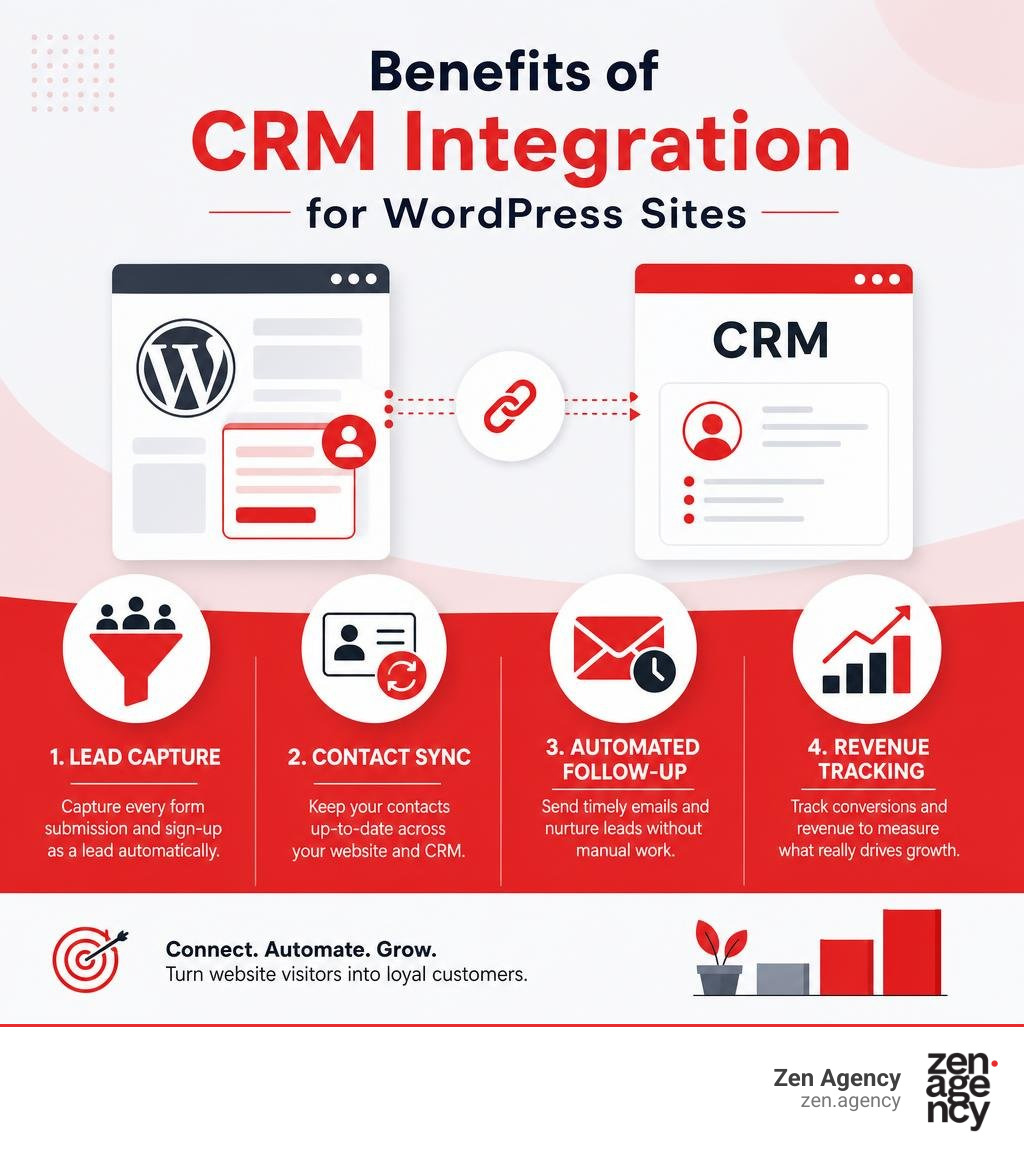
CRM integration WordPress is the process of connecting your WordPress website to a Customer Relationship Management system so that every lead, form submission, and purchase is captured and tracked automatically — no manual entry required.
Here are the main ways to do it:
- Install a native CRM plugin (like FluentCRM or Jetpack CRM) — stores all contact data directly in your WordPress database
- Use a SaaS connector plugin (like HubSpot for WordPress or Zoho CRM) — syncs your site’s data to an external CRM platform in real time
- Build a custom API integration — maps your specific form fields, WooCommerce data, or checkout fields to exact CRM properties via code
Your WordPress site is already pulling in leads through contact forms, checkout pages, and newsletter sign-ups. The problem is where those leads go next.
Without a CRM connection, that data ends up scattered. Emails land in one inbox. Form entries sit in a plugin dashboard. Purchase history lives in WooCommerce. Nobody’s following up — because nobody even knows a lead came in.
This isn’t a small problem. A lead that isn’t followed up quickly is often a lead that’s gone for good. And the longer your site runs without a proper CRM connection, the more revenue quietly slips through the cracks.
The good news is that WordPress is flexible enough to connect to almost any CRM — from lightweight self-hosted plugins to enterprise platforms like Salesforce or Microsoft Dynamics 365. The tricky part is choosing the right approach for your business and setting it up so it actually works reliably.
I’m Joseph Riviello, CEO and Founder of Zen Agency, and over my 22+ years in digital marketing I’ve helped businesses of all sizes implement CRM integration WordPress solutions that turn scattered website data into real, trackable revenue. Let’s walk through exactly how to do it.
CRM integration WordPress vocab to learn:
Understanding WordPress CRM Integration: Native Plugins vs. SaaS Connectors
When we talk about connecting a Customer Relationship Management (CRM) system to your website, we are looking at how data flows from the front-end user experience directly into your sales and marketing pipelines. In the WordPress ecosystem, this connection is typically achieved in one of two ways: using a native, self-hosted plugin or connecting to an external Software-as-a-Service (SaaS) platform.
A native plugin operates entirely within your WordPress environment. It creates dedicated database tables to store contact profiles, transaction histories, and interaction logs. On the other hand, a SaaS connector acts as a bridge. It captures lead data on your site and immediately sends it via API to an external cloud database hosted by a third-party CRM provider.
Understanding this distinction is critical. If your website is merely a static brochure, a simple connector might suffice. But if you want a highly interactive, personalized user experience, you need a setup that allows your CRM and your website to communicate seamlessly. For more on building highly interactive websites, check out our guide on moving from static to stellar crafting dynamic WordPress websites.
What is a WordPress CRM Plugin?
A WordPress CRM plugin is an extension that adds customer relationship management functionality directly to your WordPress dashboard. Unlike standard WordPress user management, which only offers basic roles like Subscriber or Editor, a CRM plugin is built to track the entire customer lifecycle.
At its core, a CRM plugin acts as both a system of record and a system of action:
- System of Record: It organizes contact management by saving rich data profiles. This includes name, email, phone number, purchase history, website activity, and custom tags.
- System of Action: It uses this stored data to trigger automated workflows, such as sending email campaigns, generating invoices, or assigning follow-up tasks to your sales team.
To prevent bloating your standard WordPress database, well-coded native CRM plugins store this information in custom, optimized database tables. This separation ensures that your site’s core performance remains fast, even as your contact list grows to thousands of records.
Key Benefits of Connecting Your Website to a CRM
Integrating your CRM with WordPress does more than just save you from manual copy-pasting. It completely transforms your lead generation and sales efficiency.
- No More Scattered Data: Instead of having contact form entries in one plugin, e-commerce transactions in WooCommerce, and marketing lists in a separate tool, everything is unified under a single customer profile.
- Instant Lead Capture & Follow-Up: When a prospect fills out a form, they are immediately added to your sales pipeline. You can trigger automated welcome emails or assign the lead to a representative while the prospect is still actively thinking about your business.
- Improved Customer Lifetime Value (LTV): By tracking purchase history and on-site behavior, you can segment your audience with precision. This allows you to send highly targeted upsell offers and personalized recommendations, maximizing the value of every customer.
- Elimination of “Success Taxes”: Many external SaaS platforms charge you more as your contact list grows, even if you aren’t emailing them. With a self-hosted WordPress CRM, you own your database and can scale without penalty.
To explore how to set up highly effective capture systems on your site, read the ultimate guide to WordPress lead generation forms funnels and free plugins.
SaaS vs. Self-Hosted: Choosing Your CRM Integration WordPress Strategy
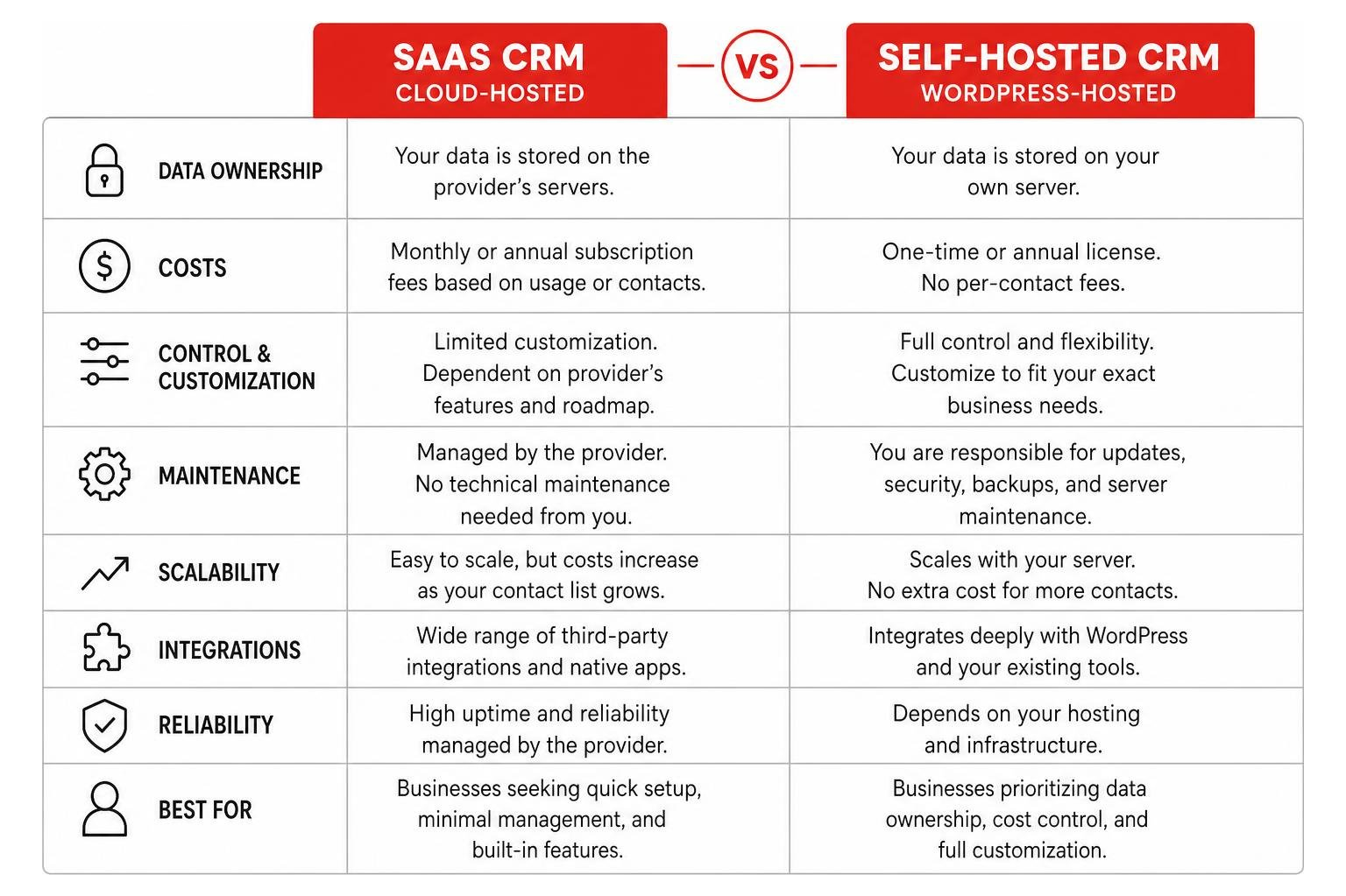
Deciding between a cloud-hosted SaaS CRM and a self-hosted WordPress CRM is one of the most critical business decisions you will make. Both models have clear advantages and distinct trade-offs regarding data ownership, subscription fees, and regulatory compliance.
SaaS-Based CRM Integrations: Pros and Cons
SaaS-based CRMs store all of your customer data on external cloud servers managed by the provider. Examples include HubSpot, Zoho CRM, Freshsales, and Pipedrive.
The Pros:
- Offloaded Server Load: Because all data processing and storage happen on external servers, your WordPress site’s hosting resources are completely untouched.
- Advanced Analytics and Reporting: Large SaaS platforms invest heavily in enterprise-grade reporting dashboards, AI forecasting, and cross-channel tracking.
- Out-of-the-Box Reliability: You do not have to worry about database optimization, server maintenance, or configuring complex email delivery protocols.
The Cons:
- High Subscription Costs (Success Taxes): SaaS platforms are notorious for charging tiered pricing based on the number of contacts in your database or user seats. For instance, while HubSpot offers a basic free tier, paid plans start at $20/user/month, and enterprise tiers can quickly scale to thousands of dollars.
- API Rate Limits: Cloud CRMs restrict the number of times your website can talk to their servers. During a high-traffic marketing campaign, you may hit these rate limits, causing delayed syncs or lost leads.
- Data Ownership Concerns: You are hosting your most valuable business asset—your customer data—on someone else’s infrastructure, making compliance with strict privacy laws more complex.
Self-Hosted WordPress CRM Plugins: Pros and Cons
Self-hosted CRMs store all customer data directly within your website’s database. Popular options include FluentCRM, Jetpack CRM, Groundhogg, and developer-focused tools like wpgaurav/syncpoint-crm.
The Pros:
- Complete Data Ownership: Your customer information stays on your server. This makes GDPR and CCPA compliance much simpler because you are not exporting sensitive data to third-party processors.
- Zero Success Taxes: You can store unlimited contacts and run unlimited campaigns without worrying about your monthly bill skyrocketing. For example, FluentCRM starts at $129/year for a single site with no contact limits.
- Deep Native Integration: Because the CRM lives inside WordPress, it can read data from WooCommerce, LMS plugins, and membership setups instantly without relying on fragile webhooks.
The Cons:
- Server Resource Demands: Storing massive databases and running bulk email campaigns can strain standard shared hosting. You will need high-quality managed hosting or a VPS to keep things running smoothly.
- SMTP Configuration Required: Self-hosted CRMs do not send emails out of the box. You must integrate a dedicated SMTP service (like Amazon SES, Mailgun, or SendGrid) to ensure high deliverability. Fortunately, Amazon SES is incredibly cheap, costing about $0.10 per 1,000 emails.
For a deeper look at top tools, you can explore the best WordPress CRM plugins to grow your business online.
How to Choose the Right CRM Integration WordPress Solution
To pick the perfect setup, you must evaluate your business size, budget, team size, and technical comfort.
If you are a solo business owner or a small team, a self-hosted CRM is often the most cost-effective way to scale without being penalized for list growth. If you are an enterprise-level business with a large sales team that needs to track complex sales pipelines, a SaaS CRM with dedicated user seats is usually the better choice.
To help you budget for your overall web presence, take a look at our comprehensive guide on the ultimate guide to custom website design pricing without the sticker shock.
| Feature | SaaS CRM Model | Self-Hosted CRM Model |
|---|---|---|
| Data Location | External Cloud Servers | Local WordPress Database |
| Pricing Model | Per-user or per-contact monthly fees | Flat annual license (unlimited contacts) |
| Server Impact | Very low (processed externally) | Moderate to high (requires good hosting) |
| Data Ownership | Subject to third-party terms | 100% owned by you |
| Email Delivery | Built-in | Requires external SMTP setup |
Selecting the Best CRM Plugins for Your Business Use Case
Not all CRM plugins are built the same way. Some are designed specifically for e-commerce tracking, while others excel at complex B2B sales pipelines or visual email marketing automation.

Top CRM Plugins for E-commerce and WooCommerce Stores
For online stores, your CRM needs to act as a system of action. It must track customer purchase history, average order value, and trigger automated follow-ups based on buying behavior.
- FunnelKit Automations: Starting at $99.50/year, this is an incredibly powerful marketing automation engine for WooCommerce. It allows you to build visual customer journeys, set up abandoned cart recovery sequences, and deliver dynamic coupons to boost sales.
- Jetpack CRM: With plans starting at $11/month (billed annually), Jetpack CRM (formerly Zero BS CRM) is highly modular. It integrates directly with WooCommerce, allowing you to view customer transaction histories and manage invoices directly from your dashboard.
- Groundhogg: Starting at $20/month (billed annually), Groundhogg is a self-hosted marketing automation tool built specifically to replace expensive platforms like Infusionsoft. It features deep WooCommerce integration and outstanding funnel-building capabilities.
Running a successful online store requires keeping your site fast and optimized. To prevent database lag from hurting your sales, consult our guide on how to stop the lag a guide to fixing slow WooCommerce stores, and learn how custom features are built in our WooCommerce plugin development complete guide.
Best CRM Plugins for Email Automation and Sales Pipelines
If your main goal is running email campaigns, managing leads, and tracking deal stages, these plugins offer the best visual builders and pipeline management:
- FluentCRM: Starting at $129/year, FluentCRM is a lightning-fast email marketing automation plugin built as a Single Page Application (SPA) using VueJS. It allows you to segment contacts dynamically, run A/B split tests, and automate user journeys without ever leaving WordPress. To see it in action, you can watch this video on how to use WordPress as a CRM with FluentCRM – the complete guide.
- WP-CRM System: With premium plans starting at $99/year, this plugin allows you to manage clients, projects, and tasks. It supports unlimited records and users, making it perfect for service-based businesses that need to track project delivery alongside client communication.
- Agile CRM: Free for up to 10 users, Agile CRM offers an excellent WordPress integration that includes intelligent exit-intent popups, real-time web tracking, and drag-and-drop workflow builders.
Essential Features to Look For in a CRM Plugin
When comparing options, make sure your chosen CRM plugin includes these non-negotiable features:
- 360-Degree Contact Profiles: A single screen displaying a contact’s complete history, including forms submitted, emails opened, pages visited, and products purchased.
- Visual Automation Builder: An intuitive, drag-and-drop canvas for building automated workflows with delays, conditions, and goals.
- Custom Fields and Tagging: The ability to create custom data fields and tag users dynamically based on their actions.
- Robust Error Logging and Retries: A system that monitors API connections and automatically retries failed syncs so you never lose a lead during a server hiccup.
- GDPR Compliance Tools: Built-in options to export, anonymize, or delete customer data upon request.
Technical Best Practices: Performance, Security, and Setup
Integrating a CRM with your WordPress site requires careful technical planning. Treating this integration as core business infrastructure ensures your data remains secure, accurate, and fast.

Overcoming Performance Issues During CRM Integration WordPress Setup
A common concern is that running a CRM inside WordPress will slow down your website. While this can happen on cheap, low-quality hosting, it is entirely preventable with the right setup:
- Use Custom Database Tables: Choose plugins like FluentCRM that store contact data in dedicated, optimized tables rather than bloating the default
wp_optionsorwp_postmetatables. - Implement Asynchronous Queueing: Instead of forcing your website to make direct API calls to your CRM while a user is waiting for a form to submit, use a queue system. This processes the data sync in the background, keeping your form submissions and checkout times instant.
- Offload Email Sending: Never use your default web host to send bulk emails. Always connect your CRM to an external SMTP service like Amazon SES or Mailgun.
- Monitor API Rate Limits: If you are using a SaaS CRM, configure throttling to ensure you do not exceed API limits during high-traffic events.
To understand how system integrations can streamline your entire business, check out our insights on how to stop the manual data entry madness with ERP integration.
Security and GDPR Compliance for Local CRM Data
Storing sensitive customer data on your own website server comes with strict legal and ethical responsibilities. To protect your business and your customers, follow these security practices:
- Protect API Keys and Secrets: Never hardcode CRM API keys into front-end scripts or theme files. Store them securely using environment variables or constants defined in your
wp-config.phpfile. - Use Least-Privilege Access: When creating API tokens or Private Apps in your CRM, grant only the minimum permissions required (e.g., read/write access to contacts, but not full admin control).
- Encrypt Stored Data: Ensure your web hosting environment uses up-to-date SSL/TLS encryption for all data in transit, and secure your SQL database with strong, unique credentials.
- Automate Data Deletion: Set up clear procedures to handle GDPR “Right to be Forgotten” requests, allowing you to quickly erase or anonymize contact profiles across both WordPress and your CRM.
Frequently Asked Questions about CRM Integration WordPress
Will a WordPress CRM plugin slow down my website?
No, not if you use a well-coded plugin and reliable hosting. Modern CRM plugins are built using lightweight frameworks (like VueJS) that run as Single Page Applications in your admin dashboard. Because they only execute when an administrator accesses the CRM backend, they have zero impact on your front-end page load speeds. For optimal performance, always use managed WordPress hosting and offload email delivery to a dedicated SMTP service.
What is the difference between a CRM and marketing automation?
A CRM is primarily a system of record designed to track contacts, manage sales pipelines, and log deal stages (e.g., Initial Contact to Demo Scheduled to Proposal Sent). Marketing automation is a system of action used to trigger automated sequences based on customer behavior, such as sending an abandoned cart email or delivering a lead magnet. Many modern tools combine both functionalities into a single platform.
Can I integrate enterprise CRMs like Microsoft Dynamics 365 with WordPress?
Yes, absolutely. Enterprise integrations require highly secure OAuth-based authentication (using App IDs and Client Secrets) rather than basic username/password setups. By utilizing tools like the Dynamics 365 Integration – WordPress plugin | WordPress.org, you can sync data bi-directionally, allowing you to build custom client portals, display real-time CRM views on your site, and capture leads securely.
Conclusion
Integrating WordPress with your CRM is no longer an optional luxury—it is a foundational requirement for any business looking to scale, improve efficiency, and maximize marketing ROI. Whether you choose a flat-rate, self-hosted solution that gives you complete data ownership or a robust SaaS connector to fuel your sales team, the key is building a reliable, secure, and high-performing connection.
At Zen Agency, we have been building enterprise-grade WordPress solutions and custom integrations since 2008. From our locations in Scranton, Wilkes-Barre, and Wyoming, Pennsylvania, to Billings, Montana, and across the USA, we help businesses eliminate manual data entry, secure their customer databases, and turn website traffic into trackable revenue.
Ready to stop losing leads and scale your business in July 2026? Contact us today to discuss your integration needs.